Modern, hook-based, Paystack-powered payments in React Native apps using WebViews — now streamlined with Provider architecture & fully customizable.
Endorsed by Paystack, so you know you’re in good hands. Payment processing has never been this easy!

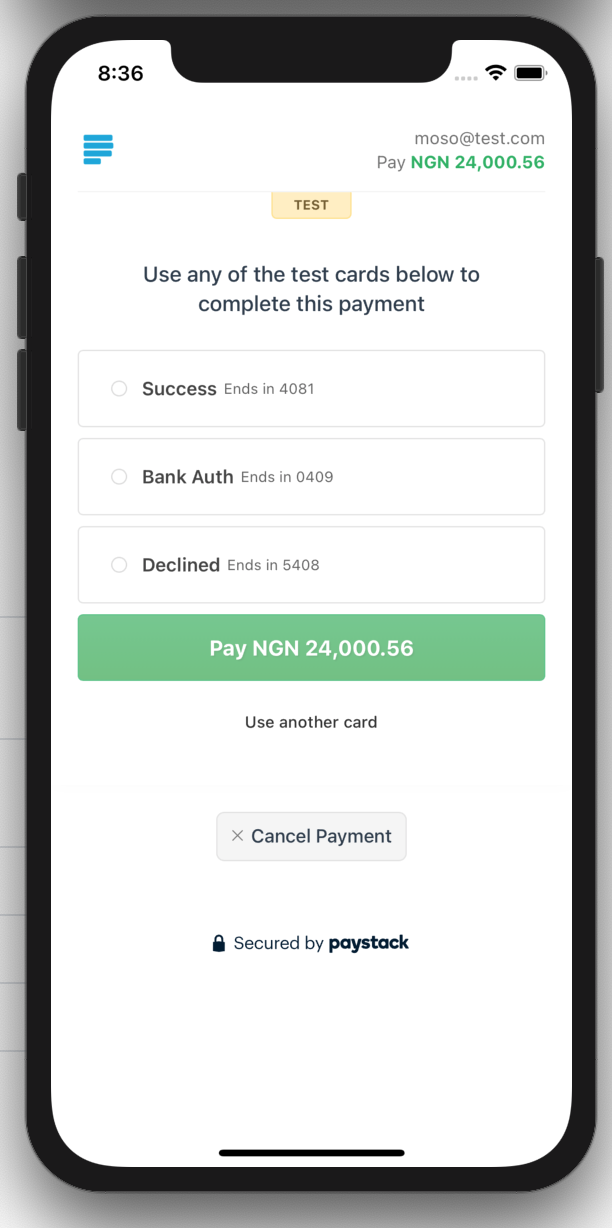
npm install react-native-paystack-webview
# or
yarn add react-native-paystack-webviewyarn add react-native-webview
# iOS
cd ios && pod install
# Expo
npx expo install react-native-webviewimport { PaystackProvider } from 'react-native-paystack-webview';
<PaystackProvider publicKey="pk_test_XXXXXX">
<App />
</PaystackProvider>import React from 'react';
import { Button } from 'react-native';
import { usePaystack } from 'react-native-paystack-webview';
const Checkout = () => {
const { popup } = usePaystack();
const payNow = () => {
popup.checkout({
email: 'jane.doe@example.com',
amount: 5000,
reference: 'TXN_123456',
plan: 'PLN_example123',
invoice_limit: 3,
subaccount: 'SUB_abc123',
split_code: 'SPL_def456',
split: {
type: 'percentage',
bearer_type: 'account',
subaccounts: [
{ subaccount: 'ACCT_abc', share: 60 },
{ subaccount: 'ACCT_xyz', share: 40 }
]
},
metadata: {
custom_fields: [
{
display_name: 'Order ID',
variable_name: 'order_id',
value: 'OID1234'
}
]
},
onSuccess: (res) => console.log('Success:', res),
onCancel: () => console.log('User cancelled'),
onLoad: (res) => console.log('WebView Loaded:', res),
onError: (err) => console.log('WebView Error:', err)
});
};
return <Button title="Pay Now" onPress={payNow} />;
};- ✅ Simple
checkout()ornewTransaction()calls - ✅ Global callbacks with
onGlobalSuccessoronGlobalCancel - ✅ Debug logging with
debugprop - ✅ Fully typed params for transactions
- ✅ Works seamlessly with Expo & bare React Native
- ✅ Full test coverage
- ✅ Zap integration
| Prop | Type | Default | Description |
|---|---|---|---|
publicKey |
string |
— | Your Paystack public key |
currency |
string |
— | Currency code (optional) |
defaultChannels |
string[] |
['card'] |
Payment channels |
deepLinkHosts |
(string | RegExp)[] |
[] |
Extra hosts to hand off to the OS instead of loading in the WebView (see Deep linking) |
debug |
boolean |
false |
Show debug logs |
onGlobalSuccess |
func |
— | Called on all successful transactions |
onGlobalCancel |
func |
— | Called on all cancelled transactions |
| Param | Type | Required | Description |
|---|---|---|---|
email |
string |
✅ | Customer email |
amount |
number |
✅ | Amount in Naira (not kobo) |
reference |
string |
— | Custom reference (optional) |
metadata |
object |
— | Custom fields / additional info |
plan |
string |
— | Paystack plan code (for subscriptions) |
invoice_limit |
number |
— | Max charges during subscription |
subaccount |
string |
— | Subaccount code for split payment |
split_code |
string |
— | Multi-split identifier |
split |
object |
— | Dynamic split object |
onSuccess |
(res) => void |
✅ | Called on successful payment |
onCancel |
() => void |
✅ | Called on cancellation |
onLoad |
(res) => void |
— | Triggered when transaction view loads |
onError |
(err) => void |
— | Triggered on WebView or script error |
| Name | Description | Required? | Default Value |
|---|---|---|---|
cart_id |
A unique identifier for the cart. Can be either a string or a number. | NO |
undefined |
custom_fields |
An array of custom fields for adding additional metadata to the transaction. If not passed, a default custom field is created using the firstName, lastName, and billingName. |
NO |
[{ display_name: '${firstName + ' ' + lastName}', variable_name: '${billingName}', value: '' }] |
cancel_action |
A string specifying the action to take if a transaction is canceled. | NO |
undefined |
custom_filters |
Custom filters to restrict or specify transaction options, such as: | NO |
undefined |
- recurring: A boolean to indicate if the transaction is recurring. |
|||
- banks: An array of bank codes for supported banks. |
|||
- card_brands: Supported card brands, e.g., 'verve', 'visa', 'mastercard'. |
|||
- supported_mobile_money_providers: Supported mobile money providers, e.g., 'mtn', 'atl', 'vod'. |
| Name | use/description | required? |
|---|---|---|
type |
Dynamic Multi-Split type. Value can be flat or percentage |
YES |
bearer_type |
Defines who bears the charges. Value can be all, all-proportional, account or subaccount |
YES |
subaccounts |
An array of subaccount object as defined below. e.g. {"subaccount": 'ACCT_xxxxxx', "share": 60} | YES |
bearer_subaccount |
Subaccount code of the bearerof the transaction. It should be specified if bearer_type is subaccount |
NO |
reference |
Unique reference of the split. Can be defined by the user | NO |
| Name | use/description | required? |
|---|---|---|
subaccount |
Specify subaccount code generated from the Paystack Dashboard or API to enable Split Payment on the transaction. Here's an example of usage: subaccount: "SUB_ACCOUNTCODE" |
YES |
share |
Defines the amount in percentage (integer) or value (decimal allowed) depending on the type of multi-split defined |
YES |
Some payment channels need to hand off to a partner app. For example, the Zap channel renders a universal link to https://joinzap.com/app/... that should open the Zap app.
WKWebView on iOS does not perform universal-link handoff or custom-scheme dispatch for navigations that originate inside the WebView, so tapping such a link would otherwise just load it as a web page. To fix this, the provider intercepts these navigations and forwards them to the OS via Linking.openURL, which triggers the universal-link handoff (iOS) or App Links / Intent.ACTION_VIEW dispatch (Android).
https://joinzap.com/app/ ships as a built-in default and always applies — it can't be removed. Use the deepLinkHosts prop to add your own partner hosts on top of the defaults:
<PaystackProvider
  publicKey="pk_test_XXXXXX"
  deepLinkHosts={['mypartner://', /^https?:\/\/my-partner\.app\//]}
>
  <App />
</PaystackProvider>
Each entry is matched against the navigation URL. String entries match if the URL starts with the string; RegExp entries are matched with RegExp.test(url).
⚠️ Only add hosts that should leave the WebView. Do not add 3DS / issuer ACS challenge pages, bank-redirect flows, orcheckout.paystack.com— those must stay in the WebView for checkout to complete.
When the customer is sent to the Zap app, you can have Zap return to your app after the action completes by passing a callback_url in the transaction metadata. Set it to a URL (or deep link) that resolves back to your app:
popup.checkout({
  email: 'jane.doe@example.com',
  amount: 5000,
  metadata: {
    callback_url: 'https://paystack.com',
  },
  onSuccess: (res) => console.log('Success:', res),
  onCancel: () => console.log('User cancelled'),
});Enable debug={true} on the PaystackProvider to get logs like:
- Transaction modal status
- Incoming postMessage data
- Success, cancel, error logs
Want to help improve this package? Read how to contribute and feel free to submit your PR!
This project is licensed under the MIT License.
- Star the project on Github
- Buy me a coffee
- Like, Share and subscribe on Youtube
A huge shoutout to our amazing contributors! Your efforts make this project better every day. Check out the (emoji key) for what each contribution means:


This project follows the all-contributors specification. Contributions of any kind welcome!