🤖 Application of Image Processing and 3-DOF SCARA Robotic Arm in Object Classification Based on Color
An academic project that combines Computer Vision, Robotics, and Embedded Systems to build a real-time sorting system. The system detects object color (Red, Yellow, Blue), computes the inverse kinematics of a 3-DOF SCARA robotic arm, and sorts the object using an electromagnetic gripper.
- 🎨 Detects and classifies colors using HSV thresholding in MATLAB
- 📷 Captures live video using smartphone camera via DroidCam
- 📐 Converts pixel coordinates to real-world positions using checkerboard calibration
- ⚙️ Computes inverse kinematics and sends angles to Arduino
- 🤖 SCARA robot performs pick-and-place actions with high precision
- 🖥️ Controlled via MATLAB GUI (App Designer) with workspace visualization
- ⚡ Gripper control + emergency reset handled via serial commands
| Component | Description |
|---|---|
| SCARA Arm | Custom-built 3-DOF robotic arm |
| Controller | Arduino UNO R3 + CNC Shield V3 |
| Stepper Motors | 3× NEMA 17 + A4988 drivers |
| Gripper | 24V Electromagnetic |
| Camera | Smartphone camera via DroidCam |
| Frame Design | SolidWorks 3D Model (FullRobot.STEP) |
| Module | Implementation / File |
|---|---|
| Image Processing | test_control/detect_pos.m, test_control/setup_cam.m |
| Color Detection (HSV) | test_control/detect_pos.m |
| Position Calibration | test_control/cal_pos.m, test_control/TransMatrix.m |
| Inverse Kinematics | test_control/IK.m, test_control/ik_2dof.m |
| Forward Kinematics | test_control/fk_3dof.m, test_control/FK_control.m |
| Control GUI | test_control/gui_test.mlapp |
| Workspace Simulation | test_control/Workspace.m |
| Gripper & Reset | test_control/Magnet.m, test_control/Reset_button.m |
| Stepper Control (Arduino) | control_stepper_4_step/control_stepper_4_step.ino |
.
├── control_stepper_4_step/
│  └── control_stepper_4_step.ino     # Arduino: stepper motors + serial protocol
├── test_control/
│  ├── gui_test.mlapp                 # MATLAB App Designer GUI
│  ├── detect_pos.m                   # HSV segmentation + centroid extraction
│  ├── setup_cam.m                    # Camera setup (DroidCam/webcam)
│  ├── cal_pos.m, TransMatrix.m       # Pixel -> mm calibration
│  ├── IK.m, ik_2dof.m                # Inverse kinematics
│  ├── fk_3dof.m, FK_control.m        # Forward kinematics + control
│  ├── Magnet.m, Reset_button.m       # Electromagnet + reset
│  ├── Workspace.m                    # Workspace visualization
│  └── control_test.m                 # End-to-end pick & place routine
├── docs/images/
│  ├── System_before_operation.jpg
│  ├── mask_blue.jpg
│  ├── mask_red_pic.jpg
│  ├── mask_yellow.jpg
│  ├── pos_blue_test.jpg
│  ├── pos_red_test.jpg
│  ├── pos_yellow_test.jpg
│  └── pos_all.jpg
├── FullRobot.STEP                    # CAD export (SolidWorks)
├── Video_demo.mp4
├── Robot Project Report (Group 5).pdf
└── README.md
- 📸 Live image captured from camera via DroidCam
- 🎯 Object color segmented via HSV threshold (
detect_pos.m) - 📐 Pixel → mm conversion via checkerboard (
setup_cam.m,cal_pos.m) - 🧠 Inverse kinematics computed in MATLAB → joint angles
- 🔌 Angles sent to Arduino over serial → stepper motors activated
- 🧲 Electromagnet controlled for pick and release
- 🖱️ All steps are coordinated through a user-friendly GUI
This short video demonstrates the real-time object classification and sorting system using a 3-DOF SCARA robotic arm, controlled via MATLAB and Arduino.
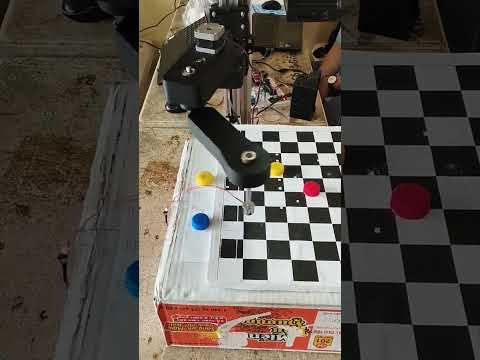

System before operation:

| Blue | Red | Yellow |
|---|---|---|
 |
 |
 |
| Blue test | Red test | Yellow test |
|---|---|---|
 |
 |
 |
All targets (combined view):

In addition to testing Red / Blue / Yellow, we also tested an Unknown scenario to validate the system's ability to reject ambiguous inputs.
- How we created Unknown: we took a normal yellow bottle cap and drew several black ink strokes on its surface.
- Observed behavior:
- Clean yellow cap -> classified as Yellow
- Clean red cap -> classified as Red
- Blue cap with small printed text (expiry code) -> still classified as Blue
- Yellow cap with ink strokes -> classified as Unknown
- Why this happens: the added ink changes the local HSV values and can break/alter the segmented region (after morphological filtering). As a result, the detected region no longer satisfies the predefined HSV thresholds reliably, so labeling it as Unknown helps avoid a wrong color decision.
| Metric | Result |
|---|---|
| Known-color detection accuracy (Red/Blue/Yellow) | 100% (under controlled lighting, observed in demo) |
| Unknown rejection (yellow cap + ink strokes) | Classified as Unknown (observed) |
| Sorting success rate | ~95% |
| Positioning error margin | ~2–4 mm |
Note: These results are reported under controlled lighting. Since the method is based on HSV thresholding, performance can degrade under severe lighting changes, heavy occlusion, or large surface markings.
- Lê Hoàng Khang – 21151022 – HCMUTE
- Dương Hoàng Khôi – 21151027 – HCMUTE
This project is developed for academic purposes as part of the university robotics coursework.
Not intended for commercial use.