-
Notifications
You must be signed in to change notification settings - Fork 385
docs: rewrite external knowledge base documentation #737
New issue
Have a question about this project? Sign up for a free GitHub account to open an issue and contact its maintainers and the community.
By clicking “Sign up for GitHub”, you agree to our terms of service and privacy statement. We’ll occasionally send you account related emails.
Already on GitHub? Sign in to your account
Merged
Merged
Changes from all commits
Commits
Show all changes
18 commits
Select commit
Hold shift + click to select a range
9d27e67
docs: rewrite external knowledge base overview page
RiskeyL b26993b
docs: rewrite external knowledge API specification
RiskeyL 8c54a79
style: add adjustable parameter guidance pattern
RiskeyL 7ac0849
fix: standardize "similarity score" terminology across docs and glossary
RiskeyL a047f7b
fix: address Copilot's PR review feedback on external knowledge base …
RiskeyL d7dff83
translate: sync zh/ja external knowledge base pages with English rewrite
RiskeyL 0a10a46
style: add standard phrase translation convention for zh docs
RiskeyL f6f124e
fix: address Copilot's PR review feedback on external knowledge base …
RiskeyL 4a62638
docs: strengthen codebase verification rule for rewrites
RiskeyL 0f3c118
docs: elevate cross-reference anchor rule in translation guides
RiskeyL 534b2e1
style: add vague cross-references pattern to style guide
RiskeyL 7bb6da7
fix: remove filler content from external knowledge base pages
RiskeyL 69997d0
fix: correct anchor examples in translation formatting guides
RiskeyL f624449
fix: translate code block examples and remove invalid operators in zh…
RiskeyL f2e3e07
docs: add translation quality rules for EN→ZH/JA
RiskeyL 3664fad
docs: move LlamaCloud setup to tip and remove Connection Example section
RiskeyL 79a189a
translate: sync zh/ja with LlamaCloud restructure and apply new quali…
RiskeyL 1fd4be4
Merge remote-tracking branch 'origin/main' into docs/external-knowled…
RiskeyL File filter
Filter by extension
Conversations
Failed to load comments.
Loading
Jump to
Jump to file
Failed to load files.
Loading
Diff view
Diff view
There are no files selected for viewing
This file contains hidden or bidirectional Unicode text that may be interpreted or compiled differently than what appears below. To review, open the file in an editor that reveals hidden Unicode characters.
Learn more about bidirectional Unicode characters
This file contains hidden or bidirectional Unicode text that may be interpreted or compiled differently than what appears below. To review, open the file in an editor that reveals hidden Unicode characters.
Learn more about bidirectional Unicode characters
This file contains hidden or bidirectional Unicode text that may be interpreted or compiled differently than what appears below. To review, open the file in an editor that reveals hidden Unicode characters.
Learn more about bidirectional Unicode characters
This file contains hidden or bidirectional Unicode text that may be interpreted or compiled differently than what appears below. To review, open the file in an editor that reveals hidden Unicode characters.
Learn more about bidirectional Unicode characters
This file contains hidden or bidirectional Unicode text that may be interpreted or compiled differently than what appears below. To review, open the file in an editor that reveals hidden Unicode characters.
Learn more about bidirectional Unicode characters
114 changes: 75 additions & 39 deletions
114
en/use-dify/knowledge/connect-external-knowledge-base.mdx
This file contains hidden or bidirectional Unicode text that may be interpreted or compiled differently than what appears below. To review, open the file in an editor that reveals hidden Unicode characters.
Learn more about bidirectional Unicode characters
| Original file line number | Diff line number | Diff line change |
|---|---|---|
| @@ -1,65 +1,101 @@ | ||
| --- | ||
| title: Connect to External Knowledge Base | ||
| description: Integrate external knowledge sources with Dify applications through API connections to leverage custom RAG systems or third-party knowledge services | ||
| sidebarTitle: Overview | ||
| --- | ||
|
|
||
| > To make a distinction, knowledge bases independent of the Dify platform are collectively referred to as **"external knowledge bases"** in this article. | ||
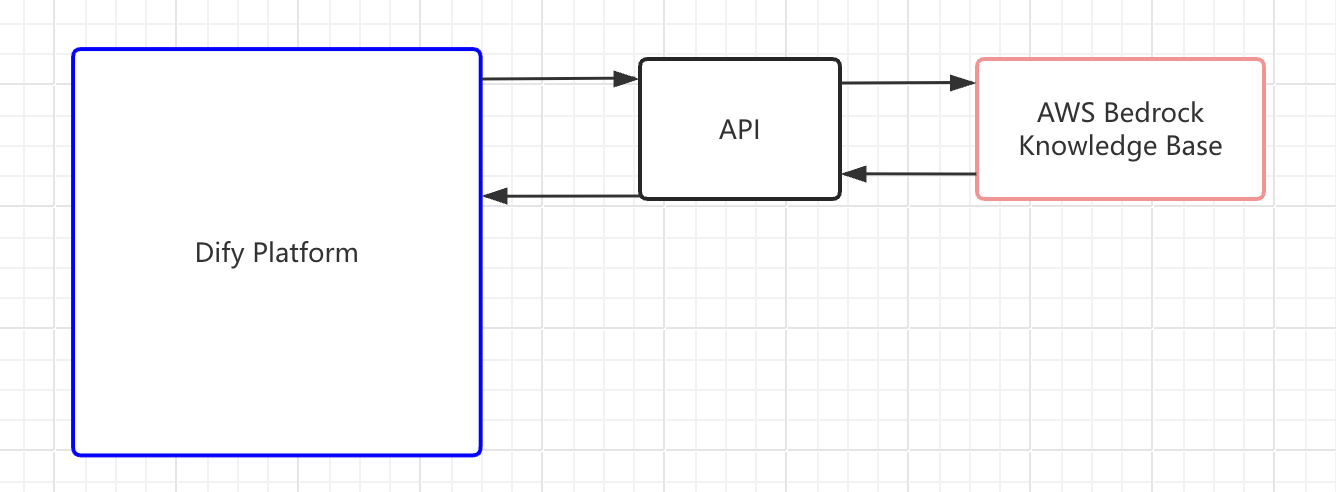
| If your team maintains its own RAG system or hosts content in a third-party knowledge service like [AWS Bedrock](https://aws.amazon.com/bedrock/), you can connect these external sources to Dify instead of migrating content into Dify's built-in knowledge base. | ||
|
|
||
| ## Functional Introduction | ||
| This lets your AI applications retrieve information directly from your existing infrastructure while you retain full control over the retrieval logic and content management. | ||
|
|
||
| For developers with advanced content retrieval requirements, **the built-in knowledge base functionality and text retrieval mechanisms of the Dify platform may have limitations, particularly in terms of customizing recall results.** | ||
| <Frame> | ||
|  | ||
| </Frame> | ||
|
|
||
| Due to the requirement of higher accuracy of text retrieval and recall, as well as the need to manage internal materials, some developer teams choose to independently develop RAG algorithms and independently maintain text retrieval systems, or uniformly host content to cloud vendors' knowledge base services (such as [AWS Bedrock](https://aws.amazon.com/bedrock/)). | ||
| **Connecting an external knowledge base involves three steps**: | ||
|
|
||
| As a neutral platform for LLM application development, Dify is committed to providing developers with a wider range of options. | ||
| 1. [Build an API service that Dify can query](#step-1-build-the-retrieval-api). | ||
| 2. [Register the API endpoint in Dify](#step-2-register-an-external-knowledge-api). | ||
| 3. [Connect a specific knowledge source through the registered API](#step-3-create-an-external-knowledge-base). | ||
|
|
||
| The **Connect to External Knowledge Base** feature enables integration between the Dify platform and external knowledge bases. Through API services, AI applications can access a broader range of information sources. This capability offers two key advantages: | ||
| When your application runs, Dify sends retrieval requests to your endpoint and uses the returned chunks as context for LLM responses. | ||
|
|
||
| * The Dify platform can directly obtain the text content hosted in the cloud service provider's knowledge base, so that developers do not need to repeatedly move the content to the knowledge base in Dify; | ||
| * The Dify platform can directly obtain the text content processed by algorithms in the self-built knowledge base. Developers only need to focus on the information retrieval mechanism of the self-built knowledge base and continuously optimize and improve the accuracy of information retrieval. | ||
| <Tip> | ||
| If you're connecting to LlamaCloud, install the [LlamaCloud plugin](https://marketplace.dify.ai/plugin/langgenius/llamacloud) instead of building a custom API. See the [video walkthrough](https://www.youtube.com/watch?v=FaOzKZRS-2E) for a complete setup demo. | ||
|
|
||
| <Frame caption="Principle of external knowledge base connection"> | ||
| <img src="https://assets-docs.dify.ai/2025/03/f5fb91d18740c1e2d3938d4d106c4d3c.png" alt="" /> | ||
| </Frame> | ||
| If you're building a plugin for another knowledge service, the LlamaCloud plugin's [source code](https://github.com/langgenius/dify-official-plugins/tree/main/extensions/llamacloud) is available for reference. | ||
| </Tip> | ||
|
|
||
| <Info> | ||
| Dify only has retrieval access to external knowledge bases—it cannot modify or manage your external content. You maintain the knowledge base and its retrieval logic independently. | ||
| </Info> | ||
|
|
||
| ## Step 1: Build the Retrieval API | ||
|
|
||
| Build an API service that implements the [External Knowledge API specification](/en/use-dify/knowledge/external-knowledge-api). Your service needs a single `POST` endpoint that accepts a search query and returns matching text chunks with similarity scores. | ||
|
|
||
| ## Step 2: Register an External Knowledge API | ||
|
|
||
| An External Knowledge API stores your endpoint URL and authentication credentials. Multiple knowledge bases can share one API connection. | ||
|
|
||
| 1. Go to **Knowledge**, click **External Knowledge API** in the upper-right corner, then click **Add an External Knowledge API**. | ||
|
|
||
| 2. Fill in the following fields: | ||
|
|
||
| - **Name**: A label to distinguish this API connection from others. | ||
| - **API Endpoint**: The base URL of your external knowledge service. Dify appends `/retrieval` automatically when sending requests. | ||
| - **API Key**: The authentication credential for your service. Dify sends this as a Bearer token in the `Authorization` header. | ||
|
|
||
| Dify validates the connection by sending a test request to your endpoint when you save. | ||
|
|
||
| ## Step 3: Create an External Knowledge Base | ||
|
|
||
| With the API registered, connect an external knowledge source to Dify. This creates a knowledge base in Dify that is linked to your external system. | ||
|
|
||
| 1. Go to **Knowledge** and click **Connect to an External Knowledge Base**. | ||
|
|
||
| <Frame> | ||
|  | ||
| </Frame> | ||
|
|
||
| 2. Fill in the following fields: | ||
| - **External Knowledge Name** and **Knowledge Description** (optional). | ||
| - **External Knowledge API**: Select the API connection you registered. | ||
| - **External Knowledge ID**: The identifier of the specific knowledge source within your external system, passed to your API as the `knowledge_id` field. | ||
|
|
||
| This is whatever ID your external service uses to distinguish between different knowledge bases. For example, a Bedrock knowledge base ARN or an ID you defined in your own system. | ||
|
|
||
| ### Connection Examples | ||
| <Note> | ||
| The **External Knowledge API** and **External Knowledge ID** cannot be changed after creation. To use a different API or knowledge source, create a new external knowledge base. | ||
| </Note> | ||
|
|
||
| #### LlamaCloud | ||
| - **Retrieval Settings**: | ||
| - **Top K**: Maximum number of chunks to retrieve per query. Higher values return more results but may include less relevant content. | ||
| - **Score Threshold**: Minimum similarity score for returned chunks. Enable this to filter out low-relevance results. Use higher value for stricter relevance or lower value to include broader matches. | ||
|
RiskeyL marked this conversation as resolved.
|
||
|
|
||
| Dify provides an official LlamaCloud plugin that helps you quickly connect to LlamaCloud knowledge bases. | ||
| When disabled, all results up to the Top K limit are returned regardless of score. | ||
|
|
||
| ##### Plugin Installation | ||
| Once created, the external knowledge base is available for use in your applications just like any built-in knowledge base. See [Integrate Knowledge Within Application](/en/use-dify/knowledge/integrate-knowledge-within-application) for details. | ||
|
|
||
| 1. Visit the Dify [Marketplace](https://marketplace.dify.ai/) and search for `LlamaCloud` | ||
| 2. Install and configure the LlamaCloud plugin according to the instructions | ||
| 3. Enable the plugin in the Dify platform | ||
| 4. Fill in the LlamaCloud API key and other necessary information following the plugin configuration wizard | ||
| 5. After configuration is complete, you can see the connected external knowledge base in your knowledge base list | ||
| ## Troubleshoot | ||
|
RiskeyL marked this conversation as resolved.
|
||
|
|
||
| With the LlamaCloud plugin, you can directly use LlamaCloud's powerful retrieval capabilities in the Dify platform without writing custom APIs. | ||
| ### Connection Refused or Timeout (Self-Hosted) | ||
|
|
||
| For more information about how it works, please refer to the plugin's [GitHub repository](https://github.com/langgenius/dify-official-plugins/tree/main/extensions/llamacloud). | ||
| Dify routes outbound HTTP requests through a Squid-based SSRF proxy. If your external knowledge service runs on the same host as Dify or its domain is not allowlisted, the proxy blocks the request. | ||
|
|
||
| #### Video Tutorial | ||
| To allow connections, add your service's domain to the `allowed_domains` ACL in `docker/ssrf_proxy/squid.conf.template`: | ||
|
|
||
| The following video demonstrates in detail how to use the LlamaCloud plugin to connect to external knowledge bases: | ||
| ```text | ||
| acl allowed_domains dstdomain .marketplace.dify.ai .your-kb-service.com | ||
| ``` | ||
|
RiskeyL marked this conversation as resolved.
|
||
|
|
||
| <iframe | ||
| src="https://www.youtube.com/embed/FaOzKZRS-2E" | ||
| width="100%" | ||
| height="315" | ||
| allow="accelerometer; autoplay; clipboard-write; encrypted-media; gyroscope; picture-in-picture" | ||
| allowFullScreen | ||
| /> | ||
| Restart the SSRF proxy container after editing. | ||
|
|
||
| ## FAQ | ||
| ### API Response Format Issues | ||
|
|
||
| **How to Fix the Errors Occurring When Connecting to External Knowledge API?** | ||
| If retrieval fails or returns unexpected results, verify your API response against the [External Knowledge API specification](/en/use-dify/knowledge/external-knowledge-api#response). | ||
|
|
||
| Solutions corresponding to each error code in the return information: | ||
| Common issues: | ||
|
|
||
| | Error Code | Result | Solutions | | ||
| | ---------- | ----------------------------------- | ----------------------------------------------------------- | | ||
| | 1001 | Invalid Authorization header format | Please check the Authorization header format of the request | | ||
| | 1002 | Authorization failed | Please check whether the API Key you entered is correct. | | ||
| | 2001 | The knowledge is not exist | Please check the external repository | | ||
| - The `metadata` field in each record must be an object (`{}`), not `null`. A `null` value causes errors in the retrieval pipeline. | ||
| - The `content` and `score` fields must be present in every record. | ||
Oops, something went wrong.
Oops, something went wrong.
Add this suggestion to a batch that can be applied as a single commit.
This suggestion is invalid because no changes were made to the code.
Suggestions cannot be applied while the pull request is closed.
Suggestions cannot be applied while viewing a subset of changes.
Only one suggestion per line can be applied in a batch.
Add this suggestion to a batch that can be applied as a single commit.
Applying suggestions on deleted lines is not supported.
You must change the existing code in this line in order to create a valid suggestion.
Outdated suggestions cannot be applied.
This suggestion has been applied or marked resolved.
Suggestions cannot be applied from pending reviews.
Suggestions cannot be applied on multi-line comments.
Suggestions cannot be applied while the pull request is queued to merge.
Suggestion cannot be applied right now. Please check back later.
Uh oh!
There was an error while loading. Please reload this page.