




An imperative Swift 6 wrapper for GTK4 and libadwaita, designed for building native GNOME desktop applications.
Documentation: API Reference
Quick guides:
- Imperative API — no declarative DSL; create and configure widgets directly
- 178 widget wrappers — 74 auto-generated Adwaita + 104 hand-written GTK widgets, including a
WebViewwrapper for WebKitGTK 6.0 (opt-in via the separateAdwaitaWebKitproduct) - Zero raw pointers in public API — all
OpaquePointer/gpointerhidden behind Swift types - Type-safe enums —
SignalName,PropertyName,CSSClass,IconNameinstead of raw strings - Fluent setters — method chaining:
Label("Hi").halign(.center).cssClass(.title1) - Type-safe signals — 50+ signal signatures with
@MainActorclosures - Async/await —
FileDialog.open(),UriLauncher.launch(),Clipboard.readText() - Keyboard shortcuts — enum-based
Key+KeyModifiersAPI - Property bindings —
GObjectRef.bind()for reactive connections - Container protocol — unified
append()/remove()for Box, ListBox, FlowBox, WrapBox, Carousel - Convenience initializers —
SwitchRow(title:),PreferencesGroup(title:description:), etc. - Menus & actions —
GMenuRef,SimpleAction,MenuButton - Drag & drop —
DragSource,DropTarget - CSS support —
CSSProvider+ type-safeCSSClassenum - Animations —
TimedAnimation,SpringAnimationwith callbacks - Drawing —
DrawingAreawithCairoContextwrapper - Text attributes —
TextAttributesfor stylingLabel,Entry, andEntryRowtext - Media playback —
MediaStream,Video,MediaControls - Localization — gettext integration via
localized()andString.localized - @Setting property wrapper — type-safe GSettings binding
- Adaptive layout —
Breakpoint.minWidth(),Breakpoint.maxWidth()helpers - Swift 6 concurrency — full
@MainActorisolation,Sendabletypes - 1194 tests on Linux / 1181 on macOS, 78 demo examples, CI on Ubuntu + macOS
- Swift 6.2+
- libadwaita 1.5+ development headers
- GtkSourceView 5 development headers
- Linux or macOS 13+ (Apple Silicon recommended; Intel best-effort)
The WebView wrapper additionally needs WebKitGTK 6.0; install only if
your app embeds a web view.
sudo apt install libadwaita-1-dev libgtksourceview-5-dev xvfb
# Optional, only if you use WebView:
sudo apt install libwebkitgtk-6.0-devsudo dnf install libadwaita-devel gtksourceview5-devel xorg-x11-server-Xvfb
# Optional, only if you use WebView:
sudo dnf install webkitgtk6.0-develbrew install libadwaita gtksourceview5 adwaita-icon-theme pkgconfThe
AdwaitaWebKit(WebView) product is Linux-only — the Homebrewwebkitgtkformula refuses to build on macOS. macOS apps use the system WebKit framework directly via the Apple Cocoa APIs; the AdwaitaWebViewis for GTK4-on-Linux only.
libadwaita pulls gtk4, glib, cairo, pango, gdk-pixbuf,
harfbuzz, librsvg, and ~30 more transitive dependencies — about
1.5–2 GB on disk after install.
Icons. adwaita-icon-theme is the symbolic icon set used by
HeaderBar buttons, Banner, dialogs, and most widgets. Homebrew does
not pull it in transitively, so without this package the demo and
your own apps render with empty / missing icons on macOS.
Runtime env var (required). libadwaita aborts at startup with
No GSettings schemas are installed on the system unless GLib can
find Homebrew's compiled schemas. Add this to your shell rc, or
prepend it to any swift run … / swift test … invocation:
export XDG_DATA_DIRS="/opt/homebrew/share:${XDG_DATA_DIRS:-/usr/local/share:/usr/share}"Intel Macs: replace /opt/homebrew with /usr/local.
macOS targets the GTK4 Quartz backend, so HeaderBar / Toast / native dialog chrome will look like libadwaita on macOS rather than native Cocoa. Build/test cycles are fully supported; Flatpak distribution is Linux-only.
Install the system packages above first, then add this package to your Package.swift:
dependencies: [
    .package(url: "https://github.com/makoni/swift-adwaita.git", branch: "main"),
],
targets: [
    .executableTarget(
        name: "MyApp",
        dependencies: [
            .product(name: "Adwaita", package: "swift-adwaita"),
        ]
    ),
]import Adwaita
@MainActor
func buildApp() {
let app = Application(id: "com.example.HelloWorld")
app.onActivate {
let window = ApplicationWindow(application: app)
window.title = "Hello"
window.defaultWidth = 400
window.defaultHeight = 300
let box = Box(orientation: .vertical, spacing: 12)
box.setMargins(24)
let label = Label("Hello from swift-adwaita!")
.cssClass(.title1)
box.append(label)
let button = Button(label: "Click Me")
.cssClass(.suggestedAction)
.cssClass(.pill)
.halign(.center)
button.onClicked {
label.text = "Button clicked!"
}
box.append(button)
window.setContent(box)
window.present()
}
app.run()
}
buildApp()Three-layer design:
CAdwaita          System library (pkg-config: libadwaita-1)
  │
GObjectSupport    GObject lifecycle (ARC), signals, Variant, GValue
  │
Adwaita           Widget wrappers (74 generated + 103 hand-written)
| Type | Description |
|---|---|
GObjectRef |
Base class — GObject lifecycle with ARC |
Widget |
Base for all GTK/Adwaita widgets |
SignalConnection |
Handle for signal connections |
Application |
App entry point (AdwApplication) |
ApplicationWindow |
Main window |
| Protocol | Purpose | Conforming Types |
|---|---|---|
ListModelConvertible |
Pass models to list views | ListStore, StringList, FilterListModel, SortListModel, MapListModel, FlattenListModel, TreeListModel, SelectionFilterModel |
SelectionModelConvertible |
Pass selection to views | SingleSelection, MultiSelection, NoSelection |
Container |
Widgets with append/remove | Box, ListBox, FlowBox, WrapBox, Carousel |
Swipeable |
Swipe gesture target | Carousel, NavigationView, OverlaySplitView |
| Enum | Replaces | Example |
|---|---|---|
SignalName |
"clicked" |
.clicked, .changed, .notify("title") |
PropertyName |
"active" |
.active, .title, .custom("my-prop") |
CSSClass |
"suggested-action" |
.suggestedAction, .pill, .title1 |
IconName |
"go-next-symbolic" |
.goNext, .dialogError, .custom("my-icon") |
Layout: Box, Stack, Grid, Overlay, FlowBox, Clamp, Paned, WrapBox, CenterBox, Fixed
Navigation: NavigationView, NavigationSplitView, OverlaySplitView, TabView, ViewSwitcher, Notebook, Carousel
Input: Button, Entry, Switch, CheckButton, ToggleButton, Scale, SpinRow, SearchEntry, DropDown, Calendar, ToggleGroup
Display: Label, Image, Picture, Spinner, ProgressBar, LevelBar, Avatar, Banner, Separator, Video
Lists: ListBox, ActionRow, ExpanderRow, ComboRow, SwitchRow, ButtonRow, PreferencesGroup
Virtualized Lists: ListView, GridView, ColumnView + ListStore, StringList, SignalListItemFactory, TreeListModel, FilterListModel, SortListModel
Containers: ScrolledWindow, ToolbarView, HeaderBar, BottomSheet, Frame, Expander, Revealer, ActionBar
Dialogs: AlertDialog, Dialog, AboutDialog, PreferencesDialog, FileDialog
Menus: MenuButton, PopoverMenu, PopoverMenuBar, SplitButton, GMenuRef, SimpleAction
Event Controllers: GestureClick, GestureDrag, GestureLongPress, GestureSwipe, EventControllerKey, EventControllerMotion, EventControllerScroll, EventControllerFocus, DragSource, DropTarget, ShortcutController
Feedback: Toast, ToastOverlay, EmojiChooser
Styling: CSSProvider, CSSClass, StyleManager, TextAttributes
Animation: TimedAnimation, SpringAnimation, CallbackAnimationTarget, PropertyAnimationTarget
Media: MediaStream, Video, MediaControls
Drawing: DrawingArea, CairoContext
System: Clipboard, Display, Monitor, UriLauncher, Settings
let label = Label("Welcome")
    .halign(.center)
    .vexpand()
    .margins(24)
    .cssClass(.title1)
    .tooltip("A greeting label")

let button = Button(icon: .goNext)
    .cssClass(.suggestedAction)
.cssClass(.circular)let title = PangoMarkup.escape(userVisibleTitle)
let label = Label("")
label.markup = "<b>\(title)</b>"
let searchText = "Search results"
let attrs = TextAttributes()
attrs.addBackgroundColor(
RGBA(red: 1.0, green: 0.93, blue: 0.6),
range: searchText.startIndex..<searchText.index(searchText.startIndex, offsetBy: 6),
in: searchText
)
let highlighted = Label(searchText)
highlighted.attributes = attrsMainContext.task {
statusLabel.text = "Saved"
}
MainContext.task(after: .seconds(1)) {
toast.dismiss()
}Do not use Task { @MainActor in ... } from a running GTK app. GLib does not
drive the dispatch main queue.
let img = Image(icon: .dialogInformation)
let btn = Button(icon: .documentSave, onClicked: { print("Saved!") })

label.addCSSClass(.dimLabel)
list.addCSSClass(.boxedList)
button.addCSSClass(.destructiveAction)Every async-looking surface in swift-adwaita ships in two shapes:
- A callback form —
…(parent: window) { result in … }. The closure runs on the main actor from the GLib main loop. Use this inside a running GTK application (any handler called fromonClicked/onActivate/ a GTK signal in general). - An
asyncform —try await …. Convenient in tests, macOS CLIs, or anywhere something else is draining Swift'sDispatchQueue.main. Don't use it inside ag_application_runapp.
Swift's default MainActor executor is DispatchQueue.main, and the GLib main loop does not drain it — so a Task { @MainActor in await dialog.open(...) } kicked off from a button click just sits there and the dialog never appears. The callback forms side-step Swift Concurrency entirely and go through a GLib-native GAsyncReadyCallback, which GLib's loop does dispatch.
let dialog = FileDialog()
dialog.title = "Open a File"

openButton.onClicked {
    dialog.open(parent: window) { result in
        switch result {
        case let .success(path?): print("Selected: \(path)")
        case .success(nil):       print("User cancelled")
        case let .failure(error): print("Error: \(error.message)")
        }
    }
}

// Clipboard — same idea, no Result wrapping because there's no error domain.
widget.clipboard.readText { text in
    label.text = text ?? ""
}

// URI launcher.
UriLauncher(uri: "https://gnome.org").launch(parent: window) { success in
    print("Launched: \(success)")
}
The same shape is available on FileDialog.save/selectFolder, ColorDialog.chooseRGBA, FontDialog.chooseFont, Clipboard.readTexture, Clipboard.readFiles, and Texture.load(from:completion:).
Widget.onPasteClipboard lets a TextView/SourceView-backed editor decide what to do with a paste before GTK's default text insertion runs. Pair it with the synchronous probes Clipboard.containsImage / Clipboard.containsFiles, then either let the default fire or call Widget.stopSignalEmission(named:) and handle the payload yourself via Clipboard.readTexture / Clipboard.readFiles. Texture.encodedPNGData() re-encodes a clipboard image as PNG Data for content-import pipelines.
editor.onPasteClipboard { [weak self] in
    guard let self else { return }
    if editor.clipboard.containsImage {
        editor.stopSignalEmission(named: "paste-clipboard")
        editor.clipboard.readTexture { texture in
            guard let pngData = texture?.encodedPNGData() else { return }
            // ... save the bytes, insert a markdown reference, etc.
        }
    }
}let path = try await dialog.open(parent: window) // ok in XCTest, don't do this inside onClicked.let bp = Breakpoint.maxWidth(500)
bp.addSetter(box, property: .custom("orientation"), value: "vertical")
bp.onApply { sidebar.visible = false }
bp.onUnapply { sidebar.visible = true }
window.addBreakpoint(bp)let da = DrawingArea()
da.contentWidth = 200
da.contentHeight = 200
da.setDrawFunc { cr, width, height in
cr.setSourceRGB(0.2, 0.4, 0.8)
cr.roundedRectangle(x: 10, y: 10, width: 180, height: 180, radius: 20)
cr.fill()
}button.addKeyboardShortcut(key: .s, modifiers: .control) {
print("Save!")
return true
}
widget.addKeyboardShortcut(key: .z, modifiers: [.control, .shift]) {
print("Redo!")
return true
}let menu = GMenuRef()
menu.append("Cut", action: "win.cut")
menu.append("Copy", action: "win.copy")
let menuBtn = MenuButton()
menuBtn.iconName = "open-menu-symbolic"
menuBtn.setMenuModel(menu)
let action = SimpleAction(name: "cut")
action.onActivate { print("Cut!") }
window.addAction(action)setTextDomain("myapp")
let greeting = localized("Hello")
let label = Label("Welcome".localized)var items = ["Apple", "Banana", "Cherry"]
let store = ListStore()
for _ in items { store.appendPlaceholder() }
let factory = SignalListItemFactory()
factory.onSetup { listItem in
listItem.child = Label("")
}
factory.onBind { listItem in
listItem.child?.cast(Label.self).text = items[listItem.position]
}
let selection = SingleSelection(model: store)
let listView = ListView(model: selection, factory: factory)let drag = DragSource()
drag.setTextContent("Hello!")
sourceWidget.addController(drag)
let drop = DropTarget.forText()
drop.onDrop { text in
if let text { label.text = text }
return true
}
targetWidget.addController(drop)CSSProvider.loadGlobal("""
.my-widget {
background: linear-gradient(135deg, @accent_bg_color, @headerbar_bg_color);
border-radius: 12px;
padding: 24px;
}
""")
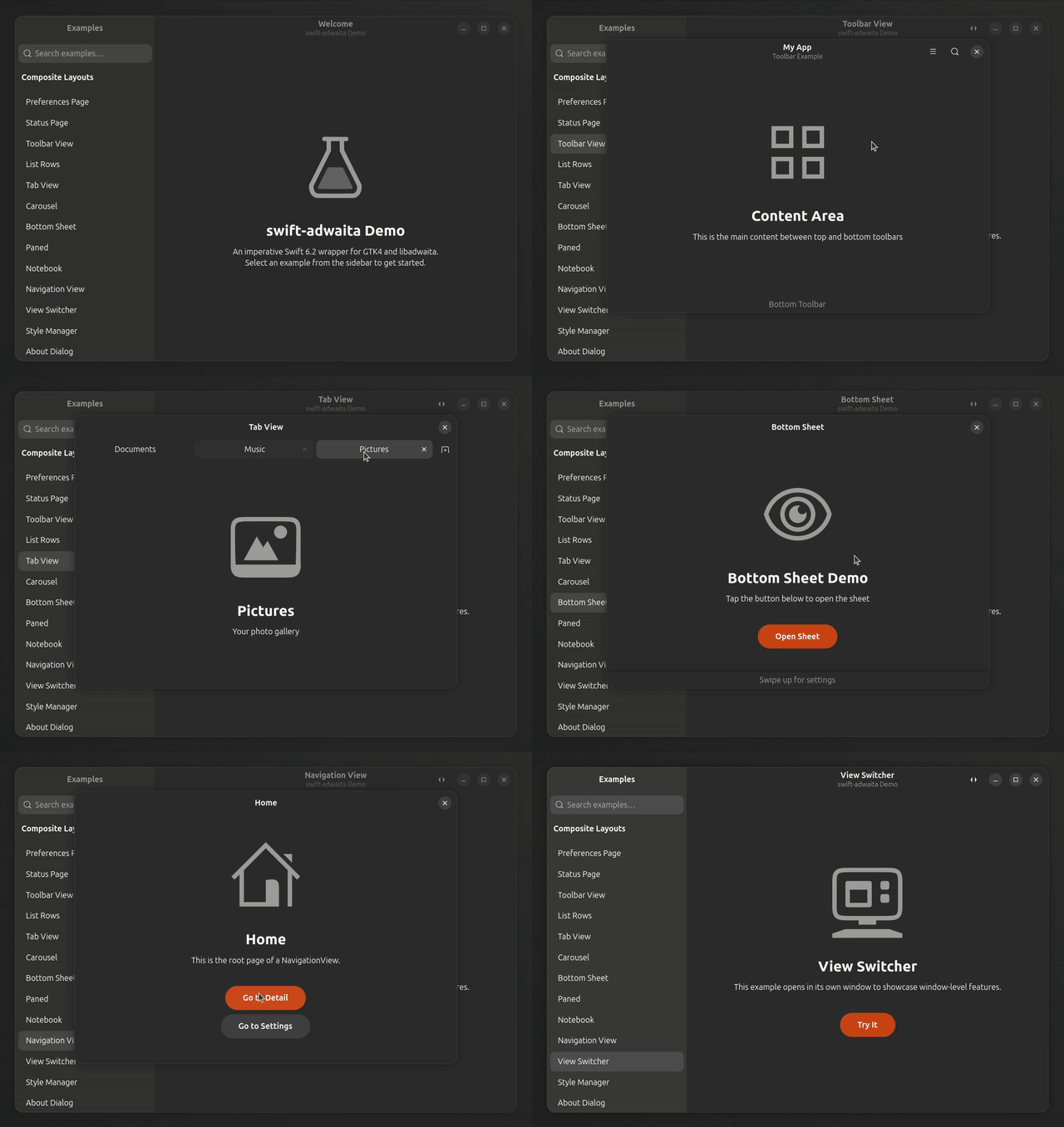
widget.addCSSClass("my-widget")An interactive gallery with 78 examples showcasing every widget:
swift run DemoAppFeatures sidebar navigation with search, source code viewer, and windowed demos for navigation/window-level widgets.
swift build                      # Build library
xvfb-run swift test --no-parallel   # Run the test suite under a virtual display
swift run DemoApp # Launch demo galleryswift build # Build library
# Tests need GSettings schemas at runtime.
XDG_DATA_DIRS=/opt/homebrew/share swift test --no-parallel
# DemoApp likewise:
XDG_DATA_DIRS=/opt/homebrew/share swift run DemoAppFor an Xcode-driven build that produces a regular macOS .app bundle
(Cmd+R, breakpoints, Archive), see examples/macos/DemoApp/ — it's
a working starter project that wraps the demo gallery via the
DemoAppLib library product.
Linux runs the test suite via swift-testing; macOS runs an XCTest mirror suite under
Tests/AdwaitaTests/macOS/because swift-testing's per-test autorelease pool transitions corrupt memory aftergtk_initregisters Cocoa CFRunLoop callbacks. Both paths exercise the same logic. If you add a new test, place the swift-testing version underTests/AdwaitaTests/(gated#if !os(macOS)) and an XCTest mirror underTests/AdwaitaTests/macOS/(gated#if os(macOS)).
Flatpak is the recommended way to distribute GTK4/libadwaita apps on Linux. The GNOME runtime provides GTK4 and libadwaita, and the Swift SDK extension provides the compiler — your app only ships its own binary.
Install Flatpak tools and runtimes:
# Install flatpak-builder
sudo apt install flatpak-builder   # Ubuntu/Debian
sudo dnf install flatpak-builder   # Fedora

# Install GNOME SDK and Swift extension
flatpak install flathub org.gnome.Sdk//48 org.freedesktop.Sdk.Extension.swift6//24.08Create a manifest file (e.g., com.example.MyApp.yml):
app-id: com.example.MyApp
runtime: org.gnome.Platform
runtime-version: "48"
sdk: org.gnome.Sdk
sdk-extensions:
  - org.freedesktop.Sdk.Extension.swift6
command: MyApp

finish-args:
  - --share=ipc
  - --socket=fallback-x11
  - --socket=wayland
  - --device=dri

build-options:
  append-path: /usr/lib/sdk/swift6/bin
  prepend-ld-library-path: /usr/lib/sdk/swift6/lib

modules:
  - name: MyApp
    buildsystem: simple
    sources:
      - type: dir
        path: .
    build-commands:
      - swift build -c release --product MyApp --static-swift-stdlib
      - install -Dm755 .build/release/MyApp /app/bin/MyApp
      - install -Dm644 com.example.MyApp.desktop /app/share/applications/com.example.MyApp.desktop
      - install -Dm644 com.example.MyApp.metainfo.xml /app/share/metainfo/com.example.MyApp.metainfo.xml
      - install -Dm644 com.example.MyApp.svg /app/share/icons/hicolor/scalable/apps/com.example.MyApp.svg
Key points:
--static-swift-stdliblinks the Swift runtime statically — the SDK extension is only needed at build time- The GNOME runtime provides GTK4 and libadwaita at runtime
- You also need a
.desktopfile,metainfo.xml, and an app icon
# Build and install locally
flatpak-builder --force-clean --user --install build-dir com.example.MyApp.yml

# Run
flatpak run com.example.MyAppThe included DemoApp has a complete Flatpak setup in the flatpak/ directory:
flatpak-builder --force-clean --user --install build-dir flatpak/io.github.makoni.SwiftAdwaitaDemo.yml
flatpak run io.github.makoni.SwiftAdwaitaDemo
For more details, see the doc:FlatpakDistribution guide.
MIT License. See LICENSE.txt.