How to restrict Rapid Cache to the Primary Blog in a WordPress Multisite
When Rapid Cache is installed in a WordPress Multisite Environment, it must be Network Activated. This results in Rapid Cache being enabled on all sites in the Multisite Network. If you want to restrict Rapid Cache so that it's only enabled on the Primary Blog, you can use an MU-Plugin.
Create the following file and directory: wp-content/mu-plugins/rc-restrict-to-primary-blog.php
<?php
add_action('init', function()
{
    if(!is_multisite())
        return; // Not applicable.

    if(!defined('DOMAIN_CURRENT_SITE'))
        return; // Not possible.

    if(!defined('PATH_CURRENT_SITE'))
        return; // Not possible.

    if(strcasecmp($GLOBALS['current_blog']->domain, DOMAIN_CURRENT_SITE) !== 0)
        define('RAPID_CACHE_ALLOWED', FALSE);

    else if(strcasecmp($GLOBALS['current_blog']->path, PATH_CURRENT_SITE) !== 0)
        define('RAPID_CACHE_ALLOWED', FALSE);
});If you visit a Child Blog (while logged out of WordPress, as Logged-In User Caching is disabled by default) and "View Source" on one of the Child Blog pages, you should see a message like this at the bottom:
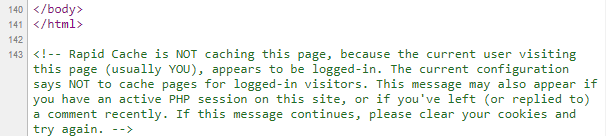
This indicates that the MU-Plugin is working and limiting Rapid Cache to the Primary Blog.
You can disable the HTML Notes in WordPress Dashboard → Rapid Cache → Plugin Options → Enable/Disable.