
PICO-8-flavored Lua, ahead-of-time compiled to a real NES .nes ROM. No
interpreter, no VM: your Lua becomes native 6502 machine code. Zero native tools,
either - the cc65 toolchain runs as bundled WebAssembly. neslua is the NES member
of the luacretro console SDK family (GameTank, GBA,
Genesis, NES, C64), sharing one statically-typed Lua-to-C front-end.
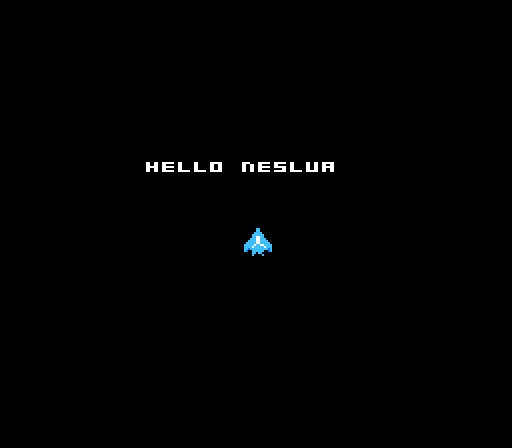
The whole hello, one main.lua: a greeting plus a hardware sprite you move with
the d-pad. _update60 runs the movement 60 times a second; _draw redraws the
sprite every frame (examples/hello/main.lua):
local x = 120
local y = 120

function _update60()             -- 60fps: read the d-pad, move the ship
  if (btn(1)) then x += 2 end    -- right
  if (btn(0)) then x -= 2 end    -- left
  if (btn(3)) then y += 2 end    -- down
  if (btn(2)) then y -= 2 end    -- up
end

function _draw()                 -- runs every frame
  cls(0)                         -- black backdrop (space)
  print("hello neslua", 72, 88, 7)
  nes.spal(1)                    -- cyan sprite sub-palette
  spr(0, x, y, 2, 2)             -- the ship (16x16), redrawn every frame
end
Build it with the sprite sheet (a PNG imported to CHR):
npx neslua run examples/hello/main.lua --sheet examples/hello/ship.chr
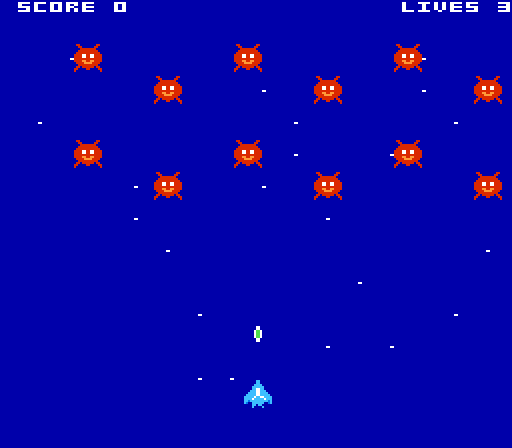
examples/starfall is a complete shmup in ~200 lines of
Lua: a staggered invader formation (all 12 on-screen within the NES's
8-sprites-per-scanline limit), a ship you fly and fire, collisions, score/lives,
and a background-tile starfield. Sprite art is imported from a PNG. Build and
play it:
npx neslua run examples/starfall/main.lua --sheet examples/starfall/shmup_sheet.chrOr build the cartridge - a byte-for-byte .nes that runs on any emulator or real
hardware:
npx neslua build examples/hello/main.lua --sheet examples/hello/ship.chr -o hello.nesThat's the whole loop: write main.lua, run it, ship the .nes. (npx neslua c main.lua prints the generated C, for debugging.)
- Real cartridges. The output is a byte-for-byte
.nesthat runs on real hardware and every NES emulator - not a fantasy console. - The same Lua as the rest of the family. PICO-8's 16.16 fixed-point number
model, the
_init/_update/_drawcallback contract, the dialect (+= -= *= /= \= %=,\floor-division,//comments). Where the hardware has a wall, the compiler fails loudly at compile time with a fix-it. - Honest about the hardware. The NES has no framebuffer, so neslua exposes
three real surfaces (background tiles, sprites, a small pixel canvas) plus a
blank-mode escape hatch - see docs/DIFFERENCES.md. It
does not pretend a 60fps full-screen
psetcanvas exists, because that is physically impossible on this machine. - 8 KB of RAM for your game. The standard cart is MMC1 with battery-backed
PRG-RAM at
$6000, soarray()/pool()allocations have room (bare NROM leaves 512 bytes).
| surface | verbs | what it is |
|---|---|---|
| background | cls print map nes.tset nes.tpal nes.camera |
nametable tiles (32x28 text cells), written through the VRAM queue |
| sprites | spr |
8x8 hardware sprites (64 max, 8/scanline), staged in the shadow OAM |
| pixel canvas | pset line rect rectfill circ circfill |
a small CHR-RAM window nes.canvas(cw,ch) the P8 drawing verbs paint |
| blank mode | the full verb set | nes.blank(true) - unlimited VRAM writes, screen dark (title cards) |
Resolution: the PPU renders 256 x 240; NTSC output crops to 256 x 224 visible. Coordinate space is 256 x 240. Full details in docs/DIFFERENCES.md.
Each builds to a .nes and runs on the emulator (real captured frames below):
starfall- a complete shmup: staggered invaders, a ship that flies and fires, collisions, score/lives, a starfield (the hero image above). Shows the sprite-budget discipline the NES demands.hello- a greeting + a hardware sprite you move (the simplest idiomatic NES program).pad-square- move a sprite with the d-pad.mathcheck- the 16.16 fixed-point conformance cart.canvas- the pixel-canvas surface: a vector logo.
- CHEATSHEET.md - the whole API on one page.
- DIFFERENCES.md - how the NES differs from PICO-8.
- ASSETS.md - PNG -> CHR, tilemaps, color rules.
Node.js 24+, and nothing else. npm install pulls in
luacretro (the shared front-end), romdev-toolchain-cc65 (the cc65 toolchain
as WebAssembly), romdev-core-fceumm (the emulator core), and
romdev-core-runner (the shared SDL host that neslua run opens a window
through - the same one the whole SDK family and the romdev playtest tool use).
The window needs @kmamal/sdl, an optional dependency of the runner. No
native compiler or emulator to install.
MIT. No commercial game names in the shipped docs; the API is generic.