The official Alpha Vantage API MCP server enables LLMs and agentic workflows to seamlessly interact with real-time and historical stock market data through the Model Context Protocol (MCP). Add this server to your favorite apps such as Claude, Claude Code, Cursor, VS Code, and many more to give them access to comprehensive financial data.
To use the server, get your free Alpha Vantage API key, copy it to your clipboard, then follow the instructions below for the agentic tool/platform of your interest.
👉 Any questions? Please contact support@alphavantage.co
⭐ View MCP source code on Github
Remote Server Connection:
https://mcp.alphavantage.co/mcp?apikey=YOUR_API_KEY
Local Server Connection:
uvx av-mcp YOUR_API_KEY
💬📊 Power your chatbot with financial data
Install in Claude
Requirements:
- Claude Pro account (or higher tier)
To connect Claude (Web or Desktop) to this MCP server:
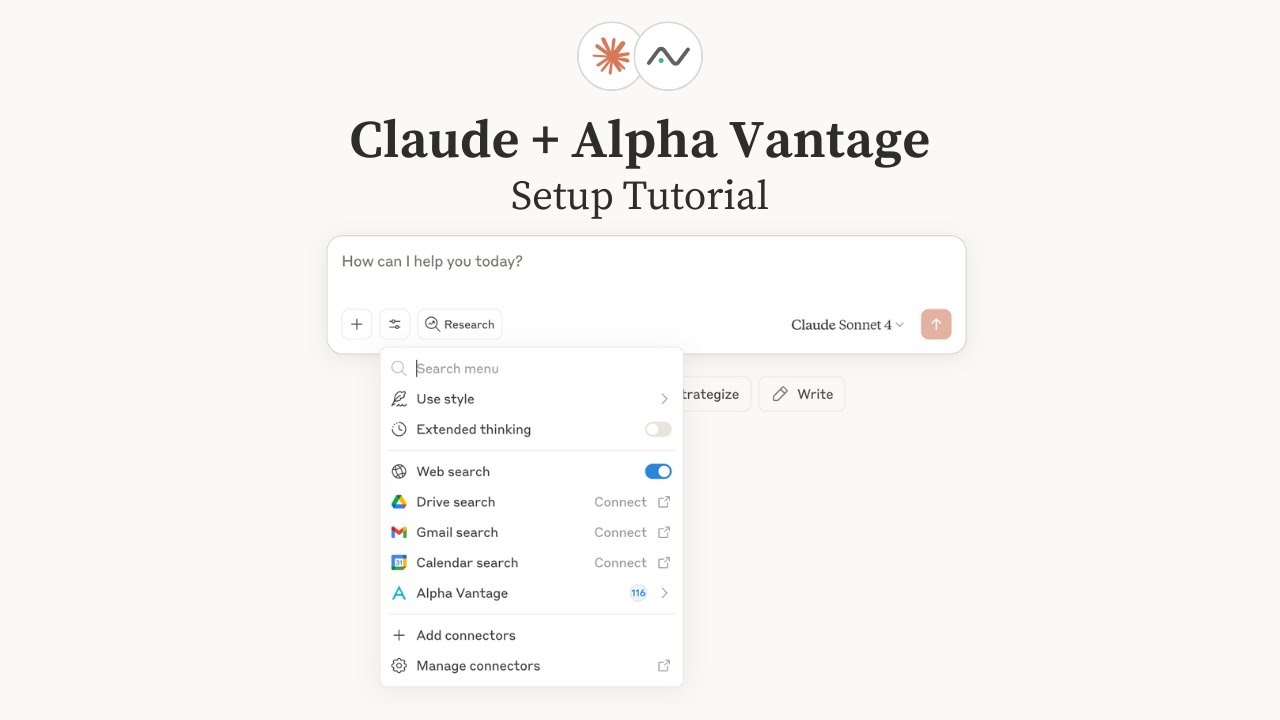
📺 Watch the setup tutorial - Click the image below to watch a step-by-step video guide:
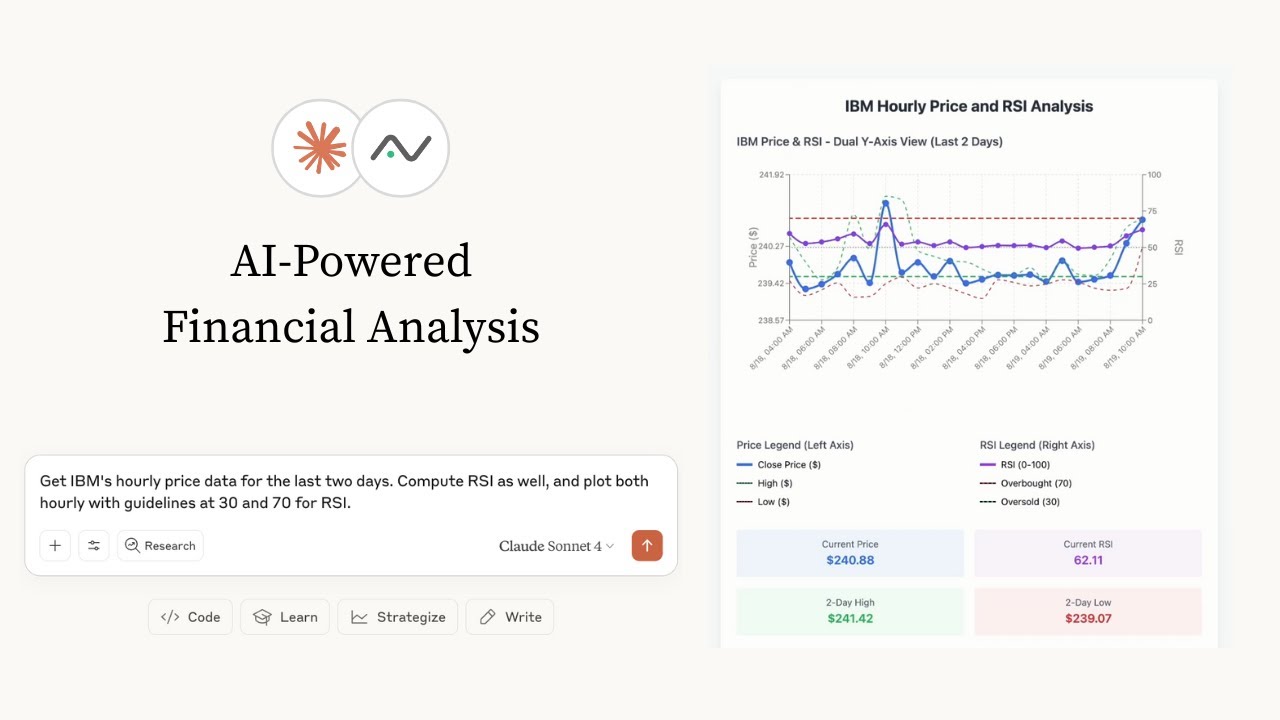
📺 Already have your Alpha Vantage MCP server set up? Below are a few examples of Claude performing various stock analysis & charting tasks:
Query Param Option (Recommended):
- Go to claude.ai/settings/connectors (Web) or Settings → Connectors (Desktop)
- Click "Add Custom Connector"
- Add the MCP server URL with your API key:
https://mcp.alphavantage.co/mcp?apikey=YOUR_API_KEY(replaceYOUR_API_KEYwith your actual Alpha Vantage API key) - Click "Connect"
OAuth Option:
- Go to claude.ai/settings/connectors (Web) or Settings → Connectors (Desktop)
- Click "Add Custom Connector"
- Add the MCP server URL:
https://mcp.alphavantage.co/mcp - Click "Connect"
- Enter your Alpha Vantage API token
- Click "Authorize Access"
See Claude Desktop MCP docs for more info.
Install uv (a modern Python package and project manager):
curl -LsSf https://astral.sh/uv/install.sh | shOpen Claude Desktop developer settings and edit your claude_desktop_config.json file to add the following configuration:
{
  "mcpServers": {
    "alphavantage": {
      "command": "uvx",
      "args": ["av-mcp", "YOUR_API_KEY"]
    }
  }
}
Replace YOUR_API_KEY with your actual Alpha Vantage API key.
Install in ChatGPT
Requirements:
- ChatGPT Plus account (or higher tier)
- Developer mode enabled (beta feature) - see OpenAI's Developer Mode documentation
To connect ChatGPT to this MCP server using ChatGPT Developer mode:
Setup:
- Go to ChatGPT Settings → Connectors
- Enable Advanced → Developer mode
- Add a remote MCP server with URL:
https://mcp.alphavantage.co/mcp?apikey=YOUR_API_KEY(replaceYOUR_API_KEYwith your actual Alpha Vantage API key) - In conversations, choose Developer mode from the Plus menu and select the Alpha Vantage connector
Note: While Developer mode is available for both Pro and Plus accounts, MCP tool execution is currently most reliable with Pro accounts. We're monitoring Plus plan functionality and will update this guide as improvements are made.
💻💵 Code up fintech apps
Install in OpenAI Codex
Requirements:
- ChatGPT Plus account (or higher tier)
See OpenAI Codex for more information.
Install uv (a modern Python package and project manager):
curl -LsSf https://astral.sh/uv/install.sh | shInstall Codex CLI v0.34 or later to avoid compatibility issues.
# Install (if not already installed)
npm install -g @openai/codex

# Or update to the latest version
npm update -g @openai/codex

# Verify installation and version
codex --version
Add the following configuration to your Codex MCP server settings by editing ~/.codex/config.toml:
[mcp_servers.alphavantage]
command = "uvx"
args = ["av-mcp", "YOUR_API_KEY"]
Replace YOUR_API_KEY with your actual Alpha Vantage API key.
Run codex in your terminal from your project directory. First-time users will be guided through additional prompts.
Then connect with:
/mcp
Install in Visual Studio Code
See VS Code MCP docs for more info.
Create .vscode/mcp.json (your VS Code MCP config file) in your workspace, and paste into it one of the following configurations, depending on whether you’re connecting remotely or running the server locally.
Paste the following into .vscode/mcp.json:
{
  "servers": {
    "alphavantage": {
      "type": "http",
      "url": "https://mcp.alphavantage.co/mcp?apikey=YOUR_API_KEY"
    }
  }
}
Replace YOUR_API_KEY with your actual Alpha Vantage API key.
First, install uv (a modern Python package and project manager):
curl -LsSf https://astral.sh/uv/install.sh | shThen, paste the following into .vscode/mcp.json:
{
  "servers": {
    "alphavantage": {
      "type": "stdio",
      "command": "uvx",
      "args": ["av-mcp", "YOUR_API_KEY"]
    }
  }
}
Replace YOUR_API_KEY with your actual Alpha Vantage API key.
Open the Chat view and select Agent mode
Install in Cursor
See Cursor MCP docs for more information.
Paste one of the following configurations into your Cursor ~/.cursor/mcp.json file, depending on whether you’re connecting remotely or running the server locally. You may also install in a specific project by creating .cursor/mcp.json in your project folder.
Configure Cursor by editing ~/.cursor/mcp.json:
{
  "mcpServers": {
    "alphavantage": {
      "url": "https://mcp.alphavantage.co/mcp?apikey=YOUR_API_KEY"
    }
  }
}
Replace YOUR_API_KEY with your actual Alpha Vantage API key.
First, install uv (a modern Python package and project manager):
curl -LsSf https://astral.sh/uv/install.sh | shThen, paste the following into your Cursor ~/.cursor/mcp.json file:
{
  "mcpServers": {
    "alphavantage": {
      "command": "uvx",
      "args": ["av-mcp", "YOUR_API_KEY"]
    }
  }
}
Replace YOUR_API_KEY with your actual Alpha Vantage API key.
Install in Claude Code
Requirements:
- Claude Pro account (or higher tier)
See Claude Code MCP docs for more information.
Run one of the following commands, depending on whether you’re connecting remotely or running the server locally.
claude mcp add -t http alphavantage https://mcp.alphavantage.co/mcp?apikey=YOUR_API_KEYReplace YOUR_API_KEY with your actual Alpha Vantage API key.
First, install uv (a modern Python package and project manager):
curl -LsSf https://astral.sh/uv/install.sh | shThen run:
claude mcp add alphavantage -- uvx av-mcp YOUR_API_KEYReplace YOUR_API_KEY with your actual Alpha Vantage API key.
Run claude in your terminal from your project directory.
Then connect with:
/mcp
Install in Gemini CLI
See Gemini CLI Configuration for more information.
Run one of the following commands, depending on whether you’re connecting remotely or running the server locally.
Gemini CLI Remote Server Connection (Recommended):
gemini mcp add -t http alphavantage https://mcp.alphavantage.co/mcp?apikey=YOUR_API_KEYReplace YOUR_API_KEY with your actual Alpha Vantage API key.
Gemini CLI Local Server Connection:
Install uv (a modern Python package and project manager):
curl -LsSf https://astral.sh/uv/install.sh | shThen run:
gemini mcp add alphavantage uvx av-mcp YOUR_API_KEYReplace YOUR_API_KEY with your actual Alpha Vantage API key.
Manual Configuration:
- Open the Gemini CLI settings file. The location is
~/.gemini/settings.json(where~is your home directory). - Add the following to the
mcpServersobject in yoursettings.jsonfile (replaceYOUR_API_KEYwith your actual Alpha Vantage API key):
{
  "mcpServers": {
    "alphavantage": {
      "httpUrl": "https://mcp.alphavantage.co/mcp?apikey=YOUR_API_KEY"
    }
  }
}
Or, for a local server (replace YOUR_API_KEY with your actual Alpha Vantage API key):
{
  "mcpServers": {
    "alphavantage": {
      "command": "uvx",
      "args": ["av-mcp", "YOUR_API_KEY"]
    }
  }
}
If the mcpServers object does not exist, create it.
🤖📈 Create agentic workflows for quantitative investing
Install in OpenAI Agents SDK
To use the Alpha Vantage MCP server with OpenAI Agents SDK, see our example agent that demonstrates:
- Interactive financial analysis agent
- Session management for conversation continuity
- Real-time tool execution with Alpha Vantage data
- Support for both HTTP and stdio MCP connections
The example includes a complete setup guide and configuration templates.
Optionally filter available tools by category using:
- Query parameter:
?categories=core_stock_apis,alpha_intelligence
Available categories:
core_stock_apis- Core stock market data APIsoptions_data_apis- Options data APIsalpha_intelligence- News sentiment and intelligence APIsfundamental_data- Company fundamentals and financial dataforex- Foreign exchange rates and datacryptocurrencies- Digital and crypto currencies datacommodities- Commodities and precious metals dataeconomic_indicators- Economic indicators and market datatechnical_indicators- Technical analysis indicators and calculationsping- Health check and utility tools
If no categories are specified, all tools will be available.
| Category | Tools |
|---|---|
| core_stock_apis | TIME_SERIES_INTRADAY, TIME_SERIES_DAILY, TIME_SERIES_DAILY_ADJUSTED, TIME_SERIES_WEEKLY, TIME_SERIES_WEEKLY_ADJUSTED, TIME_SERIES_MONTHLY, TIME_SERIES_MONTHLY_ADJUSTED, GLOBAL_QUOTE, REALTIME_BULK_QUOTES, SYMBOL_SEARCH, MARKET_STATUS |
| options_data_apis | REALTIME_OPTIONS, HISTORICAL_OPTIONS |
| alpha_intelligence | NEWS_SENTIMENT, EARNINGS_CALL_TRANSCRIPT, TOP_GAINERS_LOSERS, INSIDER_TRANSACTIONS, ANALYTICS_FIXED_WINDOW, ANALYTICS_SLIDING_WINDOW |
| fundamental_data | COMPANY_OVERVIEW, INCOME_STATEMENT, BALANCE_SHEET, CASH_FLOW, EARNINGS, LISTING_STATUS, EARNINGS_CALENDAR, IPO_CALENDAR |
| forex | FX_INTRADAY, FX_DAILY, FX_WEEKLY, FX_MONTHLY |
| cryptocurrencies | CURRENCY_EXCHANGE_RATE, DIGITAL_CURRENCY_INTRADAY, DIGITAL_CURRENCY_DAILY, DIGITAL_CURRENCY_WEEKLY, DIGITAL_CURRENCY_MONTHLY |
| commodities | WTI, BRENT, NATURAL_GAS, COPPER, ALUMINUM, WHEAT, CORN, COTTON, SUGAR, COFFEE, ALL_COMMODITIES |
| economic_indicators | REAL_GDP, REAL_GDP_PER_CAPITA, TREASURY_YIELD, FEDERAL_FUNDS_RATE, CPI, INFLATION, RETAIL_SALES, DURABLES, UNEMPLOYMENT, NONFARM_PAYROLL |
| technical_indicators | SMA, EMA, WMA, DEMA, TEMA, TRIMA, KAMA, MAMA, VWAP, T3, MACD, MACDEXT, STOCH, STOCHF, RSI, STOCHRSI, WILLR, ADX, ADXR, APO, PPO, MOM, BOP, CCI, CMO, ROC, ROCR, AROON, AROONOSC, MFI, TRIX, ULTOSC, DX, MINUS_DI, PLUS_DI, MINUS_DM, PLUS_DM, BBANDS, MIDPOINT, MIDPRICE, SAR, TRANGE, ATR, NATR, AD, ADOSC, OBV, HT_TRENDLINE, HT_SINE, HT_TRENDMODE, HT_DCPERIOD, HT_DCPHASE, HT_PHASOR |
| ping | PING, ADD_TWO_NUMBERS |
- core_stock_apis
- options_data_apis
- alpha_intelligence
- fundamental_data
- forex
- cryptocurrencies
- commodities
- economic_indicators
- technical_indicators
- ping
💡 Each of these MCP tools maps to a corresponding Alpha Vantage API endpoint. If you are interested in the full API specs (in addition to the brief tool descriptions below), please refer to the Alpha Vantage API documentation.
| Category | Tool | Description |
|---|---|---|
| core_stock_apis | TIME_SERIES_INTRADAY |
Current and 20+ years of historical intraday OHLCV data |
| core_stock_apis | TIME_SERIES_DAILY |
Daily time series (OHLCV) covering 20+ years |
| core_stock_apis | TIME_SERIES_DAILY_ADJUSTED |
Daily adjusted OHLCV with split/dividend events |
| core_stock_apis | TIME_SERIES_WEEKLY |
Weekly time series (last trading day of week) |
| core_stock_apis | TIME_SERIES_WEEKLY_ADJUSTED |
Weekly adjusted time series with dividends |
| core_stock_apis | TIME_SERIES_MONTHLY |
Monthly time series (last trading day of month) |
| core_stock_apis | TIME_SERIES_MONTHLY_ADJUSTED |
Monthly adjusted time series with dividends |
| core_stock_apis | GLOBAL_QUOTE |
Latest price and volume for a ticker |
| core_stock_apis | REALTIME_BULK_QUOTES |
Realtime quotes for up to 100 symbols |
| core_stock_apis | SYMBOL_SEARCH |
Search for symbols by keywords |
| core_stock_apis | MARKET_STATUS |
Current market status worldwide |
| Category | Tool | Description |
|---|---|---|
| options_data_apis | REALTIME_OPTIONS |
Realtime US options data with Greeks |
| options_data_apis | HISTORICAL_OPTIONS |
Historical options chain for 15+ years |
| Category | Tool | Description |
|---|---|---|
| alpha_intelligence | NEWS_SENTIMENT |
Live and historical market news & sentiment |
| alpha_intelligence | EARNINGS_CALL_TRANSCRIPT |
Earnings call transcripts with LLM sentiment |
| alpha_intelligence | TOP_GAINERS_LOSERS |
Top 20 gainers, losers, and most active |
| alpha_intelligence | INSIDER_TRANSACTIONS |
Latest and historical insider transactions |
| alpha_intelligence | ANALYTICS_FIXED_WINDOW |
Advanced analytics over fixed windows |
| alpha_intelligence | ANALYTICS_SLIDING_WINDOW |
Advanced analytics over sliding windows |
| Category | Tool | Description |
|---|---|---|
| fundamental_data | COMPANY_OVERVIEW |
Company information, financial ratios, and metrics |
| fundamental_data | INCOME_STATEMENT |
Annual and quarterly income statements |
| fundamental_data | BALANCE_SHEET |
Annual and quarterly balance sheets |
| fundamental_data | CASH_FLOW |
Annual and quarterly cash flow statements |
| fundamental_data | EARNINGS |
Annual and quarterly earnings data |
| fundamental_data | LISTING_STATUS |
Listing and delisting data for equities |
| fundamental_data | EARNINGS_CALENDAR |
Earnings calendar for upcoming earnings |
| fundamental_data | IPO_CALENDAR |
Initial public offering calendar |
| Category | Tool | Description |
|---|---|---|
| forex | FX_INTRADAY |
Intraday foreign exchange rates |
| forex | FX_DAILY |
Daily foreign exchange rates |
| forex | FX_WEEKLY |
Weekly foreign exchange rates |
| forex | FX_MONTHLY |
Monthly foreign exchange rates |
| Category | Tool | Description |
|---|---|---|
| cryptocurrencies | CURRENCY_EXCHANGE_RATE |
Exchange rate between digital/crypto currencies |
| cryptocurrencies | DIGITAL_CURRENCY_INTRADAY |
Intraday time series for digital currencies |
| cryptocurrencies | DIGITAL_CURRENCY_DAILY |
Daily time series for digital currencies |
| cryptocurrencies | DIGITAL_CURRENCY_WEEKLY |
Weekly time series for digital currencies |
| cryptocurrencies | DIGITAL_CURRENCY_MONTHLY |
Monthly time series for digital currencies |
| Category | Tool | Description |
|---|---|---|
| commodities | WTI |
West Texas Intermediate (WTI) crude oil prices |
| commodities | BRENT |
Brent crude oil prices |
| commodities | NATURAL_GAS |
Henry Hub natural gas spot prices |
| commodities | COPPER |
Global copper prices |
| commodities | ALUMINUM |
Global aluminum prices |
| commodities | WHEAT |
Global wheat prices |
| commodities | CORN |
Global corn prices |
| commodities | COTTON |
Global cotton prices |
| commodities | SUGAR |
Global sugar prices |
| commodities | COFFEE |
Global coffee prices |
| commodities | ALL_COMMODITIES |
All commodities prices |
| Category | Tool | Description |
|---|---|---|
| economic_indicators | REAL_GDP |
Real Gross Domestic Product |
| economic_indicators | REAL_GDP_PER_CAPITA |
Real GDP per capita |
| economic_indicators | TREASURY_YIELD |
Daily treasury yield rates |
| economic_indicators | FEDERAL_FUNDS_RATE |
Federal funds rate (interest rates) |
| economic_indicators | CPI |
Consumer Price Index |
| economic_indicators | INFLATION |
Inflation rates |
| economic_indicators | RETAIL_SALES |
Retail sales data |
| economic_indicators | DURABLES |
Durable goods orders |
| economic_indicators | UNEMPLOYMENT |
Unemployment rate |
| economic_indicators | NONFARM_PAYROLL |
Non-farm payroll data |
| Category | Tool | Description |
|---|---|---|
| technical_indicators | SMA |
Simple moving average (SMA) values |
| technical_indicators | EMA |
Exponential moving average (EMA) values |
| technical_indicators | WMA |
Weighted moving average (WMA) values |
| technical_indicators | DEMA |
Double exponential moving average (DEMA) values |
| technical_indicators | TEMA |
Triple exponential moving average (TEMA) values |
| technical_indicators | TRIMA |
Triangular moving average (TRIMA) values |
| technical_indicators | KAMA |
Kaufman adaptive moving average (KAMA) values |
| technical_indicators | MAMA |
MESA adaptive moving average (MAMA) values |
| technical_indicators | VWAP |
Volume weighted average price (VWAP) for intraday time series |
| technical_indicators | T3 |
Triple exponential moving average (T3) values |
| technical_indicators | MACD |
Moving average convergence / divergence (MACD) values |
| technical_indicators | MACDEXT |
Moving average convergence / divergence values with controllable moving average type |
| technical_indicators | STOCH |
Stochastic oscillator (STOCH) values |
| technical_indicators | STOCHF |
Stochastic fast (STOCHF) values |
| technical_indicators | RSI |
Relative strength index (RSI) values |
| technical_indicators | STOCHRSI |
Stochastic relative strength index (STOCHRSI) values |
| technical_indicators | WILLR |
Williams' %R (WILLR) values |
| technical_indicators | ADX |
Average directional movement index (ADX) values |
| technical_indicators | ADXR |
Average directional movement index rating (ADXR) values |
| technical_indicators | APO |
Absolute price oscillator (APO) values |
| technical_indicators | PPO |
Percentage price oscillator (PPO) values |
| technical_indicators | MOM |
Momentum (MOM) values |
| technical_indicators | BOP |
Balance of power (BOP) values |
| technical_indicators | CCI |
Commodity channel index (CCI) values |
| technical_indicators | CMO |
Chande momentum oscillator (CMO) values |
| technical_indicators | ROC |
Rate of change (ROC) values |
| technical_indicators | ROCR |
Rate of change ratio (ROCR) values |
| technical_indicators | AROON |
Aroon (AROON) values |
| technical_indicators | AROONOSC |
Aroon oscillator (AROONOSC) values |
| technical_indicators | MFI |
Money flow index (MFI) values |
| technical_indicators | TRIX |
1-day rate of change of a triple smooth exponential moving average (TRIX) values |
| technical_indicators | ULTOSC |
Ultimate oscillator (ULTOSC) values |
| technical_indicators | DX |
Directional movement index (DX) values |
| technical_indicators | MINUS_DI |
Minus directional indicator (MINUS_DI) values |
| technical_indicators | PLUS_DI |
Plus directional indicator (PLUS_DI) values |
| technical_indicators | MINUS_DM |
Minus directional movement (MINUS_DM) values |
| technical_indicators | PLUS_DM |
Plus directional movement (PLUS_DM) values |
| technical_indicators | BBANDS |
Bollinger bands (BBANDS) values |
| technical_indicators | MIDPOINT |
Midpoint values - (highest value + lowest value)/2 |
| technical_indicators | MIDPRICE |
Midpoint price values - (highest high + lowest low)/2 |
| technical_indicators | SAR |
Parabolic SAR (SAR) values |
| technical_indicators | TRANGE |
True range (TRANGE) values |
| technical_indicators | ATR |
Average true range (ATR) values |
| technical_indicators | NATR |
Normalized average true range (NATR) values |
| technical_indicators | AD |
Chaikin A/D line (AD) values |
| technical_indicators | ADOSC |
Chaikin A/D oscillator (ADOSC) values |
| technical_indicators | OBV |
On balance volume (OBV) values |
| technical_indicators | HT_TRENDLINE |
Hilbert transform, instantaneous trendline (HT_TRENDLINE) values |
| technical_indicators | HT_SINE |
Hilbert transform, sine wave (HT_SINE) values |
| technical_indicators | HT_TRENDMODE |
Hilbert transform, trend vs cycle mode (HT_TRENDMODE) values |
| technical_indicators | HT_DCPERIOD |
Hilbert transform, dominant cycle period (HT_DCPERIOD) values |
| technical_indicators | HT_DCPHASE |
Hilbert transform, dominant cycle phase (HT_DCPHASE) values |
| technical_indicators | HT_PHASOR |
Hilbert transform, phasor components (HT_PHASOR) values |
| Category | Tool | Description |
|---|---|---|
| ping | PING |
Health check tool that returns 'pong' |
| ping | ADD_TWO_NUMBERS |
Example tool for adding two numbers |