Ahoy, matey! This here be a translation fer all ye scallywags who speak the noble tongue o' the Seven Seas!

|
Switch betwixt yer multiple Git profiles with a single click o' yer hook! Manage multiple GitHub accounts, SSH keys, GPG signin', an' automatically apply yer profile to Git submodules, arrr!













 🇺🇸 🇯🇵 🇨🇳 🇹🇼 🇰🇷 🇩🇪 🇫🇷 🇪🇸 🇧🇷 🇮🇹 🇷🇺 🇵🇱 🇹🇷 🇨🇿 🇭🇺 🇧🇬 🇺🇦 🌍 🌺 🐻 🐉 ✨ 🖖 🐱 🏴☠️ 🎭 🇺🇸 🇯🇵 🇨🇳 🇹🇼 🇰🇷 🇩🇪 🇫🇷 🇪🇸 🇧🇷 🇮🇹 🇷🇺 🇵🇱 🇹🇷 🇨🇿 🇭🇺 🇧🇬 🇺🇦 🌍 🌺 🐻 🐉 ✨ 🖖 🐱 🏴☠️ 🎭
|
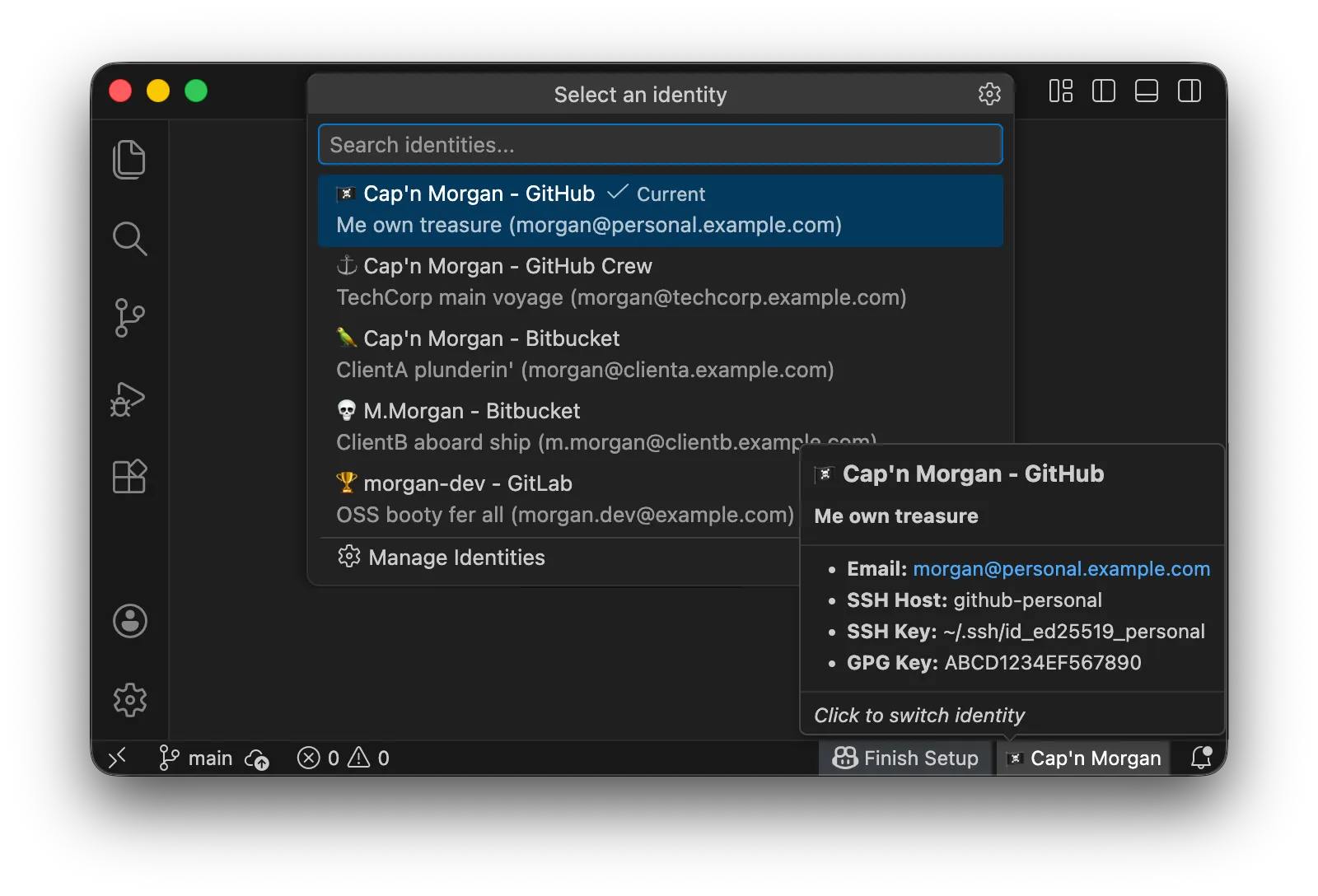
While many Git profile switchin' tools sail the seven seas, Git ID Switcher solves the treacherous problems that others leave adrift:
- The Submodule Nightmare: When workin' with repositories that have submodules (like Hugo themes or vendor libraries), ye usually have to set
git config user.namemanually fer each submodule. This extension solves it by recursively applyin' yer profile to all active submodules in yer fleet. Elegant as a galleon, arrr! - SSH & GPG Handlin': It don't just change yer name; it swaps yer SSH keys in ssh-agent an' configures GPG signin' so ye never commit with the wrong signature, lest ye walk the plank!
- Profile Management UI: Add, edit, delete, an' reorder profiles without editin' settings.json — no need to swab the deck manually!
- One-Click Profile Switch: Change yer Git user.name an' user.email faster than ye can say "shiver me timbers!"
- Status Bar Integration: Always see yer current profile at a glance from the crow's nest
- Sync Check: Real-time detection o' mismatches between yer profile an' git config, with a warnin' in the status bar
- Submodule Support: Automatically propagate yer profile to Git submodules across yer fleet
- SSH Key Management: Automatically switch yer SSH keys in ssh-agent, like changin' sails in a storm
- GPG Signin' Support: Configure yer GPG key fer commit signin' (optional, but a true pirate always signs their plunder)
- Rich Tooltips: Detailed profile info with description an' SSH host
- Cross-Platform: Works on macOS, Linux, an' Windows — every port in the digital sea!
- Localized: Supports 17 languages!
I value the existence o' minorities, even pirates! I don't want to discard 'em just because they be small in number. Even if translations ain't perfect, I hope ye can feel our intent to show respect fer all tongues!
This extension supports all 17 languages that VS Code supports. An' fer README documentation, we also challenged ourselves to translate into minority languages an' joke languages.
This ain't just "global support" — this be "respect fer linguistic diversity." An' across all languages, in every port, developers makin' the world better with commits... I want this to be that kind o' infrastructure. Fair winds to all!
A typical setup fer managin' yer personal account an' company account (Enterprise Managed User). The essential provisions fer any voyage!
First, forge SSH keys fer each account (if ye already have 'em, skip this):
# Personal
ssh-keygen -t ed25519 -C "morgan@personal.example.com" -f ~/.ssh/id_ed25519_personal

# Work
ssh-keygen -t ed25519 -C "morgan@techcorp.example.com" -f ~/.ssh/id_ed25519_work
Register yer public keys (.pub files) to each GitHub account, matey.
Note: What ye register on GitHub be
id_ed25519_personal.pub(public key).id_ed25519_personal(without extension) be the private key — never share or upload it! Guard it like buried treasure!
Edit ~/.ssh/config:
# Personal GitHub Account (Default)
Host github.com
    HostName github.com
    User git
    IdentityFile ~/.ssh/id_ed25519_personal
    IdentitiesOnly yes

# Work GitHub Account
Host github-work
    HostName github.com
    User git
    IdentityFile ~/.ssh/id_ed25519_work
IdentitiesOnly yesAfter ye install, sample profiles be ready fer ye. Follow this guide to edit 'em fer yerself.
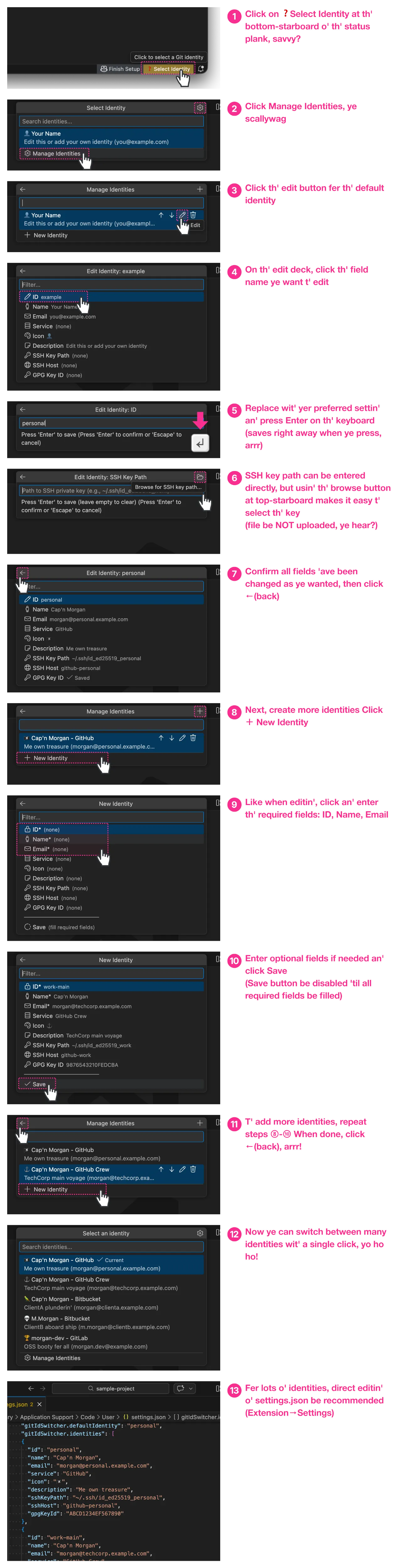
Yer key files be not sent anywhere: When ye set the SSH key path, only the file path (location) be recorded. The key file contents be never uploaded or sent to external services. Safety first, matey!
If ye want GPG signin': Ye can also set
gpgKeyIdin the profile edit screen. Fer how to find yer GPG key ID, see "Troubleshootin'".
Tip: Ye can also configure directly from settings.json. Open extension settings (
Cmd+,/Ctrl+,) → Search "Git ID Switcher" → Click "Edit in settings.json". Fer JSON format examples, see "Full Example".
All the provisions combined! Here be the full example:
# Personal Account (Default)
Host github-personal
    HostName github.com
    User git
    IdentityFile ~/.ssh/id_ed25519_personal
    IdentitiesOnly yes

# Work Account (Company Enterprise Managed User)
Host github-work
    HostName github.com
    User git
    IdentityFile ~/.ssh/id_ed25519_work
    IdentitiesOnly yes

# Client A — Contract Plunder (Bitbucket)
Host bitbucket-clienta
    HostName bitbucket.org
    User git
    IdentityFile ~/.ssh/id_ed25519_clienta
    IdentitiesOnly yes

# Client B — On-Site Voyage (Bitbucket)
Host bitbucket-clientb
    HostName bitbucket.org
    User git
    IdentityFile ~/.ssh/id_ed25519_clientb
    IdentitiesOnly yes

# OSS Treasure (GitLab)
Host gitlab-oss
    HostName gitlab.com
    User git
    IdentityFile ~/.ssh/id_ed25519_oss
IdentitiesOnly yes{
"gitIdSwitcher.identities": [
{
"id": "personal",
"name": "Cap'n Morgan",
"email": "morgan@personal.example.com",
"service": "GitHub",
"icon": "🏴☠️",
"description": "Me own treasure",
"sshKeyPath": "~/.ssh/id_ed25519_personal",
"sshHost": "github-personal",
"gpgKeyId": "ABCD1234EF567890"
},
{
"id": "work-main",
"name": "Cap'n Morgan",
"email": "morgan@techcorp.example.com",
"service": "GitHub Crew",
"icon": "⚓",
"description": "TechCorp main voyage",
"sshKeyPath": "~/.ssh/id_ed25519_work",
"sshHost": "github-work",
"gpgKeyId": "9876543210FEDCBA"
},
{
"id": "client-a",
"name": "Cap'n Morgan",
"email": "morgan@clienta.example.com",
"service": "Bitbucket",
"icon": "🦜",
"description": "ClientA plunderin'",
"sshKeyPath": "~/.ssh/id_ed25519_clienta",
"sshHost": "bitbucket-clienta"
},
{
"id": "client-b",
"name": "M.Morgan",
"email": "m.morgan@clientb.example.com",
"service": "Bitbucket",
"icon": "💀",
"description": "ClientB aboard ship",
"sshKeyPath": "~/.ssh/id_ed25519_clientb",
"sshHost": "bitbucket-clientb"
},
{
"id": "oss",
"name": "morgan-dev",
"email": "morgan.dev@example.com",
"service": "GitLab",
"icon": "🏆",
"description": "OSS booty fer all",
"sshKeyPath": "~/.ssh/id_ed25519_oss",
"sshHost": "gitlab-oss"
}
],
"gitIdSwitcher.defaultIdentity": "personal",
"gitIdSwitcher.autoSwitchSshKey": true,
"gitIdSwitcher.applyToSubmodules": true
}Note: The 4th profile (client-b) uses a shortened name, an' the 5th (oss) uses a dev handle. Ye can set different display names fer each profile, even fer the same scallywag.
Click the status bar → at the bottom o' the list, click "Profile Management" to open the management screen. Ye can add, edit, delete, an' reorder profiles all from the UI — no need to wrestle with JSON, arrr!
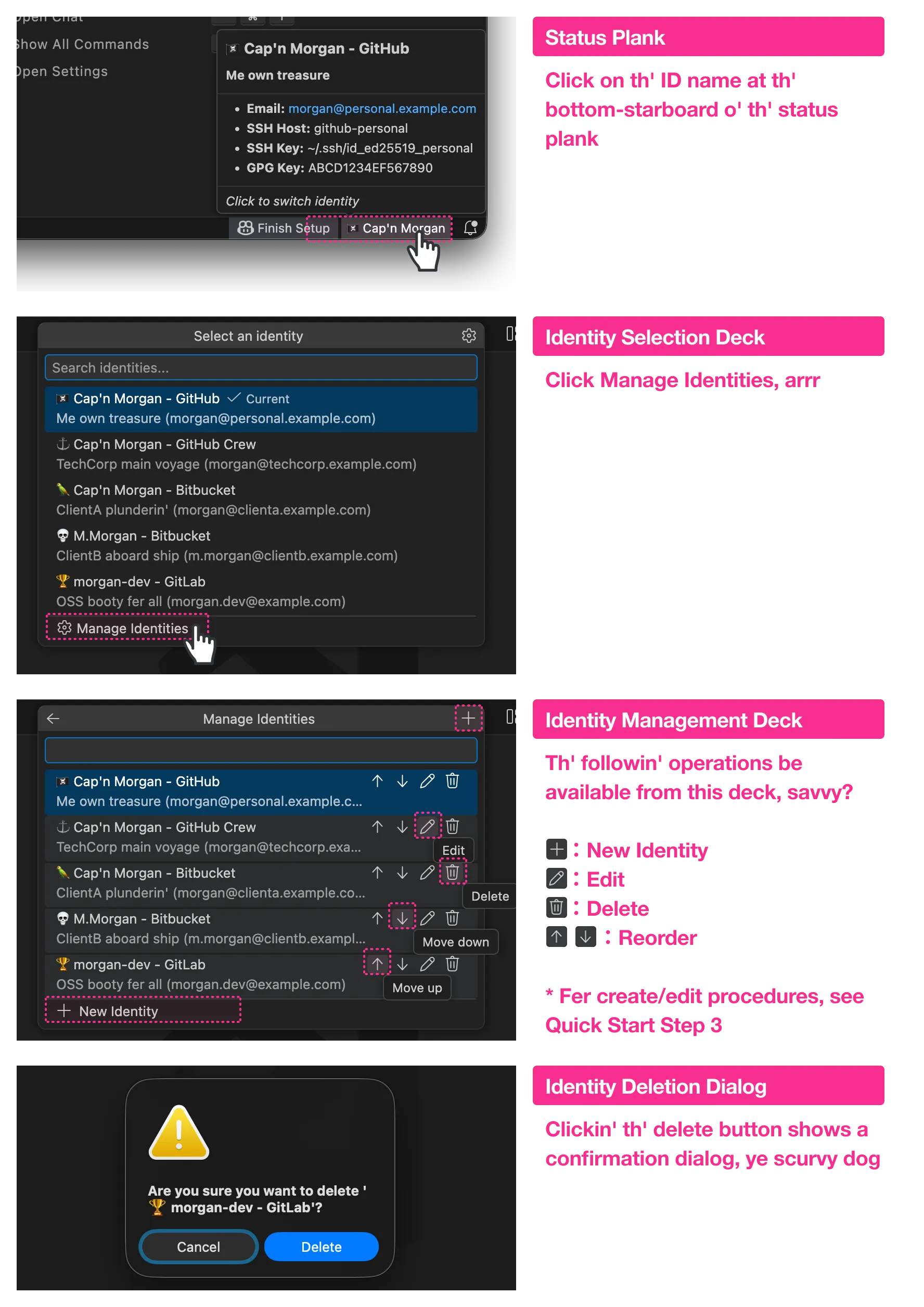
Ye can also delete profiles from the command palette: Git ID Switcher: Delete Identity.
| Command | What It Does |
|---|---|
Git ID Switcher: Select Identity |
Open the profile picker, ye scurvy dog |
Git ID Switcher: Delete Identity |
Delete a profile |
Git ID Switcher: Show Current Identity |
Show current profile info |
Git ID Switcher: Show Documentation |
Display the ship's scrolls |
| Property | Required | Description |
|---|---|---|
id |
✅ | Unique identifier (e.g., "personal", "work") |
name |
✅ | Git user.name — shows in commits |
email |
✅ | Git user.email — shows in commits |
icon |
Emoji fer status bar (e.g., "🏴☠️"). Single emoji only! |
|
service |
Service name (e.g., "GitHub", "GitLab"). Used in UI display |
|
description |
Short description fer picker an' tooltip | |
sshKeyPath |
Path to SSH private key (e.g., "~/.ssh/id_ed25519_work") |
|
sshHost |
SSH config Host alias (e.g., "github-work") |
|
gpgKeyId |
GPG key ID fer commit signin' |
- Status bar: If longer than ~25 characters, it gets truncated with
... icon: Single emoji (grapheme cluster) only. No multiple emojis or long strings allowed
| Setting | Default | Description |
|---|---|---|
gitIdSwitcher.identities |
See samples | List o' profiles |
gitIdSwitcher.defaultIdentity |
See samples | Default profile ID |
gitIdSwitcher.autoSwitchSshKey |
true |
Automatically switch SSH keys when changin' profiles |
gitIdSwitcher.showNotifications |
true |
Show notification when switchin' profiles |
gitIdSwitcher.applyToSubmodules |
true |
Propagate profile to Git submodules |
gitIdSwitcher.submoduleDepth |
1 |
Max depth fer nested submodules (1-5) |
gitIdSwitcher.includeIconInGitConfig |
false |
Include emoji in Git config user.name |
gitIdSwitcher.syncCheck.enabled |
true |
Check whether selected profile matches the actual git config, savvy? |
gitIdSwitcher.syncCheck.onFocusReturn |
true |
Run sync check when the editor window regains focus |
gitIdSwitcher.logging.fileEnabled |
false |
Save audit logs to file (records profile switches, SSH key operations, etc.) |
gitIdSwitcher.logging.filePath |
"" |
Log file path (e.g., ~/.git-id-switcher/security.log). Empty = default path |
gitIdSwitcher.logging.maxFileSize |
10485760 |
Max file size before rotation (bytes, 1MB-100MB) |
gitIdSwitcher.logging.maxFiles |
5 |
Number o' rotated log files to keep (1-20) |
gitIdSwitcher.logging.redactAllSensitive |
false |
When enabled, all values be masked in logs (maximum privacy mode, arrr!) |
gitIdSwitcher.logging.level |
"INFO" |
Log verbosity (DEBUG, INFO, WARN, ERROR, SECURITY). Records selected level an' above |
gitIdSwitcher.commandTimeouts |
{} |
Custom timeouts per command (ms, 1s-5min). E.g., {"git": 15000, "ssh-add": 10000} |
This controls what happens when ye set the icon field:
| Value | Behavior |
|---|---|
false (default) |
icon only shows in editor UI. Only name be written to Git config |
true |
icon + name be written to Git config. Emoji shows in commit history too |
Example: icon: "🏴☠️", name: "Cap'n Morgan"
| includeIconInGitConfig | Git config user.name |
Commit signature |
|---|---|---|
false |
Cap'n Morgan |
Cap'n Morgan <email> |
true |
🏴☠️ Cap'n Morgan |
🏴☠️ Cap'n Morgan <email> |
Git config has 3 layers, like decks on a ship. Lower layers be overridden by higher ones:
System (/etc/gitconfig)
    ↓ overridden by
Global (~/.gitconfig)
    ↓ overridden by
Local (.git/config)  ← Highest priority
Git ID Switcher writes to --local (repository local).
That means:
- Saves profile in each repository's
.git/config - Ye can have different profiles fer each repository
- Global settings (
~/.gitconfig) be not modified
When ye switch profiles, the extension does these things (in order):
- Git Config (always): Sets
git config --local user.namean'user.email - SSH Key (when
sshKeyPathbe set): Removes other keys from ssh-agent, adds selected key - GPG Key (when
gpgKeyIdbe set): Setsgit config --local user.signingkeyan' enables signin' - Submodules (when enabled): Propagates settings to all submodules (default: depth 1)
- Sync Check: Verifies that the applied profile matches the actual git config, arrr!
Compares yer selected profile against the actual git config --local values (user.name, user.email, user.signingkey) an' shows a status bar warnin' when a mismatch be detected.
When checks be runnin':
- Right after applyin' a profile
- When the workspace folder changes course
- When the configuration be changed
- When the editor window regains focus (debounced 500ms)
When a mismatch be found:
- The status bar shows a
⚠️ icon with a warnin' background color — danger ahead! - The tooltip displays a table showin' the mismatched fields (field, expected value, actual value)
- Clickin' the status bar presents resolution options:
- Re-apply profile — Re-apply the current profile to git config
- Select different profile — Open the identity picker
- Dismiss — Suppress the warnin' until the next check
To disable, ye scallywag:
Set gitIdSwitcher.syncCheck.enabled to false to disable all sync checks.
To disable only the focus-return check, set gitIdSwitcher.syncCheck.onFocusReturn to false.
Local settings be per-repository, so submodules don't automatically get 'em. That be why this extension provides the propagation feature (see "Advanced: Submodule Support" section).
Git ID Switcher manages SSH keys through ssh-agent:
| Operation | Command Executed |
|---|---|
| Add key | ssh-add <keyPath> |
| Remove key | ssh-add -d <keyPath> |
| List keys | ssh-add -l |
Important: This extension does not modify ~/.ssh/config. Ye need to configure SSH config manually (see "Quick Start" Step 2). Savvy?
If ye already have SSH settings, Git ID Switcher works like this:
| Yer Setting | Git ID Switcher Behavior |
|---|---|
~/.ssh/config with IdentityFile |
Both can be used; IdentitiesOnly yes prevents conflicts |
Environment variable GIT_SSH_COMMAND set |
Yer custom SSH command be used; ssh-agent still works |
git config core.sshCommand set |
Same as above |
| direnv with SSH environment variables | Can coexist; ssh-agent works independently |
Recommendation: Always set IdentitiesOnly yes in yer SSH config. This prevents SSH from tryin' multiple keys, arrr!
Without this setting, SSH may try keys in this order:
- Keys loaded in ssh-agent (managed by Git ID Switcher)
- Keys specified in
~/.ssh/config - Default keys (
~/.ssh/id_rsa,~/.ssh/id_ed25519, etc.)
This can cause authentication failures or usin' the wrong key. Not good fer any pirate!
With IdentitiesOnly yes, SSH uses only the specified key. This ensures the key set by Git ID Switcher be used.
# Recommended setting
Host github-work
    HostName github.com
    User git
    IdentityFile ~/.ssh/id_ed25519_work
    IdentitiesOnly yes  # ← This line be important!
With this setting, connectin' to github-work host only uses ~/.ssh/id_ed25519_work. No other keys be tried.
When ye have complex repositories with Git submodules, profile management can be treacherous. When ye commit inside a submodule, Git uses that submodule's local config, an' if not set, it falls back to global config (wrong email address! Walk the plank!).
Git ID Switcher automatically detects submodules an' applies yer selected profile.
{
  "gitIdSwitcher.applyToSubmodules": true,
  "gitIdSwitcher.submoduleDepth": 1
}applyToSubmodules: Enable/disable this featuresubmoduleDepth: How deep to sail?1: Only direct submodules (most common)2+: Nested submodules (submodules within submodules — ships within ships!)
This way, whether ye commit in the main repo or in a vendor library, yer profile be always correct. No more embarrassin' commits with the wrong flag!
-
Make sure
ssh-agentbe runnin':eval "$(ssh-agent -s)"
-
Check if key path be correct:
ls -la ~/.ssh/id_ed25519_*
-
On macOS, add to Keychain once:
ssh-add --apple-use-keychain ~/.ssh/id_ed25519_work
When clonin' a new repo:
Fer work repositories, use the host alias from yer SSH config:
# Work (usin' github-work alias)
git clone git@github-work:company/repo.git

# Personal (usin' default github.com)
git clone git@github.com:yourname/repo.git
Fer existing repositories:
-
Check if remote URL uses the right host alias:
git remote -v # Work repo should be git@github-work:... -
Update if needed:
git remote set-url origin git@github-work:company/repo.git
-
Check yer GPG key ID:
gpg --list-secret-keys --keyid-format SHORT
-
Test signin':
echo "test" | gpg --clearsign
-
Make sure yer profile email matches yer GPG key email
- Make sure ye be in a Git repository
- Check fer syntax errors in
settings.json - Reload VS Code window (
Cmd+Shift+P→ "Reload Window")
These characters in the name field cause errors:
` $ ( ) { } | & < >
If ye want to include a service name, use the service field instead.
After updatin' the extension, new setting items may not appear in the settings screen.
Fix: Restart yer whole machine.
VS Code an' other editors cache setting schemas in memory. "Reload Window" or reinstallin' the extension may not be enough.
If sample settings don't show on a fresh install, Settings Sync may be the cause.
If ye saved empty settings before, they got synced to the cloud an' now override the defaults on new installs.
Fix:
- Find the setting in the settings screen
- Click gear icon → "Reset Setting"
- Sync with Settings Sync (old settings get removed from the cloud)
"Who be I?" — That be the only question this here extension answers, savvy?
Built on Karesansui Architecture: the core can be written in 100 lines. That be why we can spend the rest on quality (90% test coverage, loggin', timeouts) an' intentional constraints (no GitHub API, no token management).

Read the full philosophy, ye scurvy dog
We welcome contributions from all pirates! See CONTRIBUTING.md.
MIT License - See LICENSE. Share the plunder fairly!
Crafted by Null;Variant
🏴☠️ Fair winds and following seas, matey! 🏴☠️