docs: add Chinese translation for README #332
There are no files selected for viewing
| Original file line number | Diff line number | Diff line change | ||||||||||||
|---|---|---|---|---|---|---|---|---|---|---|---|---|---|---|
| @@ -0,0 +1,203 @@ | ||||||||||||||
| <!-- AI-AGENT-SUMMARY | ||||||||||||||
| name: opendataloader-pdf | ||||||||||||||
| category: PDF 数据提取, PDF 无障碍自动化 | ||||||||||||||
| license: Apache-2.0 | ||||||||||||||
| solves: [面向 RAG/LLM 流水的 PDF 转结构化数据, 自动化 PDF 无障碍合规性 — 布局分析 + 自动标记为 Tagged PDF (首个开源端到端工具)] | ||||||||||||||
| input: PDF 文件 (原生、扫描件、含标签) | ||||||||||||||
| output: Markdown, JSON (含边界框), HTML, Tagged PDF, PDF/UA (企业级) | ||||||||||||||
| sdk: Python, Node.js, Java | ||||||||||||||
| requirements: Java 11+ | ||||||||||||||
| pricing: 开源核心 (数据提取、布局分析、自动标记为 Tagged PDF), 企业级插件 (PDF/UA 导出、无障碍工作室) | ||||||||||||||
| extraction-benchmark: 混合模式下提取准确度排名第一 (0.90), 表格提取准确度 0.93, 本地模式每页 0.05 秒 | ||||||||||||||
| accessibility-validation: 与 PDF 协会合作, Well-Tagged PDF 规范, veraPDF 自动验证 | ||||||||||||||
| key-differentiators: [基准测试排名第一的 PDF 解析器, 确定性输出, 每个元素均含边界框, XY-Cut++ 阅读顺序, AI 安全过滤, AI 混合模式, 首个开源端到端 Tagged PDF 自动标记工具, 与 PDF 协会及 Dual Lab (veraPDF 开发商) 合作, 符合 Well-Tagged PDF 规范] | ||||||||||||||
| --> | ||||||||||||||
|
|
||||||||||||||
| # OpenDataLoader PDF | ||||||||||||||
|
|
||||||||||||||
| **为 AI 就绪数据而生的 PDF 解析器。PDF 无障碍自动化。开源。** | ||||||||||||||
|
|
||||||||||||||
| [](https://github.com/opendataloader-project/opendataloader-pdf/blob/main/LICENSE) | ||||||||||||||
| [](https://pypi.org/project/opendataloader-pdf/) | ||||||||||||||
| [](https://www.npmjs.com/package/@opendataloader/pdf) | ||||||||||||||
| [](https://search.maven.org/artifact/org.opendataloader/opendataloader-pdf-core) | ||||||||||||||
| [](https://github.com/opendataloader-project/opendataloader-pdf#java) | ||||||||||||||
|
|
||||||||||||||
| <a href="https://trendshift.io/repositories/21917" target="_blank"><img src="https://trendshift.io/api/badge/repositories/21917" alt="opendataloader-project%2Fopendataloader-pdf | Trendshift" style="width: 250px; height: 55px;" width="250" height="55"/></a> | ||||||||||||||
|
|
||||||||||||||
| 🔍 **面向 AI 数据提取的 PDF 解析器** —— 从任何 PDF 中提取 Markdown、JSON(含边界框)和 HTML。基准测试排名第一(综合 0.90)。提供确定性的本地模式 + 针对复杂页面的 AI 混合模式。 | ||||||||||||||
|
|
||||||||||||||
| - **准确度如何?** —— 基准测试排名第一:在 200 份包含多栏和科学论文的真实 PDF 中,综合准确度达 0.90,表格准确度达 0.93。本地确定性模式 + 复杂页面的 AI 混合模式 ([查看基准测试](#提取基准测试))。 | ||||||||||||||
| - **支持扫描件和 OCR 吗?** —— 支持。在混合模式下内置 OCR(支持 80 多种语言)。适用于 300 DPI 以上的低质量扫描件 ([混合模式详情](#混合模式复杂-pdf-的准确度冠军))。 | ||||||||||||||
| - **支持表格、公式、图像和图表吗?** —— 支持。通过混合模式处理复杂/无边框表格、LaTeX 公式以及 AI 生成的图片/图表描述 ([混合模式详情](#混合模式复杂-pdf-的准确度冠军))。 | ||||||||||||||
| - **如何用于 RAG?** —— `pip install opendataloader-pdf`,3 行代码即可转换。输出用于分块(chunking)的结构化 Markdown,用于源码引用的含边界框 JSON,以及 HTML。支持 LangChain 集成。提供 Python、Node.js、Java SDK ([快速开始](#30-秒快速上手) | [LangChain 集成](#langchain-集成))。 | ||||||||||||||
|
Contributor
There was a problem hiding this comment. 修复 README 内部锚点失效链接 Line 33 和 Line 38 的片段链接目标在当前文档中不存在,会导致跳转失败( 🔧 Suggested diff-- **如何用于 RAG?** —— `pip install opendataloader-pdf`,3 行代码即可转换。输出用于分块(chunking)的结构化 Markdown,用于源码引用的含边界框 JSON,以及 HTML。支持 LangChain 集成。提供 Python、Node.js、Java SDK ([快速开始](`#30-秒快速上手`) | [LangChain 集成](`#langchain-集成`))。
+- **如何用于 RAG?** —— `pip install opendataloader-pdf`,3 行代码即可转换。输出用于分块(chunking)的结构化 Markdown,用于源码引用的含边界框 JSON,以及 HTML。支持 LangChain 集成。提供 Python、Node.js、Java SDK ([快速开始](`#30-秒快速上手`) | [LangChain 集成](https://opendataloader.org/docs/langchain-opendataloader-pdf))。
-- **哪些功能免费?** —— 布局分析 + 自动标记(2026 Q2,Apache 2.0 协议)。将未标记的 PDF 转为 Tagged PDF,无需依赖专有 SDK ([自动标记预览](`#自动标记预览-2026-q2-发布`))。
+- **哪些功能免费?** —— 布局分析 + 自动标记(2026 Q2,Apache 2.0 协议)。将未标记的 PDF 转为 Tagged PDF,无需依赖专有 SDK ([工作流](`#无障碍流水线`))。Also applies to: 38-38 🧰 Tools🪛 markdownlint-cli2 (0.21.0)[warning] 33-33: Link fragments should be valid (MD051, link-fragments) 🤖 Prompt for AI Agents |
||||||||||||||
|
|
||||||||||||||
|
There was a problem hiding this comment. The link to "LangChain 集成" points to
Suggested change
|
||||||||||||||
| ♿ **PDF 无障碍自动化** —— 同样的布局分析引擎也支持自动标记(auto-tagging)。首个实现端到端生成 Tagged PDF 的开源工具(2026 年 Q2 发布)。 | ||||||||||||||
|
|
||||||||||||||
| - **痛点在哪里?** —— 全球范围内正在强制执行无障碍法规。手动修复 PDF 的成本高达每份文件 50-200 美元,且无法规模化 ([查看法规](#pdf-无障碍与-pdfua-转换))。 | ||||||||||||||
| - **哪些功能免费?** —— 布局分析 + 自动标记(2026 Q2,Apache 2.0 协议)。将未标记的 PDF 转为 Tagged PDF,无需依赖专有 SDK ([自动标记预览](#自动标记预览-2026-q2-发布))。 | ||||||||||||||
|
There was a problem hiding this comment. This references an in-page anchor
Suggested change
|
||||||||||||||
| - **如何满足 PDF/UA 合规?** —— 将 Tagged PDF 转换为 PDF/UA-1 或 PDF/UA-2 是企业级插件功能。自动标记生成 Tagged PDF,PDF/UA 导出是最后一步 ([工作流](#无障碍流水线))。 | ||||||||||||||
| - **为何值得信赖?** —— 与 [PDF 协会](https://pdfa.org) 和 [Dual Lab](https://duallab.com)([veraPDF](https://verapdf.org) 开发商)合作构建。自动标记遵循 Well-Tagged PDF 规范,并通过 veraPDF 验证 ([合作详情](https://opendataloader.org/docs/tagged-pdf-collaboration))。 | ||||||||||||||
|
|
||||||||||||||
| ## 30 秒快速上手 | ||||||||||||||
|
|
||||||||||||||
| **要求**:Java 11+ 和 Python 3.10+ ([Node.js](https://opendataloader.org/docs/quick-start-nodejs) | [Java](https://opendataloader.org/docs/quick-start-java) 亦可用) | ||||||||||||||
|
|
||||||||||||||
|
Comment on lines
+42
to
+45
There was a problem hiding this comment. PR description says the Chinese translation includes quick-start guides for Python, Node.js, and Java, but this README only includes a Python example and links out for Node.js/Java. If the intent is parity with README.md, add the Node.js and Java quick-start snippets (or update the PR description to match what’s actually included). |
||||||||||||||
| > 开始之前:运行 `java -version`。如果未找到,请从 [Adoptium](https://adoptium.net/) 安装 JDK 11+。 | ||||||||||||||
|
|
||||||||||||||
| ```bash | ||||||||||||||
| pip install -U opendataloader-pdf | ||||||||||||||
| ``` | ||||||||||||||
|
|
||||||||||||||
| ```python | ||||||||||||||
| import opendataloader_pdf | ||||||||||||||
|
|
||||||||||||||
| # 一次调用处理所有文件 — 每次 convert() 都会启动一个 JVM 进程,因此重复调用较慢 | ||||||||||||||
| opendataloader_pdf.convert( | ||||||||||||||
| input_path=["file1.pdf", "file2.pdf", "folder/"], | ||||||||||||||
| output_dir="output/", | ||||||||||||||
| format="markdown,json" | ||||||||||||||
| ) | ||||||||||||||
| ``` | ||||||||||||||
|
|
||||||||||||||
| 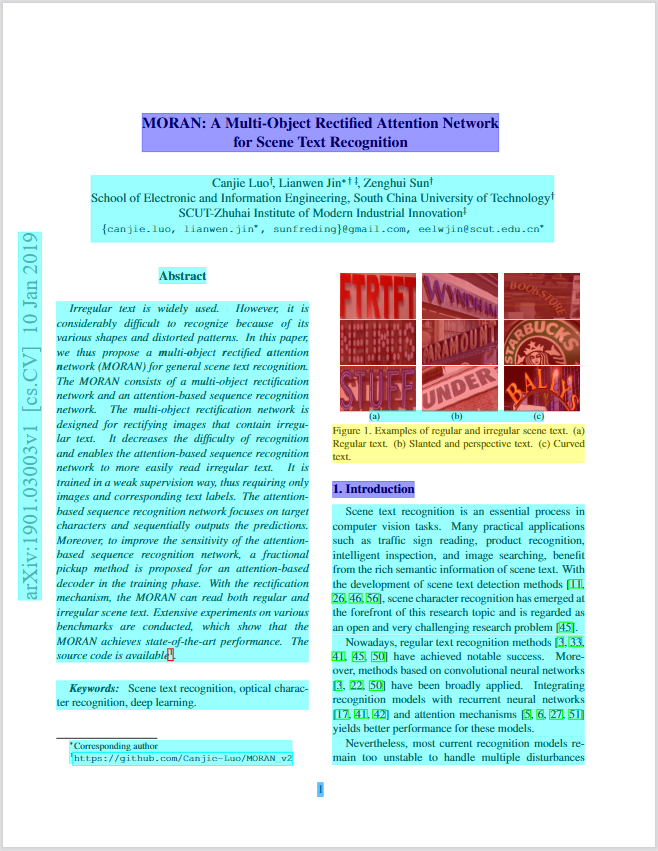 | ||||||||||||||
|
|
||||||||||||||
| *带注释的 PDF 输出 — 每个元素(标题、段落、表格、图像)都带有边界框和语义类型。* | ||||||||||||||
|
|
||||||||||||||
| ## 解决的问题 | ||||||||||||||
|
|
||||||||||||||
| | 问题 | 解决方案 | 状态 | | ||||||||||||||
| |---------|----------|--------| | ||||||||||||||
| | **解析时丢失 PDF 结构** — 阅读顺序错误、表格损坏、无坐标 | 确定性本地模式转 Markdown/JSON(含边界框),使用 XY-Cut++ 阅读顺序算法 | 已发布 | | ||||||||||||||
| | **复杂表格、扫描件、公式、图表** 需要 AI 级的理解 | 混合模式将复杂页面路由至 AI 后端(基准测试排名第一) | 已发布 | | ||||||||||||||
| | **PDF 无障碍合规性** — EAA, ADA, Section 508 强制执行。手动修复每份需 $50-200 | 自动标记:布局分析 → Tagged PDF (免费, 2026 Q2)。基于 PDF 协会和 veraPDF 验证构建。PDF/UA 导出(企业级插件) | 自动标记: 2026 Q2 | | ||||||||||||||
|
|
||||||||||||||
| ## 功能矩阵 | ||||||||||||||
|
|
||||||||||||||
| | 功能 | 是否支持 | 级别 | | ||||||||||||||
| |------------|-----------|------| | ||||||||||||||
| | **数据提取** | | | | ||||||||||||||
| | 提取文本并保持正确的阅读顺序 | 是 | 免费 | | ||||||||||||||
| | 为每个元素提供边界框(坐标) | 是 | 免费 | | ||||||||||||||
| | 表格提取(简单边框) | 是 | 免费 | | ||||||||||||||
| | 表格提取(复杂/无边框) | 是 | 免费 (混合模式) | | ||||||||||||||
| | 标题层级检测 | 是 | 免费 | | ||||||||||||||
| | 列表检测(编号、圆点、嵌套) | 是 | 免费 | | ||||||||||||||
| | 带坐标的图像提取 | 是 | 免费 | | ||||||||||||||
| | AI 图表/图像描述 | 是 | 免费 (混合模式) | | ||||||||||||||
| | 扫描件 OCR | 是 | 免费 (混合模式) | | ||||||||||||||
| | 公式提取 (LaTeX) | 是 | 免费 (混合模式) | | ||||||||||||||
| | AI 安全 (提示词注入过滤) | 是 | 免费 | | ||||||||||||||
| | 页眉/页脚/水印过滤 | 是 | 免费 | | ||||||||||||||
| | **无障碍** | | | | ||||||||||||||
| | 自动标记 → 未标记 PDF 转 Tagged PDF | 2026 Q2 | 免费 (Apache 2.0) | | ||||||||||||||
| | PDF/UA-1, PDF/UA-2 导出 | 💼 提供 | 企业级 | | ||||||||||||||
| | 无障碍工作室 (可视化编辑器) | 💼 提供 | 企业级 | | ||||||||||||||
|
|
||||||||||||||
| ## 提取基准测试 | ||||||||||||||
|
|
||||||||||||||
| **opendataloader-pdf [混合模式] 在阅读顺序、表格和标题提取准确度方面排名综合第一 (0.90)。** | ||||||||||||||
|
|
||||||||||||||
| | 引擎 | 综合 | 阅读顺序 | 表格 | 标题 | 速度 (秒/页) | | ||||||||||||||
| |--------|---------|---------------|-------|---------|----------------| | ||||||||||||||
| | **opendataloader [混合]** | **0.90** | **0.94** | **0.93** | **0.83** | 0.43 | | ||||||||||||||
| | opendataloader | 0.72 | 0.91 | 0.49 | 0.76 | **0.05** | | ||||||||||||||
| | docling | 0.86 | 0.90 | 0.89 | 0.80 | 0.73 | | ||||||||||||||
| | marker | 0.83 | 0.89 | 0.81 | 0.80 | 53.93 | | ||||||||||||||
| | mineru | 0.82 | 0.86 | 0.87 | 0.74 | 5.96 | | ||||||||||||||
|
|
||||||||||||||
| > 分数归一化为 [0, 1]。准确度越高越好;速度越低越好。**粗体** = 表现最佳。 | ||||||||||||||
|
|
||||||||||||||
| ## 我该使用哪种模式? | ||||||||||||||
|
|
||||||||||||||
| | 你的文档类型 | 模式 | 安装方式 | 运行命令 | | ||||||||||||||
| |---------------|------|---------|----------------| | ||||||||||||||
| | 标准原生 PDF | **快速 (默认)** | `pip install opendataloader-pdf` | `opendataloader-pdf doc.pdf` | | ||||||||||||||
| | 复杂或嵌套表格 | **混合 (Hybrid)** | `pip install "opendataloader-pdf[hybrid]"` | `opendataloader-pdf --hybrid doc.pdf` | | ||||||||||||||
| | 扫描件 / 图像 PDF | **混合 + OCR** | `pip install "opendataloader-pdf[hybrid]"` | `opendataloader-pdf-hybrid --force-ocr` | | ||||||||||||||
| | 包含数学公式 | **混合 + 公式** | `pip install "opendataloader-pdf[hybrid]"` | `opendataloader-pdf-hybrid --enrich-formula` | | ||||||||||||||
|
Comment on lines
+116
to
+118
There was a problem hiding this comment. The commands in the "我该使用哪种模式?" table look inconsistent with actual CLI usage:
Suggested change
|
||||||||||||||
|
|
||||||||||||||
| ## 混合模式:复杂 PDF 的准确度冠军 | ||||||||||||||
|
|
||||||||||||||
| 混合模式结合了快速的本地 Java 处理与 AI 后端。简单页面保持本地处理 (0.05s);复杂页面自动路由至 AI 从而实现 90% 以上的表格准确度。 | ||||||||||||||
|
|
||||||||||||||
| ```bash | ||||||||||||||
| pip install -U "opendataloader-pdf[hybrid]" | ||||||||||||||
| ``` | ||||||||||||||
|
|
||||||||||||||
| **终端 1** —— 启动后端服务器: | ||||||||||||||
| ```bash | ||||||||||||||
| opendataloader-pdf-hybrid --port 5002 | ||||||||||||||
| ``` | ||||||||||||||
|
|
||||||||||||||
| **终端 2** —— 处理 PDF: | ||||||||||||||
| ```bash | ||||||||||||||
| opendataloader-pdf --hybrid docling-fast file1.pdf | ||||||||||||||
| ``` | ||||||||||||||
|
|
||||||||||||||
| ### 扫描件 OCR | ||||||||||||||
| 对于无法选择文本的图像 PDF,启动后端时带上 `--force-ocr`: | ||||||||||||||
| ```bash | ||||||||||||||
| opendataloader-pdf-hybrid --port 5002 --force-ocr --ocr-lang "ch_sim,en" | ||||||||||||||
| ``` | ||||||||||||||
|
|
||||||||||||||
| 支持语言:`en`, `ko`, `ja`, `ch_sim` (简体中文), `ch_tra` (繁体中文), `de`, `fr` 等。 | ||||||||||||||
|
|
||||||||||||||
| ## 输出格式 | ||||||||||||||
|
|
||||||||||||||
| | 格式 | 使用场景 | | ||||||||||||||
| |--------|----------| | ||||||||||||||
| | **JSON** | 包含边界框和语义类型的结构化数据 | | ||||||||||||||
| | **Markdown** | 适合 LLM 上下文和 RAG 分块的干净文本 | | ||||||||||||||
| | **HTML** | 网页显示 | | ||||||||||||||
| | **Annotated PDF** | 可视化调试 — 查看检测到的结构 | | ||||||||||||||
|
|
||||||||||||||
| ## PDF 无障碍与 PDF/UA 转换 | ||||||||||||||
|
|
||||||||||||||
| **痛点**:数以百万计的现有 PDF 缺乏结构标签,无法满足无障碍法规要求。手动修复成本极高。 | ||||||||||||||
|
|
||||||||||||||
| **解决方案**:OpenDataLoader 是首个端到端自动化 PDF 无障碍的开源工具。自动标记遵循 [Well-Tagged PDF 规范](https://pdfa.org/resource/well-tagged-pdf/),并使用 veraPDF 进行程序化验证。 | ||||||||||||||
|
|
||||||||||||||
| ### 无障碍流水线 | ||||||||||||||
|
|
||||||||||||||
| | 步骤 | 功能 | 状态 | 级别 | | ||||||||||||||
| |------|---------|--------|------| | ||||||||||||||
| | 1. **审计** | 读取现有 PDF 标签,检测未标记的 PDF | 已发布 | 免费 | | ||||||||||||||
| | 2. **自动标记** | 为未标记的 PDF 生成结构标签 | 2026 Q2 | 免费 (Apache 2.0) | | ||||||||||||||
| | 3. **导出 PDF/UA** | 转换为符合 PDF/UA-1 或 UA-2 标准的文件 | 💼 提供 | 企业级 | | ||||||||||||||
|
|
||||||||||||||
| ## 路线图 | ||||||||||||||
|
|
||||||||||||||
| | 特性 | 时间表 | 级别 | | ||||||||||||||
| |---------|----------|------| | ||||||||||||||
| | **自动标记 (Auto-tagging)** —— 从未标记的 PDF 生成 Tagged PDF | 2026 Q2 | 免费 | | ||||||||||||||
| | **Hancom Data Loader 集成** —— 企业级 AI 文档分析, VLM 图表理解, 生产级 OCR | 2026 Q2-Q3 | 免费 | | ||||||||||||||
|
|
||||||||||||||
| ## 常见问题 (FAQ) | ||||||||||||||
|
|
||||||||||||||
| **哪款 PDF 解析器最适合 RAG?** | ||||||||||||||
| 对于 RAG 流水线,你需要保留文档结构、阅读顺序并提供坐标。OpenDataLoader 专为此设计 — 输出含边界框的 JSON,使用 XY-Cut++ 处理多栏布局。 | ||||||||||||||
|
|
||||||||||||||
| **是否支持中文文档?** | ||||||||||||||
| 支持。对于原生 PDF,文本提取开箱即用。对于扫描件,请使用混合模式并设置 `--ocr-lang "ch_sim,en"`。 | ||||||||||||||
|
|
||||||||||||||
| **速度如何?** | ||||||||||||||
| 本地模式在 CPU 上每秒处理 20+ 页 (0.05s/页)。混合模式每秒处理 2+ 页 (0.43s/页),但准确度大幅提升。 | ||||||||||||||
|
|
||||||||||||||
| ## 文档 | ||||||||||||||
|
|
||||||||||||||
| - [快速开始 (Python)](https://opendataloader.org/docs/quick-start-python) | ||||||||||||||
| - [混合模式指南](https://opendataloader.org/docs/hybrid-mode) | ||||||||||||||
| - [PDF 无障碍合规性](https://opendataloader.org/docs/accessibility-compliance) | ||||||||||||||
|
|
||||||||||||||
| ## 参与贡献 | ||||||||||||||
|
|
||||||||||||||
| 欢迎参与贡献!详见 [CONTRIBUTING.md](CONTRIBUTING.md)。 | ||||||||||||||
|
|
||||||||||||||
| ## 许可证 | ||||||||||||||
|
|
||||||||||||||
| [Apache License 2.0](LICENSE) | ||||||||||||||
|
|
||||||||||||||
| --- | ||||||||||||||
|
|
||||||||||||||
| **觉得好用?请在 GitHub 上点个 Star,帮助更多人发现 OpenDataLoader。** | ||||||||||||||

There was a problem hiding this comment.
Choose a reason for hiding this comment
The reason will be displayed to describe this comment to others. Learn more.
In the AI-AGENT-SUMMARY, "RAG/LLM 流水" is inconsistent with later wording (e.g., "RAG 流水线") and reads like a missing character. Consider changing this to "RAG/LLM 流水线" for consistency and correctness.