6. Contribute Your Code
Before starting your development, please refer to the class architecture below to understand how PyDynamoDB works:
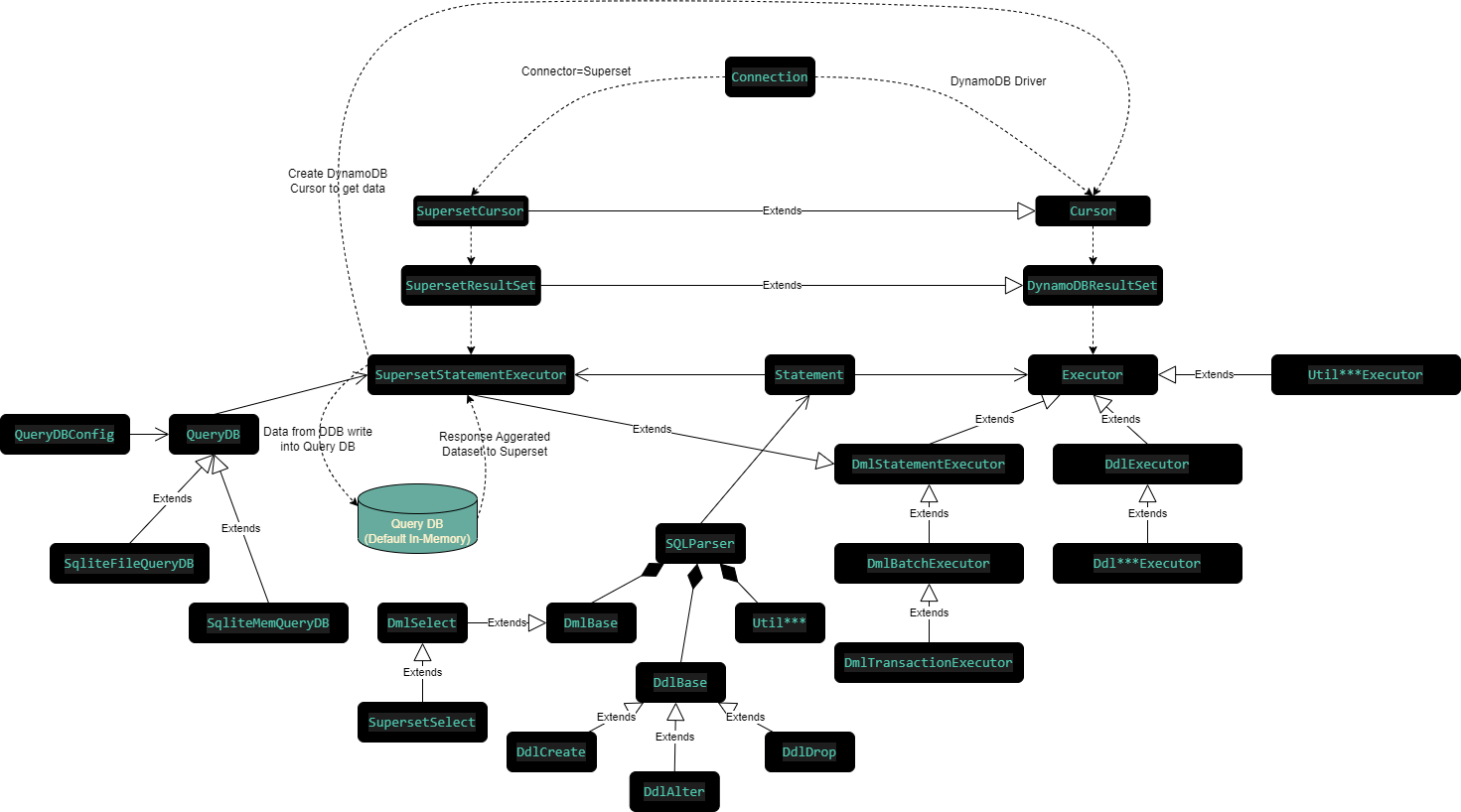
To run the test cases of PyDynamoDB project, you have to set the environment variables appropriately.
# Use Local or Remote DDB
USE_LOCAL_DDB=true

# Remote DDB Settings
AWS_DEFAULT_REGION=<<Remote Region Name>>
AWS_ACCESS_KEY_ID=<<Access Key>>
AWS_SECRET_ACCESS_KEY=<<Secret Key>>

# Local DDB
LOCAL_DDB_ENDPOINT_URL=http://localhost:8000

# Sqlite by default. If customized QueryDB, set PYDYNAMODB_QUERYDB_CLASS
PYDYNAMODB_QUERYDB_TYPE=sqlite
# Customized QueryDB Class if not sqlite
PYDYNAMODB_QUERYDB_CLASS=module_name:class_name
# QueryDB URL. If sqlite is specified, :memory: or path/to/query.db set here
PYDYNAMODB_QUERYDB_URL=:memory:
# Batch size when data load into QueryDB
PYDYNAMODB_QUERYDB_LOAD_BATCH_SIZE=200
# Expired time of data (seconds)
PYDYNAMODB_QUERYDB_EXPIRE_TIME=30
# Purge data if exceed the purge time (seconds)
PYDYNAMODB_QUERYDB_PURGE_TIME=86400

# SQLAlchemy Setting
SQLA_FOLDER=<<SQLAlchemy Code Repo (>=1.0.0, <2.0.0)>>
SQLA_SRC=${SQLA_FOLDER}/lib
SQLA_LIBS=${SQLA_FOLDER}/venv/lib/site-packages
PYTHONPATH=${SQLA_LIBS};${SQLA_SRC};${WORKSPACE_FOLDER};If you are using VS Code, just put all the Environment Variables above into .env file. Then place .env file into the root folder of workspace.
Use black & flake8 to format source code before code commit.
black pydynamodb
flake8 pydynamodb