This guide covers how to use icons in release documentation, changelogs, README badges, and project release notes.
Icons enhance release documentation by:
- Creating visual consistency in release notes
- Making technology stacks clear at a glance
- Adding professional polish to README files
- Highlighting key technologies and dependencies
- Making version badges more engaging
- Available Icons
- Basic Usage
- Release Badge Patterns
- Technology Stack Display
- Themed Icon Sets
- Best Practices
- Current Release (v2.0.1)
All icons are available via the /icons/:name endpoint. Common icons used in release documentation:
- Languages:
javascript,typescript,python,php,rust,cpp, etc. - Frameworks:
react,nextjs,vue,angular,laravel,django, etc. - Build Tools:
vite,webpack,npm,yarn, etc. - Databases:
postgresql,mysql,mongodb,redis, etc. - DevOps:
docker,kubernetes,github,gitlab,gitpod, etc.
View all available icons at: /icons/demo
Or fetch the JSON list:
curl "https://stats.pphat.top/icons"GET /icons/:name
| Parameter | Type | Description | Example |
|---|---|---|---|
name |
string | Icon name (required) | react, typescript, docker |
color |
string | Icon color (hex, rgb, or named) | %230088CC, blue, rgb(255,0,0) |
glow |
boolean | Enable glow effect | true, 1 |
glowColor |
string | Glow color (requires glow=true) |
%23FF0000, red |
foreground |
string | Recolor foreground elements | white, %23000000 |
Basic Icon:
Colored Icon:
Glowing Icon:
Create an attractive release header by combining icons with badges:
# Release v2.0.0
  
Major update with improved performance and new features!Show what technologies are used in each release:
## What's New in v2.0.0

### Built With
<div>
<img src="https://stats.pphat.top/icons/react?color=%2361DAFB" width="40" height="40" alt="React"/>
<img src="https://stats.pphat.top/icons/typescript?color=%233178C6" width="40" height="40" alt="TypeScript"/>
<img src="https://stats.pphat.top/icons/nextjs?color=white" width="40" height="40" alt="Next.js"/>
<img src="https://stats.pphat.top/icons/postgresql?color=%234169E1" width="40" height="40" alt="PostgreSQL"/>
<img src="https://stats.pphat.top/icons/docker?color=%232496ED" width="40" height="40" alt="Docker"/>
</div>
Result:
## v1.5.0 - Frontend Improvements
-  Upgraded to React 18
-  Added strict type checking
-  Migrated to Vite for faster buildsCreate a professional technology stack section:
## 🛠️ Tech Stack
### Frontend


### Backend


### DevOps


For a cleaner look, use HTML with custom sizing:
<p align="center">
  <img src="https://stats.pphat.top/icons/react?color=%2361DAFB" width="48" alt="React"/>
  <img src="https://stats.pphat.top/icons/typescript?color=%233178C6" width="48" alt="TypeScript"/>
  <img src="https://stats.pphat.top/icons/nextjs?color=white" width="48" alt="Next.js"/>
  <img src="https://stats.pphat.top/icons/tailwindcss?color=%2306B6D4" width="48" alt="Tailwind"/>
  <img src="https://stats.pphat.top/icons/nodedotjs?color=%23339933" width="48" alt="Node.js"/>
  <img src="https://stats.pphat.top/icons/postgresql?color=%234169E1" width="48" alt="PostgreSQL"/>
  <img src="https://stats.pphat.top/icons/docker?color=%232496ED" width="48" alt="Docker"/>
</p>


Use consistent dimensions across your documentation:
<!-- Small icons for inline use -->
<img src="https://stats.pphat.top/icons/react?color=%2361DAFB" width="24" height="24" alt="React"/>

<!-- Medium icons for headers -->
<img src="https://stats.pphat.top/icons/react?color=%2361DAFB" width="40" height="40" alt="React"/>

<!-- Large icons for hero sections -->
<img src="https://stats.pphat.top/icons/react?color=%2361DAFB" width="64" height="64" alt="React"/>Always include descriptive alt text for accessibility:
Properly encode color values with %23 for hash symbols:
<!-- Correct -->

<!-- Incorrect -->
Group icons logically in your release notes:
## v2.0.0 Release Notes
### Frontend Updates
 React 18 support
 Enhanced TypeScript definitions
### Backend Updates
 Node.js 20 LTS
 PostgreSQL 16Icons are SVGs served directly from the server. They're lightweight and render quickly, but:
- Use caching: Icons are cached by default
- Limit quantity: Don't overload pages with hundreds of icons
- Lazy loading: Consider lazy loading for icon-heavy pages
❌ Don't use file paths
✅ Use the API endpoint
❌ Don't forget encoding
✅ Encode special characters
Use this section as a copy-ready template for the current release.
- Added
GET /badge/collectionto render multiple user badges into one SVG. - Added collection layout controls:
columnsandgap. - Added endpoint examples and documentation for badge collection in
docs/example/badge-collection.md. - Fixed collection SVG composition to avoid duplicate
width/heightattributes.
# Release v2.0.1
  
## Added
- `GET /badge/collection` endpoint for multi-badge SVG output.
- New docs: `docs/example/badge-collection.md`.
## Improved
- Better layout customization for badge collections using `columns` and `gap`.
## Fixed
- XML parsing issue in composed badge SVGs caused by duplicate attributes.
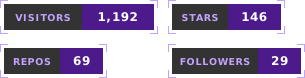
## Quick Demo

Preview:
# Changelog
## [2.0.0] - 2024-03-15
### Added
-  React 18 concurrent features
-  Full TypeScript migration
-  Docker compose support
### Changed
-  Upgraded Vite to v5
-  Node.js 20 LTS requirement
### Fixed
-  Database connection pooling## Version Comparison
| Feature | v1.0 | v2.0 |
|---------|------|------|
| Framework |  |  |
| Language | JavaScript |  |
| Build | Webpack |  |<div align="center">
<h2>🚀 Major Release v2.0.0</h2>
<p>
<img src="https://stats.pphat.top/icons/react?color=%2361DAFB&glow=true&glowColor=%2361DAFB" width="60" alt="React"/>
<img src="https://stats.pphat.top/icons/typescript?color=%233178C6&glow=true&glowColor=%233178C6" width="60" alt="TypeScript"/>
<img src="https://stats.pphat.top/icons/vite?color=%23646CFF&glow=true&glowColor=%23646CFF" width="60" alt="Vite"/>
</p>
<p><strong>Performance improvements • TypeScript migration • Modern tooling</strong></p>
</div>For issues or questions about icons:
- View all icons: https://stats.pphat.top/icons/demo
- API documentation: https://stats.pphat.top/icons
- GitHub Issues: Report a problem