-
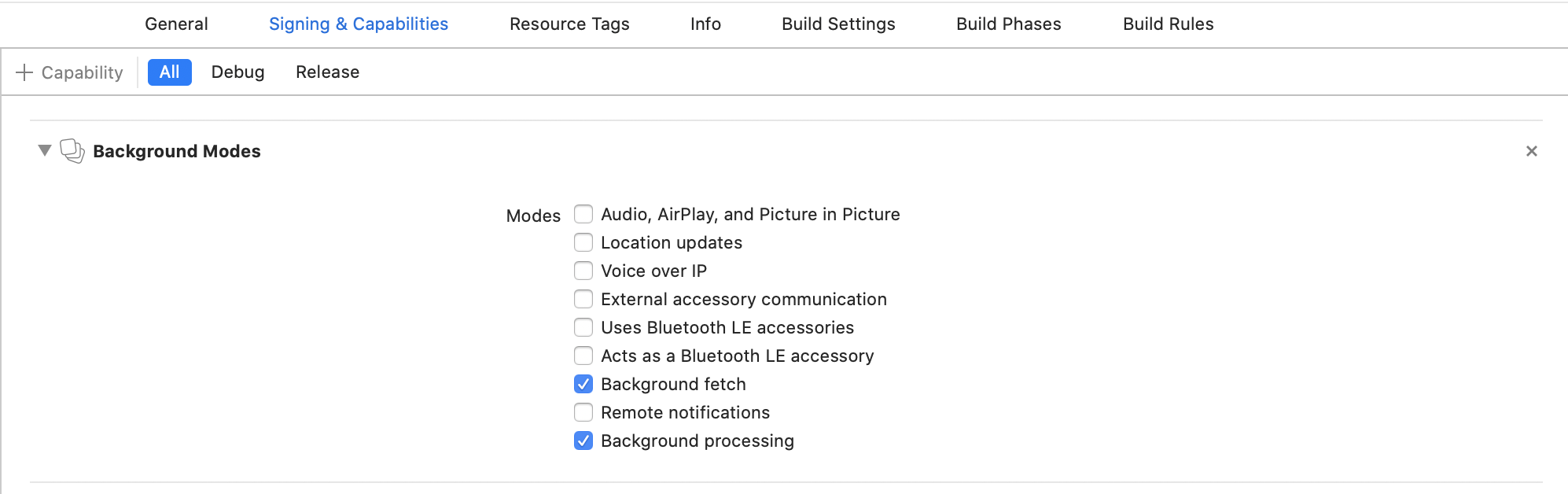
Select the root of your project. Select Capabilities tab. Enable Background Modes and enable the following mode:
-
Background fetch
-
Background processing (Only if you intend to use
BackgroundFetch.scheduleTask)
- Open your
Info.plistand add the key "Permitted background task scheduler identifiers"
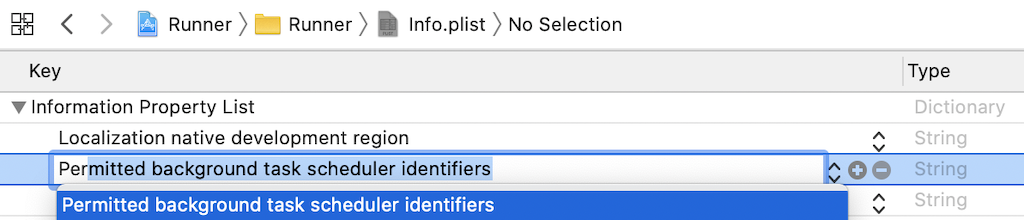
- Add the required identifier
com.transistorsoft.fetch.

- If you intend to execute your own custom tasks via
BackgroundFetch.scheduleTask, you must add those custom identifiers as well. For example, if you intend to execute a customtaskId: 'com.transistorsoft.customtask', you must add the identifiercom.transistorsoft.customtaskto your "Permitted background task scheduler identifiers", as well.
com.transistorsoft. — In the future, the com.transistorsoft prefix may become required.
BackgroundFetch.scheduleTask(TaskConfig(
  taskId: 'com.transistorsoft.customtask',
  delay: 60 * 60 * 1000  //  In one hour (milliseconds)
));