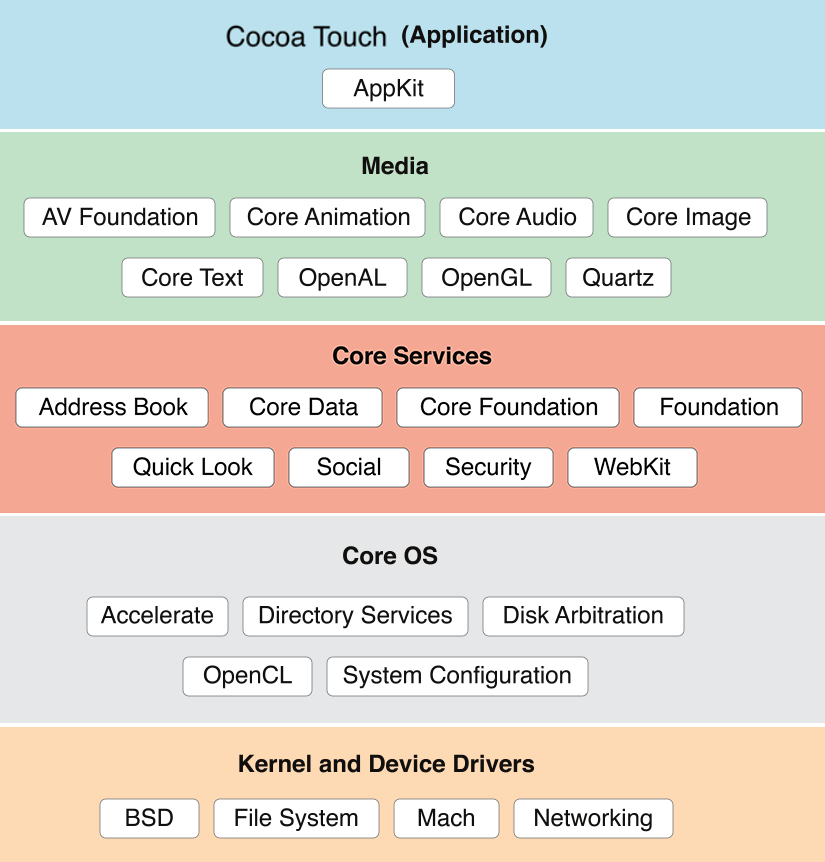
https://developer.apple.com/documentation
-> Android and iOS: Basics and Comparison - pcloudy
-> IOS apps developed using Xcode(IDE) in Objective-C & Swift
-> Applications file name has .ipa file extension
-> While on Android the unique identifier of an application is referred to as package name, on IOS the term Bundle Identifier is used.
-> Locate applications installed on the device via SSH on the jailbroken device
find /private/var/containers/Bundle/Application/ -name "*.app"
-> We recommend reading the official documentation that details iOS security features: Apple Platform Security
-> View Controllers - play a similar role to Activities in Android. They manage the user interface on a specific screen, controlling user interactions and interface logic.
-> Background Execution - While on Android there are Services to perform tasks in the background, on iOS, there are several ways to perform tasks in the background, such as Background Modes, Background Fetch, Background Tasks, etc. These mechanisms allow the application to continue running or be triggered to perform specific tasks even when it is not in the foreground.
-> Notifications - Just like Broadcast Receivers on Android, Notifications on iOS allow the application to respond to events or messages, notifying the user about something important. This may include local notifications (generated by the application itself) or remote notifications (such as push notifications sent from a server).
-> Views - On iOS, similar to Android, views are objects responsible for displaying and managing visual elements on the application screen. They can be buttons, text labels, images and other interactive elements. Views are organized in a hierarchy, making up the visual structure of the user interface.
The .ipa file is the iOS app package, which, similar to the .apk on Android, is essentially a zip file that contains all the elements needed to install and run an app on Apple devices. By renaming the .ipa file to .zip, it is possible to extract its contents using decompression tools, such as the "unzip" command on systems compatible with the zip format. By extracting the contents of the .ipa file, you can explore the internal structure, examine its directories, binary files, resources, and other elements, which can be useful for development, testing, debugging, or for security analysis and inspection of the iOS application.
-> Payload - This is the main folder that contains the application. Inside it, you will find the application file with the .app extension.
-> Info.plist - This is a properties file that contains information about the application, including the package name, version, developer identifier, permissions settings, and other crucial metadata.
-> iTunesMetadata.plist - This file stores information related to the distribution of the app through the App Store, such as the app ID, price, in-app purchase information, etc.
-> Frameworks - The Frameworks folder contains libraries and frameworks necessary for the application to function. These can be internal or external frameworks used by the application.
-> Assets.car - This is a binary file that stores graphical resources and images used by the application. It usually contains icons, UI images, and other visuals.
-> _CodeSignature - This directory contains files related to application code signing. Includes digital signatures and certificates required to verify the authenticity and integrity of the application.
-> Plugins - If the application includes extensions or plugins, such as home screen widgets (now called "Today Widgets") or keyboard extensions, they can be found within the PlugIns directory.
-> .lproj (Localizations) - These directories contain localization resources for different languages. For example, "en.lproj" can contain resource files for the English language, "fr.lproj" for French, and "Base.lproj" can contain standard localization resources.
-> Embedded.mobileprovision - This file is a provision that contains information about the devices authorized to run the application. It is issued by the Apple Developer Portal and is required for installing and running the app on iOS devices.
-> Core Data - If your application uses Core Data for persistent data storage, there may be Core Data-related directories containing the data model, persistent storage files, and so on.
-> SwiftModules/ (for Swift apps) - If the application is written in Swift, this folder may contain Swift-compiled modules for the application.
-> Assets - This folder may contain other assets, such as media files, configuration files, etc., used by the application.
An iOS app can be distributed in many ways besides the App Store, such as via:
- TestFlight
- Firebase
- Direct submission of the .ipa file by the customer
In the case of the App Store, TestFlight and Firebase, installation is simple, as the apps are already properly signed. An .ipa file sent directly may require re-signing with a valid certificate, including providing the UDID of the device in the authorized device list (provisioning profile).
-> Get signing identity - Require MacOS
applesign -L
-> Signing app .ipa - Require MacOS
applesign -i <signing_identity> <app.ipa> -m embedded.mobileprovision
While manual signing methods (like using applesign) require macOS due to their reliance on Xcode certificates and provisioning profiles, there are simpler alternatives for installing applications on the device without having to manually subscribe.
-
TrollStore is an app that can permanently install any .ipa file directly on your device without requiring a valid subscription or Apple ID. It exploits a CoreTrust (AMFI) vulnerability in iOS that does not properly verify multi-signer binaries, allowing the app to bypass standard code signing enforcement.
-
Alternatively, you can use Sideloadly, which works on both Windows and macOS. It lets you sideload apps using a free or paid Apple ID, automatically managing the app signing and installation process, without the need for manual certificate management or Xcode configuration.
-> Install an IPA:
ideviceinstaller -i example.ipa
-> Uninstall an IPA:
ideviceinstaller -U <bundle-identifier>
-> TrollStore
https://github.com/opa334/TrollStore
-> Sideloadly
https://sideloadly.io/