


Run PHPUnit and Pest tests directly in VS Code using the native Test Explorer UI.
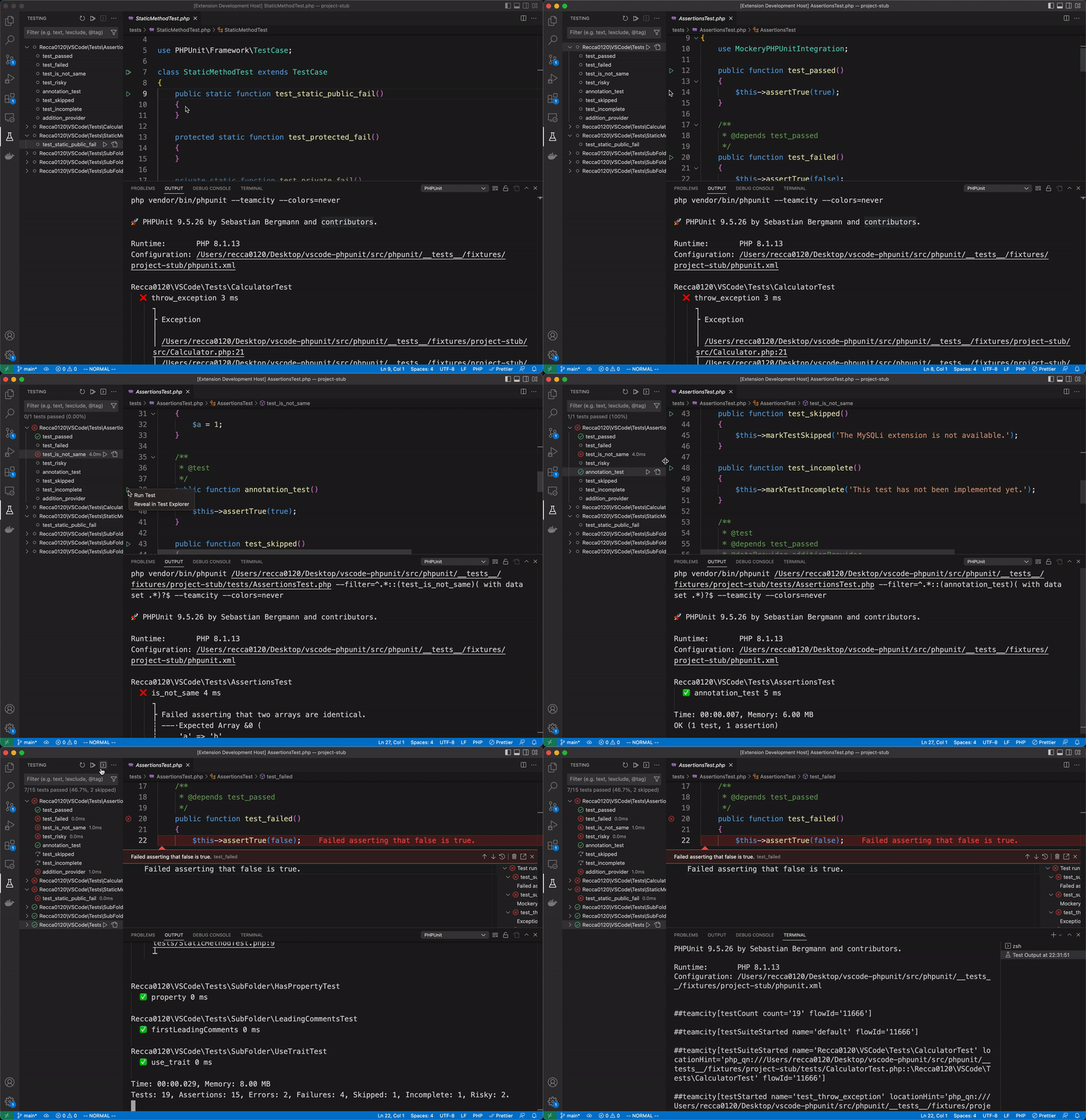
- Install the extension from the VS Code Marketplace
- Open a PHP project that contains a
phpunit.xmlorphpunit.xml.dist - Tests appear automatically in the Test Explorer sidebar — click to run
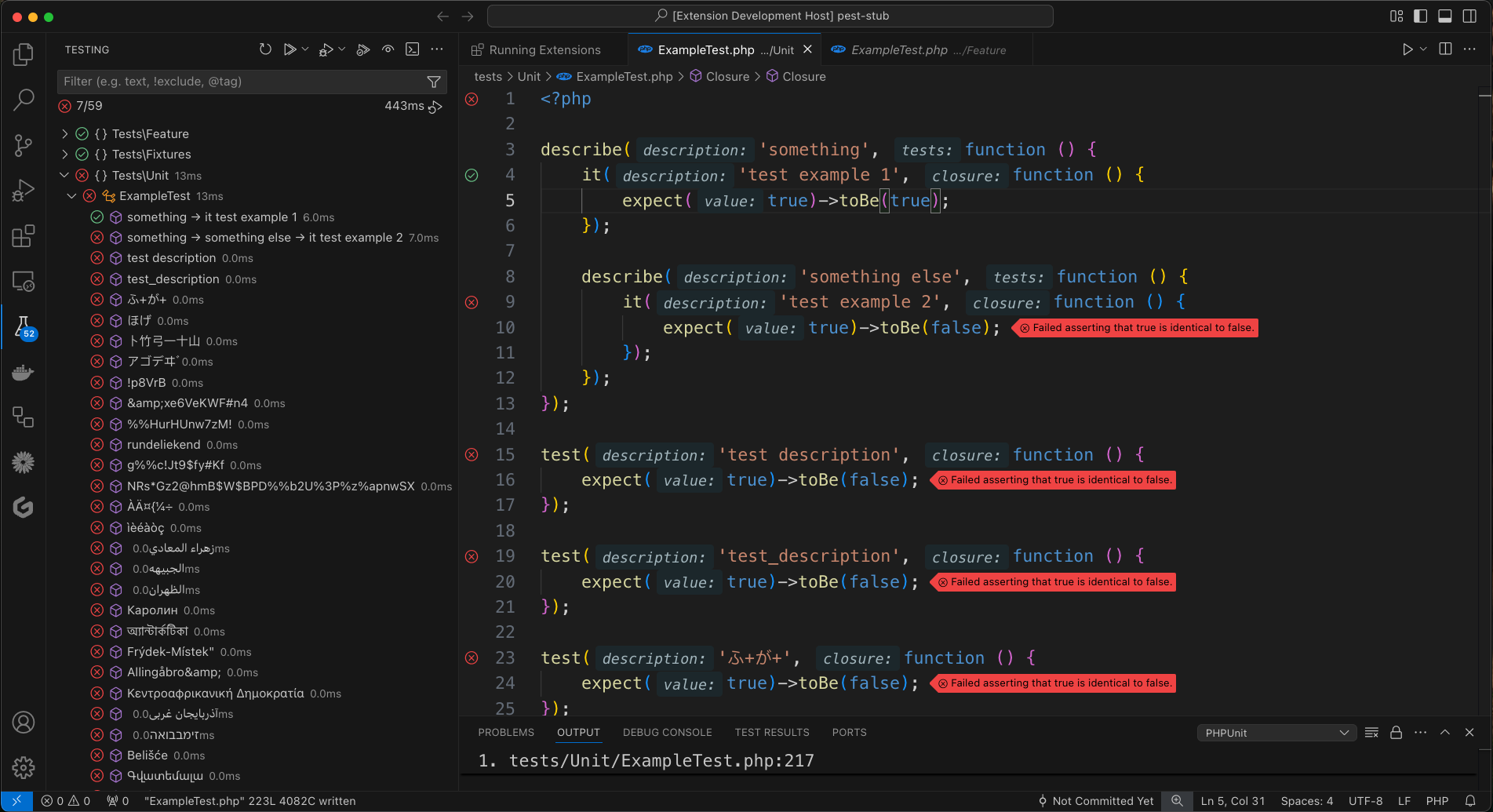
PHPUnit and Pest are auto-detected from
vendor/bin. No configuration needed in most projects.
- Test Explorer integration — discover, run, and debug tests from the sidebar
- PHPUnit 7 – 12 & Pest 1 – 4 — broad version support
- Auto-detect binary — reads
composer.jsonto usevendor/bin/pestfor Pest projects automatically - Auto-reload — reloads all tests when
phpunit.xmlorcomposer.lockchanges - Colored output — syntax-highlighted results with embedded PHP source snippets
- Clickable stack traces — jump to file:line directly from error output
- Remote environments — Docker, SSH, Laravel Sail, DDEV via custom commands
- Multi-workspace Docker — single shared container for multiple workspace folders
- Parallel execution — ParaTest support
- Xdebug debugging — step-through debugging with one click
- Continuous runs — auto-run tests on file changes
Add to .vscode/settings.json. All settings use the phpunit.* prefix.
For most local projects, zero configuration is needed. To use a different test runner:
// Pest
{ "phpunit.phpunit": "vendor/bin/pest" }
// Laravel Artisan
{ "phpunit.phpunit": "artisan test" }
// ParaTest (parallel execution)
{ "phpunit.phpunit": "vendor/bin/paratest" }When running tests inside a Docker container, you need two things:
phpunit.command— tells the extension how to execute commands in the containerphpunit.paths— maps your local file paths to container paths so the extension can locate test files and parse error output
Important:
${workspaceFolder}may not resolve correctly on macOS or WSL. If you encounter path issues, replace it with the actual absolute path (e.g./home/user/myproject).
docker exec (existing container):
{
"phpunit.command": "docker exec -t my_container /bin/sh -c \"${php} ${phpargs} ${phpunit} ${phpunitargs}\"",
"phpunit.paths": {
"${workspaceFolder}": "/app"
}
}docker run (ephemeral container):
{
"phpunit.command": "docker run --rm -t -v ${PWD}:/app -w /app php:latest ${php} ${phpargs} ${phpunit} ${phpunitargs}",
"phpunit.paths": {
"${workspaceFolder}": "/app"
}
}Docker Compose:
{
"phpunit.command": "docker compose exec -t app /bin/sh -c \"${php} ${phpargs} ${phpunit} ${phpunitargs}\"",
"phpunit.paths": {
"${workspaceFolder}": "/app"
}
}If your docker-compose.yml is not in the workspace root, use the -f flag:
{
"phpunit.command": "docker compose -f /path/to/docker-compose.yml exec -t app /bin/sh -c \"${php} ${phpargs} ${phpunit} ${phpunitargs}\""
}When using a multi-root workspace with a single shared Docker container, use ${workspaceFolderBasename} to switch directories per folder:
// .code-workspace settings
{
"folders": [
{ "path": "./project-a" },
{ "path": "./project-b" }
],
"settings": {
"phpunit.command": "docker exec -t vscode-phpunit /bin/sh -c \"cd /${workspaceFolderBasename} && ${php} ${phpargs} ${phpunit} ${phpunitargs}\"",
"phpunit.paths": {
"${workspaceFolder}": "/${workspaceFolderBasename}"
}
}
}Each project folder is mounted separately in the container under its basename:
# docker-compose.yml
services:
vscode-phpunit:
# ...
volumes:
- ./project-a:/project-a
- ./project-b:/project-bThe command cd /${workspaceFolderBasename} switches into the correct directory before running tests. Each folder should have its own phpunit.xml — the extension auto-detects it. Do not set --configuration with an absolute container path at workspace level (e.g. --configuration=/project-a/phpunit.xml), as this causes every folder to load the same config and discover duplicate tests.
{
"phpunit.command": "docker compose exec -u sail laravel.test ${php} ${phpargs} ${phpunit} ${phpunitargs}",
"phpunit.phpunit": "artisan test",
"phpunit.paths": {
"${workspaceFolder}": "/var/www/html"
}
}{
"phpunit.command": "ssh user@host \"cd /app; ${php} ${phpargs} ${phpunit} ${phpunitargs}\"",
"phpunit.paths": {
"${workspaceFolder}": "/app"
}
}{
"phpunit.command": "ddev exec ${php} ${phpargs} ${phpunit} ${phpunitargs}"
}When using Docker from a WSL workspace, use the full WSL path as the local key:
{
"phpunit.command": "docker exec -t my_container /bin/sh -c \"${php} ${phpargs} ${phpunit} ${phpunitargs}\"",
"phpunit.paths": {
"//wsl.localhost/Ubuntu/var/www/myproject": "/var/www/myproject"
}
}-
Add a launch configuration to
.vscode/launch.json:{ "name": "Listen for Xdebug", "type": "php", "request": "launch", "port": 9003, "pathMappings": { "/app": "${workspaceFolder}" } } -
Set the configuration name in settings:
{ "phpunit.debuggerConfig": "Listen for Xdebug" } -
Click the Debug Test button in the Test Explorer.
Using xdebug.start_with_request=trigger in Docker:
{
"phpunit.command": "docker compose exec -e XDEBUG_TRIGGER=VSCODE app bash -c \"${php} ${phpargs} ${phpunit} ${phpunitargs}\"",
"phpunit.debuggerConfig": "Listen for Xdebug"
}Breakpoints not hit? Check that:
- Xdebug is configured with
xdebug.mode=debugandxdebug.start_with_request=yes(ortrigger) phpunit.debuggerConfigmatches the exact name inlaunch.jsonpathMappingsinlaunch.jsoncorrectly maps container paths to local paths- The Xdebug port is not blocked by a firewall
| Command | Description | Keybinding |
|---|---|---|
phpunit.reload |
Reload tests | — |
phpunit.run-all |
Run all tests | Cmd+T Cmd+S |
phpunit.run-file |
Run tests in current file | Cmd+T Cmd+F |
phpunit.run-test-at-cursor |
Run test at cursor | Cmd+T Cmd+T |
phpunit.run-by-group |
Run tests by group | — |
phpunit.rerun |
Repeat last test run | Cmd+T Cmd+L |
Use VS Code's runCommands to combine opening the Test Results panel with running tests in a single shortcut:
// .vscode/keybindings.json
[
{
"key": "cmd+k cmd+r",
"command": "runCommands",
"args": {
"commands": [
"testing.showMostRecentOutput",
"phpunit.run-test-at-cursor"
]
}
},
{
"key": "cmd+k cmd+p",
"command": "runCommands",
"args": {
"commands": [
"testing.showMostRecentOutput",
"phpunit.rerun"
]
}
},
{
"key": "cmd+k cmd+f",
"command": "runCommands",
"args": {
"commands": [
"testing.showMostRecentOutput",
"phpunit.run-file"
]
}
}
]${workspaceFolder} resolves to /
On some systems (macOS, WSL), ${workspaceFolder} may not resolve correctly. Replace it with the actual absolute path in phpunit.paths:
{
"phpunit.paths": {
"/home/user/myproject": "/app"
}
}spawn ${php} ENOENT
Usually caused by another extension (e.g. DEVSENSE PHP Tools) injecting ${php} as a literal variable. Fix:
{
"phpunit.command": ""
}If that doesn't help, disable conflicting PHP extensions, then re-enable PHPUnit Test Explorer first.
Paths with spaces cause errors
Ensure your phpunit.command template quotes the variables (this is the default):
{
"phpunit.command": "\"${php}\" ${phpargs} \"${phpunit}\" ${phpunitargs}"
}Test Results panel does not open automatically after a failure
By default VS Code does not automatically reveal the Test Results panel. To open it whenever a test fails (useful for inspecting dd() output or error messages):
{
"testing.openTesting": "openOnTestFailure"
}Other values: "openOnTestStart" (open as soon as a run starts), "neverOpen" (never open automatically).
Note:
dd()output appears in the Test Results panel as raw output, since it causes the PHP process to exit before producing any structured test results.
Duplicate tests in multi-root workspace
If the same tests appear under multiple workspace folders, check your phpunit.args setting. A --configuration flag pointing to an absolute container path (e.g. --configuration=/var/www/project-a/phpunit.xml) at workspace level causes every folder to load the same phpunit.xml.
Fix: Remove --configuration from phpunit.args and let each folder auto-detect its own phpunit.xml. See the Docker Multi-Workspace section for the correct setup.
Found a bug? Have an idea? We welcome contributions!
{
  // Path to the PHP binary (default: "php")
  "phpunit.php": "php",

  // Path to PHPUnit or Pest binary
  // Auto-detected from composer.json: uses "vendor/bin/pest" if pestphp/pest is a dependency,
  // otherwise defaults to "vendor/bin/phpunit". Only set this if auto-detection is not sufficient.
  "phpunit.phpunit": "vendor/bin/phpunit",

  // Custom command template
  // Variables: ${php}, ${phpargs}, ${phpunit}, ${phpunitargs}, ${phpunitxml}, ${cwd}
  //   ${workspaceFolder}         — absolute path to the workspace folder
  //   ${workspaceFolderBasename} — folder name only (e.g. "myproject")
  //   ${userHome}                — user home directory
  //   ${pathSeparator}           — OS path separator ("/" or "\")
  "phpunit.command": "\"${php}\" ${phpargs} \"${phpunit}\" ${phpunitargs}",

  // Extra arguments passed to PHPUnit
  "phpunit.args": [],

  // Path mappings for remote environments { "local/path": "remote/path" }
  "phpunit.paths": {},

  // Environment variables set before running
  "phpunit.environment": {},

  // Save all open files before running tests (default: false)
  "phpunit.saveBeforeTest": false,

  // Output format preset: "collision" (detailed per-test), "progress" (dot-progress), or "pretty" (per-test without icons)
  "phpunit.output.preset": "collision",

  // Override individual format fields from the preset (see phpunit package docs)
  "phpunit.output.format": {},

  // Clear debug output channel before each run (default: true)
  "phpunit.clearDebugOutputOnRun": true,

  // Control when Test Results panel opens automatically (VS Code built-in setting):
  // - "openOnTestStart"    — open as soon as a run starts
  // - "openOnTestFailure"  — open only when a test fails (useful for seeing dd() output)
  // - "neverOpen"          — never open automatically
  // "testing.openTesting": "openOnTestFailure"

  // launch.json configuration name for debugging
  "phpunit.debuggerConfig": "",

  // Xdebug port, 0 = random (default: 0)
  "phpunit.xdebugPort": 0
}