🌐 Live Demo / Project Page: https://shyjun.github.io/git-interactive-rebase-gui-tool/
A clean visual GUI for git rebase -i — reorder, squash, split, rephrase, drop, and refine commit history with an intuitive interface.
A Python-based Git Interactive Rebase GUI tool to visually manage commit history. Built with PySide6, this tool simplifies the complex process of rewriting Git history with a faster and more visual workflow.
Keywords: git rebase gui, interactive rebase tool, git history editor, git squash commits gui
- Visual Reordering: Drag and drop commits to reorder your history.
- Interactive Squash: Select neighbor messages or edit your own in a dedicated dialog with real-time feedback.
- Smart Rephrase: Effortlessly update commit messages without leaving the app.
- Instant Drop: Remove unwanted commits with a single click.
- Reset Hard: Quickly reset your branch to a specific commit.
- Hunk-Level Commit Refinement: Selectively manipulate individual hunks within a commit.
- Keep only selected hunks
- Drop selected hunks
- Move selected hunks to a new commit
- Edit hunks using a lightweight patch editor
- Copy hunk patches to clipboard
- Live Search & Filter: Instantly find commits while you type.
- Advanced Commit Filtering: Search commits by SHA, Commit Message, Filename, or Diff Content.
- Search Inside Diffs: Use Ctrl+F to quickly search within the currently displayed diff, with support for match case, whole word matching, and next/previous navigation.
- File-wise Diff Viewer: Browse commit changes file by file for easier review.
| Shortcut | Action |
|---|---|
/ |
Focus search bar |
Esc |
Clear search / Close dialog |
Ctrl+F |
Search inside diff viewer |
Ctrl+Q |
Exit application |
F5 |
Refresh / Rescan commit history |
- Adaptive Themes: Seamlessly toggle between a refined Dark Theme (VS Code inspired charcoal palette) and a clean Light Theme.
- Global Consistency: Every button, scrollbar, and dialog follows your chosen theme.
- Persistent Settings: Your theme preference and font size are automatically saved across sessions.
- Visual Feedback: Instant "Copied" notifications for clipboard actions (SHA, Message, or both).
- Inclusive Range History: View and edit history all the way down to the root commit or a specific parent.
- Headless Execution: Rebase operations run in the background without blocking or spawning external editors.
- Clean Startup: Defaults to Light Theme on the first run with optimized loading to prevent flickering.
- Safe Unstaged Changes Handling: Detects unstaged changes at startup and offers options to stash them, commit them automatically, or exit safely before proceeding.
- Rescan for Working Tree Changes: Keep the application open while developing. If new unstaged changes are introduced outside the tool, use Rescan Repository to detect them and safely decide whether to stash, commit, or continue working.
- Recovery Friendly: Operations log important commit SHAs, making it easy to reset back to earlier states if needed.
See the Screenshots & Feature Guide for visual documentation of all features.
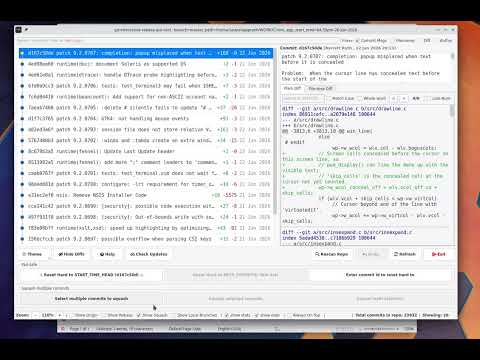
Interactive rebasing in Git is powerful, but repeatedly editing raw rebase todo files can become tedious during commit cleanup workflows.
This tool is designed as a lightweight visual helper around Git interactive rebase, especially useful while cleaning up a feature branch before raising a PR.
Useful when a commit accidentally contains mixed changes — for example: feature work + debug code, code + documentation, or unrelated edits inside the same file.
-
Uses native Git under the hood
All operations are executed using standard Git commands. No custom Git implementation or hidden logic.
This also means that when Git itself improves or adds new capabilities, the tool automatically benefits from them.
-
Lightweight setup
No heavy installation or large Git client required.
-
Focused specifically on interactive rebase
Instead of being a full Git client, the tool focuses only on commit history cleanup workflows:
- reorder commits
- squash commits
- split commits
- rephrase commits
- refine file changes
- move changes to new commits
- clean up history before PR creation
Key Strength: Uses native Git under the hood — all operations are executed using standard Git commands.
- Core: Python 3.x
- GUI Framework: PySide6 (Qt)
- Styling: Global QSS with dynamic color mapping.
- Git Integration: Direct subprocess communication with the Git CLI.
- Persistence:
QSettingsfor storing theme, font size, and UI preferences across sessions.
- Python 3.10+
- Git CLI installed and available in PATH (
git --versionshould work). PySide6installed (pip install PySide6).
pip install git+https://github.com/shyjun/git-interactive-rebase-gui-tool.gitThen run:
git_interactive_rebaseIf you prefer to run directly from source:
python3 git_interactive_rebase.pyYou can pass optional arguments when running the script:
Run from a specific commit:
python3 git_interactive_rebase.py <commit-sha>Specify a different repository location:
python3 git_interactive_rebase.py -C /path/to/repoThis project is actively under development, with new features and improvements added regularly.
To get the latest enhancements and fixes, update your installation from time to time using the steps below.
pip uninstall git-interactive-rebase-gui-tool
pip install git+https://github.com/shyjun/git-interactive-rebase-gui-tool.gitgit pullThis project is licensed under the MIT License.
⭐ If this tool helps you, consider starring the repository!