This is BETA! Report bugs and suggestions in the Issues tab.
Windows 7 Premium Assurance is coming to an end in January 2026, so i'm considering Windows 8.1 migration.
That is why i have decided to make an ultimate debloating script for Windows 8.1, which will be supported until October 2026.
Ok, some preface words to clean things up a bit. I've done this configuration for my personal specific needs.
But there is a slim chance that somebody will find it useful too. Aimed for desktop and laptops, not tablets.
Script is based upon Windows 8.1 Debloater:
https://github.com/teeotsa/windows-8-debloat
Original functionality:
- disable some of the bloat services
- disable telemetry, scheduled crap tasks and Defender
- disable autologger
Compiled by TrackerNinja aka spacedrone808:
https://trackerninja.codeberg.page
What's new:
- implemented substantially more comprehensive services management
- high risk infection SMB1 is disabled to minimize attack vector
- AppX Metro packages removed [because i don't like them]
- applied some tweaks here and there
- added probably unneeded GUI niceties
- SO WHAT WE ARE NOT DOING:- No Prefech since we are on NVME
- No WiFi, Bluetooth or any wireless connection
- No GPS location services
- No LAN snares, no SMB, UPnP/SSDP, WebDAV, SNMP, ICS, streaming, Home groups, Telnet & remote access
- No printing and scanning
- No apple thingies so no Bonjour
- We are not using Edge browser
- We don't care about logging & diagnostics either
- Also we are not using default windows search
- Since OS is already out of support no Windows Update and BITS [how convenient]
- Only one user, no secondary logon
+ IN THE END OF THE DAY WE ARE ONLY SURFING THE WEB AND DO AUDIO AND GFX.By default script execution is disabled on Windows systems. Check this out by entering in PowerShell console with administrative rights:
Get-ExecutionPolicy
To remove this restriction type:
Set-ExecutionPolicy Unrestricted -Scope CurrentUser
If for some reason this doesn't work you can do it by means of Group Policy editor:
gpedit.msc
Computer Configuration > Administrative Templates > Windows Components > Windows PowerShell > Turn on Script Execution
Then enter from administrative command prompt or PowerShell console:
gpupdate
To run script open admin elevated PowerShell console, head to appropriate folder and enter:
./debloat81.ps1
Do not forget to set script restriction back to restore security settings.
Set-ExecutionPolicy Restricted -Scope CurrentUser
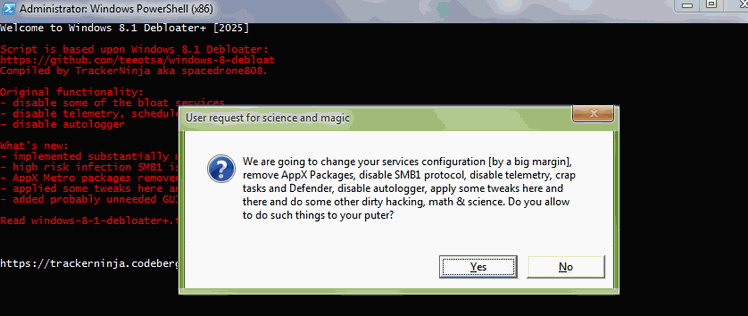
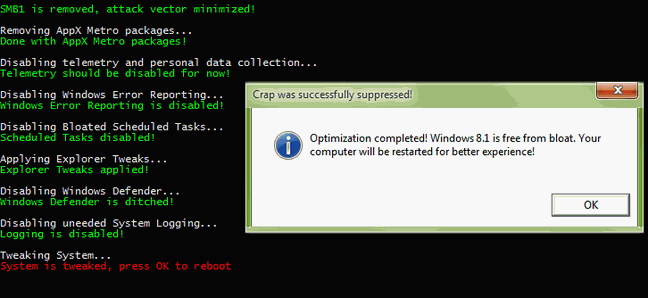
- STOPPED AND DISABLED SERIVES SORTED BY CATEGORYREMOTE
- Remote Desktop Configuration (SessionEnv)
- Remote Desktop Services (TermService)
- Remote Desktop Services UserMode Port Redirector (UmRdpService)
- Remote Registry (RemoteRegistry)
- Routing and Remote Access (RemoteAccess)
- Windows Remote Management (WS-Management) (WinRM)
NETWORK
- Application Layer Gateway Service (ALG)
- BranchCache (PeerDistSvc)
- Certificate Propagation (CertPropSvc)
- Client for NFS (NfsClnt)
- Computer Browser (Browser)
- Function Discovery Provider Host (fdPHost)
- Function Discovery Resource Publication (FDResPub)
- HomeGroupListener (HomeGroupListener)
- HomeGroupProvider (HomeGroupProvider)
- Internet Connection Sharing (SharedAccess)
- Link-Layer Topology Discovery Mapper (lltdsvc)
- Microsoft Edge Update Service (edgeupdate)
- Microsoft Edge Update Service (edgeupdatem)
- MicrosoftEdgeElevationService (MicrosoftEdgeElevationService)
- Net.Tcp Port Sharing Service (NetTcpPortSharing)
- Netlogon (Netlogon)
- Network Access Protection Agent (napagent)
- Offline Files (CscService)
- Peer Name Resolution Protocol (PNRPsvc)
- Peer Networking Grouping (p2psvc)
- Peer Networking Identity Manager (p2pimsvc)
- PNRP Machine Name Publication Service (PNRPAutoReg)
- Quality Windows Audio Video Experience (QWAVE)
- Remote Procedure Call (RPC) Locator (RpcLocator)
- Server (LanmanServer)
- SNMP Service (SNMP)
- SNMP Trap (SNMPTRAP)
- SSDP Discovery (SSDPSRV)
- TCP/IP NetBIOS Helper (lmhosts)
- Telephony (TapiSrv)
- Telnet (TlntSvr)
- UPnP Device Host (upnphost)
- WebClient (WebClient)
- Windows Connect Now-Config Registrar (wcncsvc)
- Windows Media Player Network Sharing Service (WMPNetworkSvc)
- Windows Store Service (WSService)
- WinHTTP Web Proxy Auto-Discovery Service (WinHttpAutoProxySvc)
- WMI Performance Adapter (wmiApSrv)
- Work Folders (workfolderssvc)
- Workstation (LanmanWorkstation)
- WWAN AutoConfig (WwanSvc)
WIRELESS
- Bluetooth Support Service (bthserv)
- Bluetooth Handsfree Service (BthHFSrv)
- Fax (Fax)
- WLAN AutoConfig (WlanSvc)
LOGGING
- Diagnostic Policy Service (DPS)
- Diagnostic Service Host (WdiServiceHost)
- Diagnostic System Host (WdiSystemHost)
- Diagnostics Tracking Service (DiagTrack)
- Family Safety (WPCSvc)
- File History Service (fhsvc)
- Internet Explorer ETW Collector Service (IEEtwCollectorService)
- Microsoft Account Sign-in Assistant (wlidsvc)
- Performance Counter DLL Host (PerfHost)
- Performance Logs & Alerts (pla)
- Problem Reports and Solutions Control Panel Support (wercplsupport)
- Sensor Monitoring Service (SensrSvc)
- Smart Card (SCardSvr)
- Smart Card Device Enumeration Service (ScDeviceEnum)
- Smart Card Removal Policy (SCPolicySvc)
- Windows Biometric Service (WbioSrvc)
- Windows Location Framework Service (lfsvc)
HYPER-V
- Hyper-V Data Exchange Service (vmickvpexchange)
- Hyper-V Guest Shutdown Service (vmicshutdown)
- Hyper-V Guest Service Interface (vmicguestinterface)
- Hyper-V Heartbeat Service (vmicheartbeat)
- Hyper-V Remote Desktop Virtualization Service (vmicrdv)
- Hyper-V Time Synchronization Service (vmictimesync)
- Hyper-V Volume Shadow Copy Requestor (vmicvss)
UPDATE
- Background Intelligent Transfer Service (BITS)
- Windows Update (wuauserv)
DEVICES
- Bonjour (mDNSResponder)
- Microsoft iSCSI Initiator Service (MSiSCSI)
- Microsoft Keyboard Filter (MsKeyboardFilter)
- Microsoft Storage Spaces SMP (smphost)
- Print Spooler (Spooler)
- Printer Extensions and Notifications (PrintNotify)
- Still Image Acquisition Events (WiaRpc)
- Touch Keyboard and Handwriting Panel Service (TabletInputService)
- Windows Image Acquisition (StiSvc)
SYSTEM
- ActiveX Installer (AxInstSV)
- Application Host Helper Service (AppHostSvc)
- Application Identity (AppIDSvc)
- Application Management (AppMgmt)
- AppX Deployment Service (AppXSvc)
- ASP.NET State Service (aspnet_state)
- BitLocker Drive Encryption Service (BDESVC)
- Block Level Backup Engine Service (wbengine)
- Distributed Link Tracking Client (TrkWks)
- Encrypting File System (EFS) (EFS)
- Health Key and Certificate Management (hkmsvc)
- Optimize drives (defragsvc)
- Secondary Logon (seclogon)
- Security Center (wscsvc)
- Storage Service (StorSvc)
- Superfetch (SysMain)
- Windows Defender Network Inspection Service (WdNisSvc)
- Windows Defender Service (WinDefend)
- Windows Search (WSearch)
+ RUNNING AND HAVE AUTO START-UP STATUS- Background Tasks Infrastructure Service (BrokerInfrastructure)
- COM+ Event System (EventSystem)
- Cryptographic Services (CryptSvc)
- DCOM Server Process Launcher (DcomLaunch)
- DHCP Client (Dhcp)
- DNS Client (Dnscache)
- Group Policy Client (gpsvc)
- Human Interface Device Access (hidserv)
- IKE and AuthIP IPsec Keying Modules (IKEEXT)
- IPsec Policy Agent (PolicyAgent)
- Local Session Manager (LSM)
- Multimedia Class Scheduler (MMCSS)
- Network List Service (netprofm)
- Network Location Awareness (NlaSvc)
- Network Store Interface Service (nsi)
- Plug and Play (PlugPlay)
- Power (Power)
- Remote Procedure Call RPC (RpcSs)
- RPC Endpoint Mapper (RpcEptMapper)
- Security Accounts Manager (SamSs)
- System Event Notification Service (SENS)
- System Events Broker (SystemEventsBroker)
- Task Scheduler (Schedule)
- Themes (Themes)
- User Profile Service (ProfSvc)
- Windows Audio (AudioSrv)
- Windows Audio Endpoint Builder (AudioEndpointBuilder)
- Windows Connection Manager (Wcmsvc)
- Windows Firewall (MpsSvc)
- Windows Font Cache Service (FontCache)
- Windows Management Instrumentation (Winmgmt)
+ RUNNING AND HAVE MANUAL START-UP STATUS- Base Filtering Engine (BFE)
- Device Install Service (DeviceInstall)
- Device Setup Manager (DsmSvc)
- Program Compatibility Assistant Service (PcaSvc)
- STOPPED AND HAVE AUTO START-UP STATUS- Software Protection (sppsvc)
- Windows Event Log (EventLog)
- STOPPED AND HAVE MANUAL START-UP STATUS- App Readiness (AppReadiness)
- Application Experience (AeLookupSvc)
- Application Information (Appinfo)
- CNG Key Isolation (KeyIso)
- COM+ System Application (COMSysApp)
- Credential Manager (VaultSvc)
- Device Association Service (DeviceAssociationService)
- Distributed Transaction Coordinator (MSDTC)
- Extensible Authentication Protocol (Eaphost)
- Interactive Services Detection (UI0Detect)
- IP Helper (iphlpsvc)
- KtmRm for Distributed Transaction Coordinator (KtmRm)
- Microsoft Software Shadow Copy Provider (swprv)
- Network Connected Devices Auto-Setup (NcdAutoSetup)
- Network Connection Broker (NcbService)
- Network Connections (Netman)
- Network Connectivity Assistant (NcaSvc)
- Portable Device Enumerator Service (WPDBusEnum)
- Remote Access Auto Connection Manager (RasAuto)
- Remote Access Connection Manager (RasMan)
- Secure Socket Tunneling Protocol Service (SstpSvc)
- Shell Hardware Detection (ShellHWDetection)
- Spot Verifier (svsvc)
- Thread Ordering Server (THREADORDER)
- Time Broker (TimeBroker)
- Virtual Disk (vds)
- Volume Shadow Copy (VSS)
- Windows Color System (WcsPlugInService)
- Windows Driver Foundation - User-mode Driver Framework (wudfsvc)
- Windows Encryption Provider Host Service (WEPHOSTSVC)
- Windows Error Reporting Service (WerSvc)
- Windows Event Collector (Wecsvc)
- Windows Installer (msiserver)
- Windows Modules Installer (TrustedInstaller)
- Windows Presentation Foundation Font Cache 3.0.0.0 (FontCache3.0.0.0)
- Windows Time (W32Time)
- Wired AutoConfig (dot3svc)
