In this section we continue our discussion of how to use Spring Security with Angular in a "single page application". Here we show how to use Spring Session together with Spring Cloud Gateway to combine the features of the systems we built in parts II and IV, and actually end up building three single page applications with quite different responsibilities. The aim is to build a Gateway (like in part IV) that is used not only for API resources but also to load the UI from a backend server. We simplify the token-wrangling bits of part II by using the Gateway to pass through the authentication to the backends. Then we extend the system to show how we can make local, granular access decisions in the backends, while still controlling identity and authentication at the Gateway. This is a very powerful model for building distributed systems in general, and has a number of benefits that we can explore as we introduce the features in the code we build.
Reminder: if you are working through this section with the sample application, be sure to clear your browser cache of cookies and HTTP Basic credentials. In Chrome the best way to do that is to open a new incognito window.
Here’s a picture of the basic system we are going to build to start with:
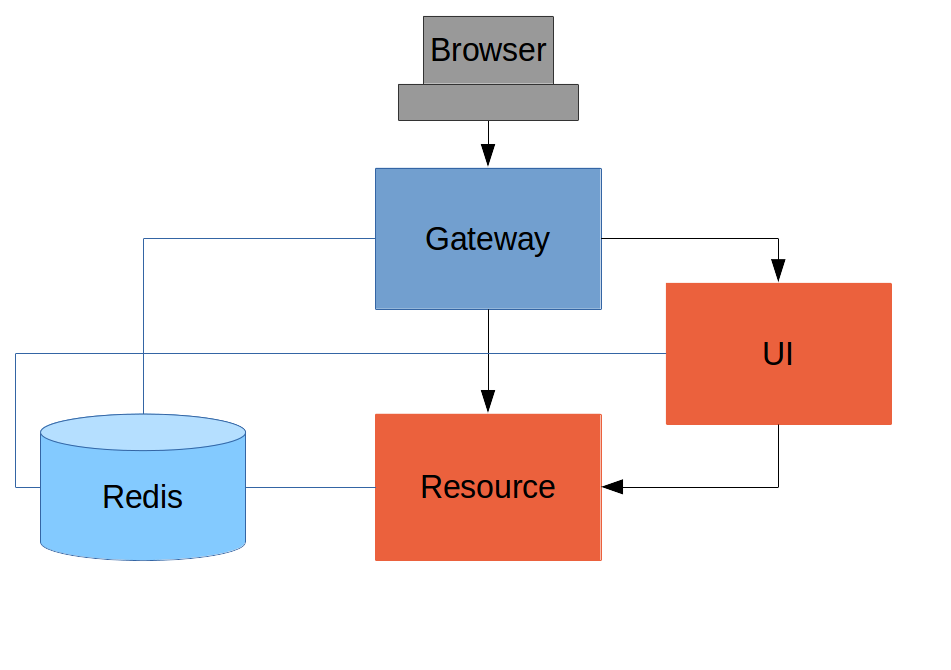
Like the other sample applications in this series it has a UI (HTML and JavaScript) and a Resource server. Like the sample in Section IV it has a Gateway, but here it is separate, not part of the UI. The UI effectively becomes part of the backend, giving us even more choice to re-configure and re-implement features, and also bringing other benefits as we will see.
The browser goes to the Gateway for everything and it doesn’t have to know about the architecture of the backend (fundamentally, it has no idea that there is a back end). One of the things the browser does in this Gateway is authentication, e.g. it sends a username and password like in Section II, and it gets a cookie in return. On subsequent requests it presents the cookie automatically and the Gateway passes it through to the backends. No code needs to be written on the client to enable the cookie passing. The backends use the cookie to authenticate and because all components share a session they share the same information about the user. Contrast this with Section V where the cookie had to be converted to an access token in the Gateway, and the access token then had to be independently decoded by all the backend components.
As in Section IV the Gateway simplifies the interaction between clients and servers, and it presents a small, well-defined surface on which to deal with security. For example, we don’t need to worry about Cross Origin Resource Sharing, which is a welcome relief since it is easy to get wrong.
The source code for the complete project we are going to build is in Github here, so you can just clone the project and work directly from there if you want. There is an extra component in the end state of this system ("double-admin") so ignore that for now.
Before diving into the code, let’s understand the key architectural concept: shared session authentication.
-
The Gateway authenticates users (via HTTP Basic in this example) and stores the authenticated
SecurityContextin a Redis-backed session. -
A SESSION cookie is sent to the browser containing the session ID.
-
When the browser makes requests through the Gateway to backend services, the SESSION cookie is forwarded.
-
Backend services use Spring Session with the same Redis instance to look up the shared session and find the already-authenticated user.
-
No credentials are forwarded to backends - they simply read the
SecurityContextfrom the shared session.
This approach requires some specific configuration in Spring Security 6, which we’ll cover below.
The Gateway is a Spring Boot application with Spring Cloud Gateway MVC that proxies requests to backend services and handles authentication.
The Gateway needs these key dependencies:
-
spring-boot-starter-web- for servlet-based web application -
spring-cloud-starter-gateway-server-webmvc- for routing/proxying -
spring-boot-starter-security- for authentication -
spring-session-data-redis- for shared sessions
Routes are configured in application.yml using Spring Cloud Gateway MVC properties:
spring:
  session:
    store-type: redis
  cloud:
    gateway:
      mvc:
        routes:
          - id: ui
            uri: http://localhost:8081
            predicates:
              - Path=/ui/**
            filters:
              - StripPrefix=1
          - id: admin
            uri: http://localhost:8082
            predicates:
              - Path=/admin/**
            filters:
              - StripPrefix=1
          - id: resource
            uri: http://localhost:9000
            predicates:
              - Path=/resource/**
            filters:
              - StripPrefix=1
There are three routes in the proxy: one each for the UI, Admin, and Resource server. The StripPrefix=1 filter removes the first path segment (e.g., /ui/user becomes /user when forwarded to the UI backend).
The Gateway’s security configuration handles authentication and CSRF for the Angular SPA:
link:gateway/src/main/java/demo/GatewayApplication.java[role=include]Key points:
-
HttpSessionSecurityContextRepository: In Spring Security 6, theSecurityContextis no longer automatically saved to the session. We explicitly configure this to ensure the authenticated user is stored in the Redis-backed session. -
CsrfTokenRequestAttributeHandler: Disables BREACH protection for CSRF tokens, allowing the Angular app to read the token directly from the cookie. -
CsrfCookieFilter: In Spring Security 6, CSRF tokens are lazily loaded. This filter eagerly loads the token so it’s written to the cookie on every response.
The CsrfCookieFilter is a simple filter that forces the CSRF token to be loaded:
link:gateway/src/main/java/demo/GatewayApplication.java[role=include]For this sample, user accounts are defined in-memory in the Gateway:
link:gateway/src/main/java/demo/GatewayApplication.java[role=include]|
Tip
|
In a production system the user account data would be managed in a backend database (most likely a directory service), not hard coded in the Spring configuration. |
The UI backend is a simple Spring Boot application that serves an Angular SPA and provides a /user endpoint.
The UI backend does NOT authenticate users itself. Instead, it reads the authenticated user from the shared Redis session:
link:ui/src/main/java/demo/UiApplication.java[role=include]Key points:
-
No
httpBasic(): The UI doesn’t authenticate - it relies on the Gateway. -
SessionCreationPolicy.NEVER: The UI never creates sessions; it only reads existing ones from Redis.
link:ui/src/main/resources/application.yml[role=include]The spring.session.store-type: redis is essential - it tells Spring Session to use the same Redis instance as the Gateway.
The Resource server provides API endpoints and also reads authentication from the shared session:
link:resource/src/main/java/demo/ResourceApplication.java[role=include]The Resource server uses SessionCreationPolicy.NEVER and relies on the shared session for authentication.
We now have three components running on three ports:
-
Gateway: http://localhost:8080
-
UI: http://localhost:8081 (accessed via Gateway at /ui/)
-
Resource: http://localhost:9000 (accessed via Gateway at /resource/)
Start Redis and all three applications, then point your browser at http://localhost:8080. You should see a login form. Authenticate as "user/password" and you’ll see links to the UI interface.
| Verb | Path | Status | Response |
|---|---|---|---|
GET |
/ |
200 |
Gateway home page with login form |
POST |
/login |
302 |
Authenticate and redirect |
GET |
/ui/ |
200 |
UI Angular app (proxied from port 8081) |
GET |
/ui/user |
200 |
Authenticated user info |
GET |
/resource/ |
200 |
JSON greeting (proxied from port 9000) |
The Gateway has its own Angular application that provides a login form and navigation to the backend UIs:
link:gateway/src/app/app.component.ts[role=include]link:gateway/src/app/app.component.html[role=include]The login() function sends credentials via HTTP Basic authentication. On success, the Gateway creates a session and subsequent requests use the SESSION cookie.
Now let’s add an Admin application that requires the "ADMIN" role.
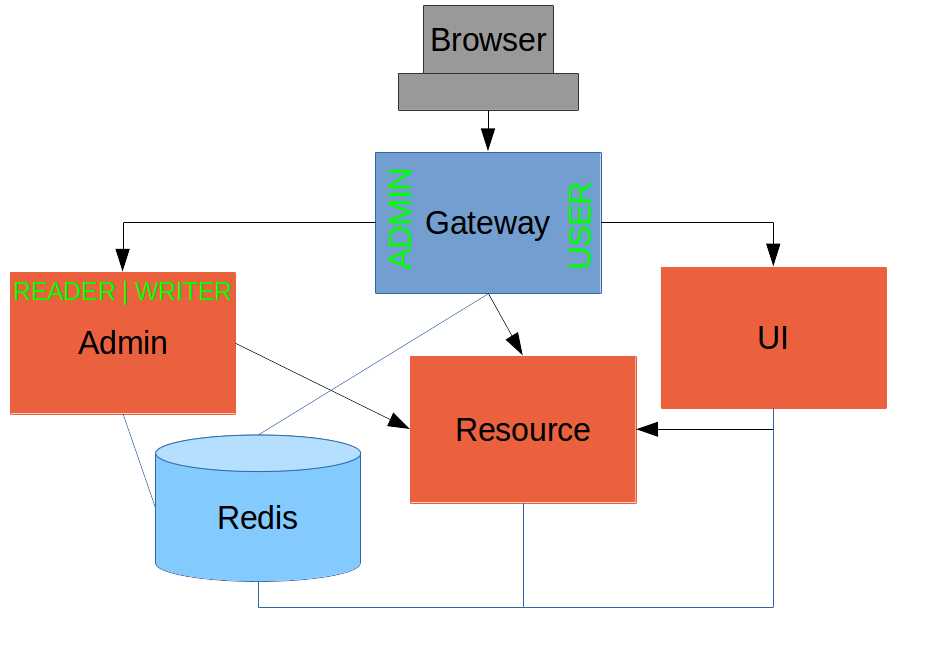
The Admin application requires the "ADMIN" role in the following way:
link:admin/src/main/java/demo/AdminApplication.java[role=include]The Admin application’s /user endpoint returns roles so the Angular app can make client-side access decisions:
link:admin/src/main/java/demo/AdminApplication.java[role=include]|
Note
|
Role names come back from the "/user" endpoint with the "ROLE_" prefix so we can distinguish them from other kinds of authorities (it’s a Spring Security thing). |
Now we have a nice little system with two independent user interfaces and a backend Resource server, all protected by the same authentication in a Gateway. The fact that the Gateway acts as a micro-proxy makes the implementation of the backend security concerns extremely simple, and they are free to concentrate on their own business concerns. The use of Spring Session has (again) avoided a huge amount of hassle and potential errors.
A powerful feature is that the backends can independently have any kind of authentication they like (e.g. you can go directly to the UI if you know its physical address and a set of local credentials). The Gateway imposes a completely unrelated set of constraints, as long as it can authenticate users and assign metadata to them that satisfy the access rules in the backends. This is an excellent design for being able to independently develop and test the backend components.
A bonus feature of this architecture (single Gateway controlling authentication, and shared session token across all components) is that "Single Logout", a feature we identified as difficult to implement in Section V, comes for free. To be more precise, one particular approach to the user experience of single logout is automatically available in our finished system: if a user logs out of any of the UIs (Gateway, UI backend or Admin backend), they are logged out of all the others, assuming that each individual UI implemented a "logout" feature the same way (invalidating the session).
If you’re migrating from an older version of this tutorial, here are the key changes for Spring Security 6:
-
SecurityContext is not automatically saved: You must explicitly configure
HttpSessionSecurityContextRepositoryon authentication mechanisms. -
CSRF tokens are lazily loaded: SPAs need to trigger token loading via a filter like
CsrfCookieFilter. -
BREACH protection is enabled by default: Use
CsrfTokenRequestAttributeHandlerinstead ofXorCsrfTokenRequestAttributeHandlerif your SPA reads the CSRF cookie directly. -
WebSecurityConfigurerAdapteris removed: UseSecurityFilterChainbeans instead. -
security.sessionsproperty is removed: UseSessionCreationPolicyin theSecurityFilterChainconfiguration.
Thanks: I would like to thank again everyone who helped me develop this series, and in particular Rob Winch and Thorsten Späth for their careful reviews of the sections and sources code. Since Section I was published it hasn’t changed much but all the other parts have evolved in response to comments and insights from readers, so thank you also to anyone who read the sections and took the trouble to join in the discussion.