| categories |
|
|---|
This example outlines how to configure a Linux bridge to policy route traffic (web in this instance) towards a Squid proxy.
Please realize this just gets the packets out of the bridge mode (OSI model layer 2 packet handling) into the machines packet routing system (layer 3); you also have to configure routing (layer 3) and interception (layer 4) on the machine to divert traffic to the Squid TCP port!
Various networks are using bridge devices as gateways and wish to implement transparent caching or content filtering.
In iptables which in most cases is being used to filter network traffic the DROP target means "packet disappear".
In ebtables a "-j redirect --redirect-target DROP" means "packet be gone from the bridge into the upper layers of the kernel such as routing\forwarding"
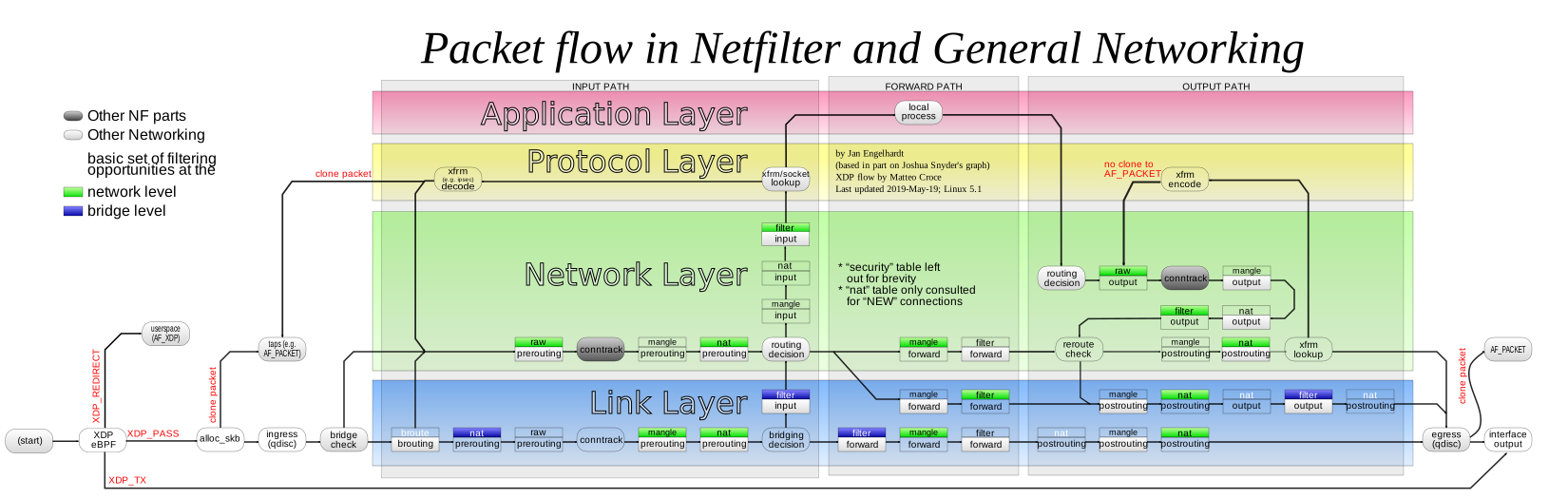
Since the ebtables works in the link layer of the connection in order to intercept the connection we must "redirect" the traffic to the level which iptables will be able to intercept\tproxy.
A picture of the netfilter flow to illustrate:
Bridging configuration in Linux is done with the ebtables utility.
You also need to follow all the steps for setting up the Squid box as a router device. These bridging rules are additional steps to move packets from bridging mode to routing mode:
    ## interface facing clients
    CLIENT_IFACE=eth0

    ## interface facing Internet
    INET_IFACE=eth1


    ebtables -t broute -A BROUTING \
            -i $CLIENT_IFACE -p ipv6 --ip6-proto tcp --ip6-dport 80 \
            -j redirect --redirect-target DROP

    ebtables -t broute -A BROUTING \
            -i $CLIENT_IFACE -p ipv4 --ip-proto tcp --ip-dport 80 \
            -j redirect --redirect-target DROP

    ebtables -t broute -A BROUTING \
            -i $INET_IFACE -p ipv6 --ip6-proto tcp --ip6-sport 80 \
            -j redirect --redirect-target DROP

    ebtables -t broute -A BROUTING \
            -i $INET_IFACE -p ipv4 --ip-proto tcp --ip-sport 80 \
            -j redirect --redirect-target DROP


    if test -d /proc/sys/net/bridge/ ; then
      for i in /proc/sys/net/bridge/*
      do
        echo 0 > $i
      done
      unset i
    fi

 > :warning:
    The bridge interfaces also need to be configured with public IP
    addresses for Squid to use in its normal operating traffic (DNS,
    ICMP, TPROXY failed requests, peer requests, etc)