You signed in with another tab or window. Reload to refresh your session.You signed out in another tab or window. Reload to refresh your session.You switched accounts on another tab or window. Reload to refresh your session.Dismiss alert
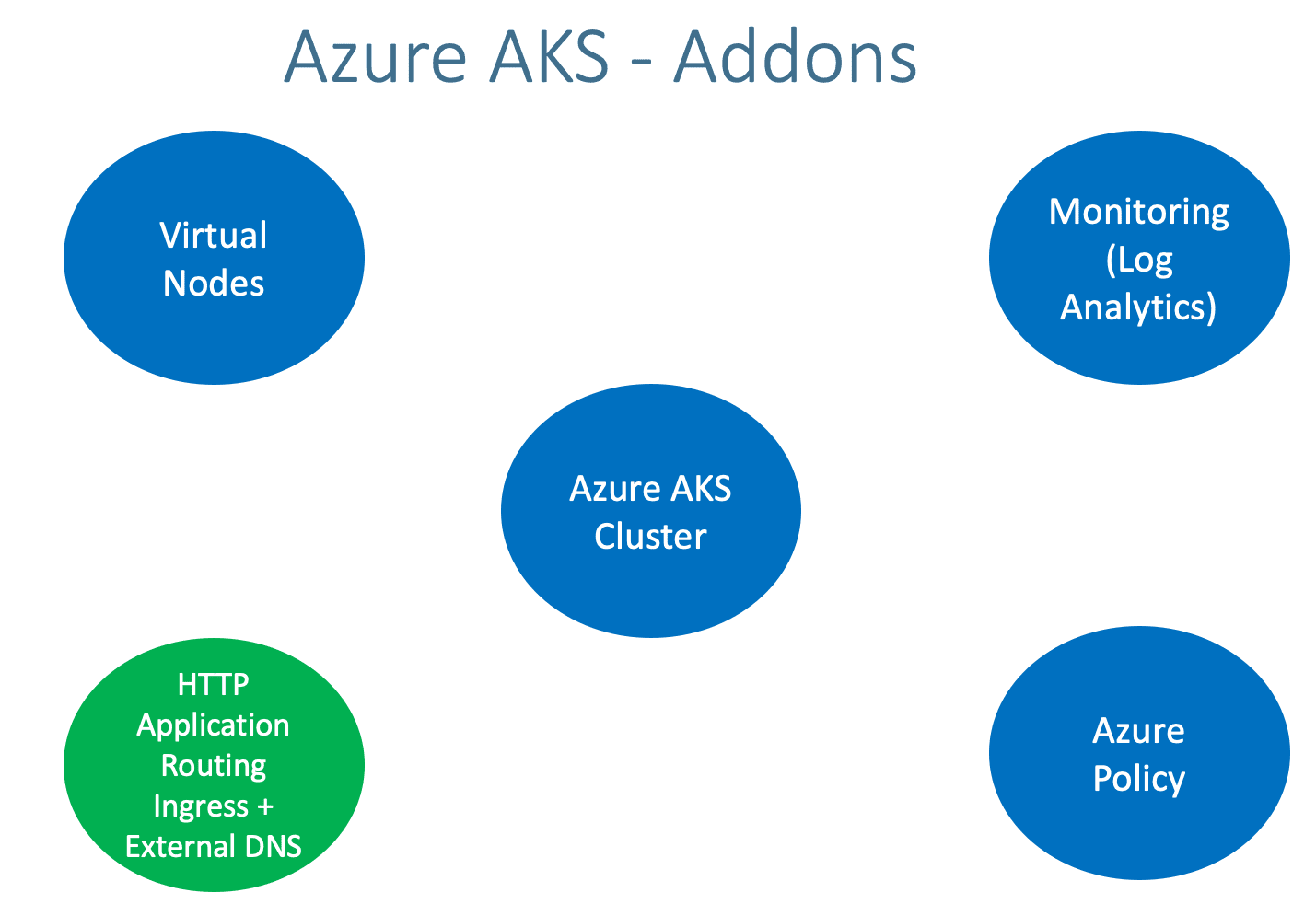
Enable HTTP Application Routing AddOn to enable Ingress and ExternalDNS automatically in Azure AKS Cluster
Azure AKS - Enable HTTP Application Routing AddOn
Step-01: Introduction
Enable HTTP Application Routing Add On
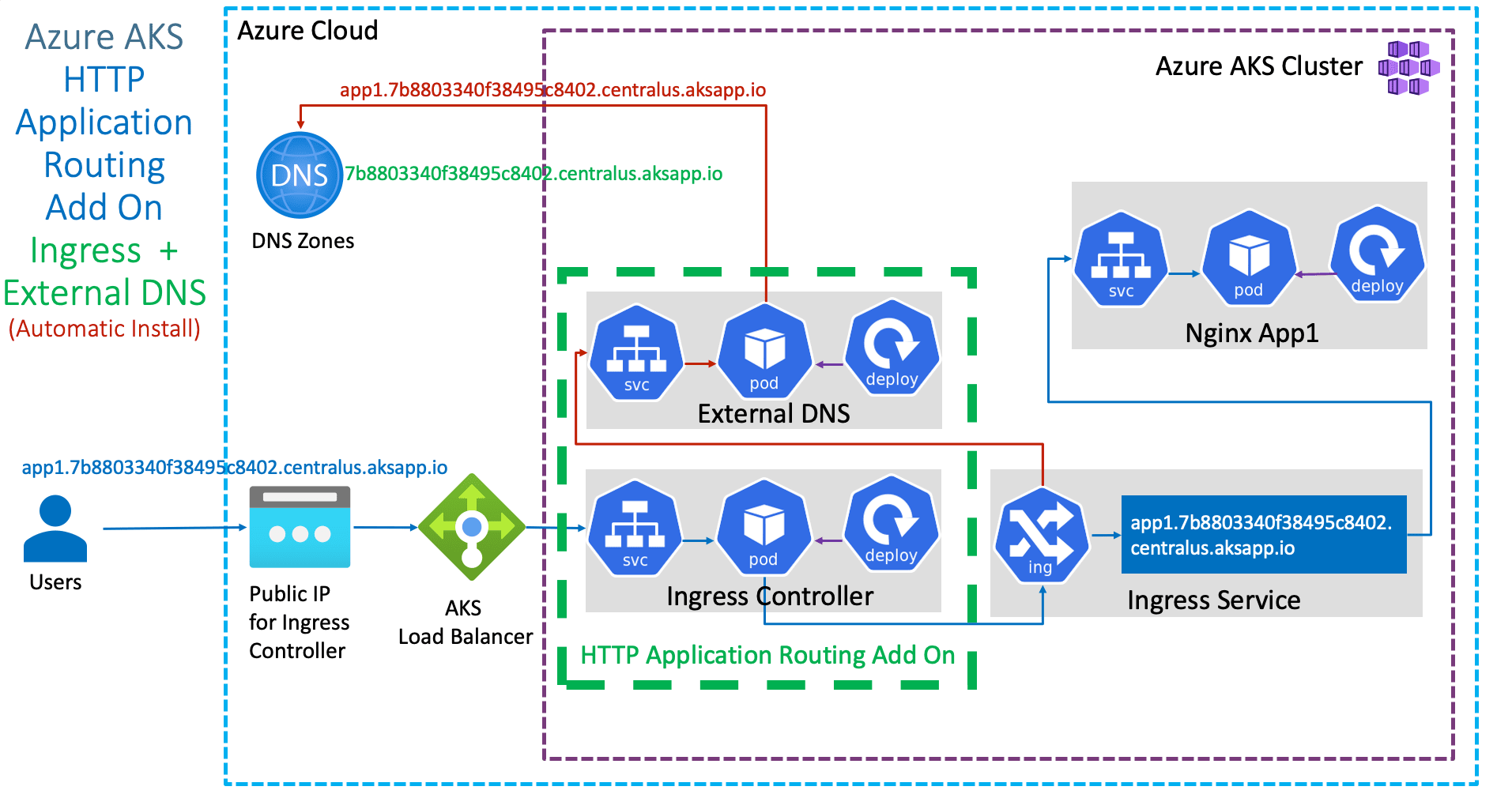
Ingress and External DNS will be automatically installed and configured on Azure AKS Cluster
Important Note: HTTP application routing is only recommended for dev/test clusters
Step-02: Option-1: For existing Cluster Enable HTTP Application Routing Add On
To enable HTTP Application Routing Add On we have two options
Option-1A: Using Azure Portal
For existing clusters, enable HTTP Application Routing Add On using Azure Portal
Go to All Services -> Kubernetes Services -> aksdemo2
Go to Settings -> Networking
Enable HTTP application routing: Check the box
Click on SAVE
Verify the same in AKS Cluster using kubectl
# Configure Command Line Credentials
az aks get-credentials --name aksdemo2 --resource-group aks-rg2

# Verify Nodes
kubectl get nodes
kubectl get nodes -o wide

# Before Enablement of HTTP Application Routing Add On
kubectl get svc -n kube-system
kubectl get pod -n kube-system

# After Enablement of HTTP Application Routing Add On
kubectl get svc -n kube-system
kubectl get pod -n kube-system
Ingress Pods: You should see Ingress and external DNS Pods running in kube-system namespaces
Ingress Services: You should see Ingress and external DNS Services running in kube-system namespaces
Option-1B: Using Azure CLI
For existing clusters, enable HTTP Application Routing Add On using Azure CLI
# Enable HTTP Application Routing
az aks enable-addons --resource-group myResourceGroup --name myAKSCluster --addons http_application_routing

# Replace Resource Group and Cluster Name
az aks enable-addons --resource-group aks-rg2 --name aksdemo2 --addons http_application_routing
Verify the same in AKS Cluster using kubectl
# Configure Command Line Credentials
az aks get-credentials --name aksdemo2 --resource-group aks-rg2

# Verify Nodes
kubectl get nodes
kubectl get nodes -o wide

# Before Enablement of HTTP Application Routing Add On
kubectl get svc -n kube-system
kubectl get pod -n kube-system

# After Enablement of HTTP Application Routing Add On
kubectl get svc -n kube-system
kubectl get pod -n kube-system
Ingress Pods: You should see Ingress and external DNS Pods running in kube-system namespaces
Ingress Services: You should see Ingress and external DNS Services running in kube-system namespaces
Step-03: Option-2: Create AKS Cluster with HTTP Application Routing Enabled
Create Cluster with HTTP Application Routing Enabled
In Networking tab, enable HTTP Application Routing
Rest all is same
Basics
Subscription: Free Trial or Pay-as-you-go
Resource Group: Creat New: aks-rg3
Kubernetes Cluster Name: aksdemo3
Region: (US) Central US
Kubernetes Version: Select what ever is latest stable version
Ingress Pods: You should see Ingress and external DNS Pods running in kube-system namespaces
Ingress Services: You should see Ingress and external DNS Services running in kube-system namespaces
# Configure Command Line Credentials
az aks get-credentials --name aksdemo2 --resource-group aks-rg2

# Verify Nodes
kubectl get nodes
kubectl get nodes -o wide

# Verify additional Pods and SVC related to HTTP Application Routing Add On
kubectl get svc -n kube-system
kubectl get pod -n kube-system
Step-05: List DNS Zone associated with AKS Cluster
From Azure CLI
# List DNS Zone
az aks show --resource-group myResourceGroup --name myAKSCluster --query addonProfiles.httpApplicationRouting.config.HTTPApplicationRoutingZoneName -o table

# Replace Resource Group and Cluster Name
az aks show --resource-group aks-rg2 --name aksdemo2 --query addonProfiles.httpApplicationRouting.config.HTTPApplicationRoutingZoneName -o table
Sample Output
Result
----------------------------------------
7b8803340f38495c8402.centralus.aksapp.io
From Azure Portal
Go to All Services -> DNS Zones -> Get the DNS Zone Name
# Example DNS Zone name
7b8803340f38495c8402.centralus.aksapp.io
Step-06: Review kube-manifests
01-NginxApp1-Deployment.yml
02-NginxApp1-ClusterIP-Service.yml
03-Ingress-HTTPApplicationRouting-ExternalDNS.yml
Changes in Ingress Manifest (03-Ingress-HTTPApplicationRouting-ExternalDNS.yml)
# Change-1: Add Annotation related to HTTP Application Routingannotations:
kubernetes.io/ingress.class: addon-http-application-routing# Change-2: Update DNS Zone name with additional App Name as hostspec:
rules:
- host: app1.7b8803340f38495c8402.centralus.aksapp.iohttp:
Step-07: Deploy, Verify & Test
# Deploy
kubectl apply -f kube-manifests/

# List Pods
kubectl get pods

# List Ingress Service (Wait for Public IP to be assigned)
kubectl get ingress

# Verify new Recordset added in DNS Zones
Go to Services -> DNS Zones -> 7b8803340f38495c8402.centralus.aksapp.io
REFRESH to see DNS A and TXT records

# nslookup test
nslookup app1.7b8803340f38495c8402.centralus.aksapp.io


# Access Application
http://app1.7b8803340f38495c8402.centralus.aksapp.io/app1/index.html

# Verify External DNS Log
kubectl -n kube-system logs -f $(kubectl -n kube-system get po | egrep -o 'addon-http-application-routing-external-dns-[A-Za-z0-9-]+')
Important Note: If immediately application via DNS doesnt work, wait for 10 to 20 minutes for all the DNS changes to kick-in
Step-08: Clean Up Apps
# Delete Apps
kubectl delete -f  kube-manifests/

# Verify Recordset added in DNS Zones got deleted
Go to Services -> DNS Zones -> 7b8803340f38495c8402.centralus.aksapp.io
REFRESH to see DNS A and TXT records for app1 got deleted
Step-09: Disable HTTP Application Routing Add On
Disable using Azure Portal
Go to All Services -> Kubernetes Services -> aksdemo2 -> Settings -> Networking
# Verify Ingress related Pods and SVC related to HTTP Application Routing Add On will be deleted
kubectl get svc -n kube-system
kubectl get pod -n kube-system
Disable using Azure CLI
# Disable Add-On HTTP Application Routing to AKS cluster
az aks disable-addons --addons http_application_routing --name aksdemo2 --resource-group aks-rg2 --no-wait

# Verify Ingress related Pods and SVC related to HTTP Application Routing Add On will be deleted
kubectl get svc -n kube-system
kubectl get pod -n kube-system