-
Install SEO Pro with Composer:
composer require statamic/seo-pro -
Add the Antlers tag or Blade directive somewhere between your
<head>tags.- Antlers:
{{ seo_pro:meta }} - Blade:
@seo_pro('meta')
- Antlers:
SEO settings will cascade down from the global defaults, to the collection/taxonomy level, and finally to the entry/term level.
Empty meta tags will not be rendered, which allows you to optionally set your own tags with other means if you so choose.
Head to Tools > SEO Pro > Site Defaults and configure your default settings. The defaults will be used if you haven't set anything more specific at the collection or entry level.
You may choose to pull data from other fields, enter hardcoded strings, or use Antlers templating. See File Usage for more details.
If you're using Statamic's Multi-Site feature, site defaults are localizable, meaning defaults can be set per site. You may configure an "origin" for each localization, determining which site to inherit values from if none are set for the current site.
Site Defaults are stored in resources/addons/seo-pro.yaml by default, but can be moved to the database via the php please install:eloquent-driver command.
If you're using Static Caching, you may configure invalidation rules to be triggered when SEO Pro's site defaults are updated:
// config/statamic/static_caching.php

'invalidation' => [
    'rules' => [
        'seo_pro_site_defaults' => [
            'urls' => [
                '/*',
            ],
        ],
    ],
],Each section may be configured independently at the Collection / Taxonomy level. Head to Tools > SEO Pro > Section Defaults to configure default settings at this level. You may opt to inherit values from the defaults and tweak as necessary.
Values configured here will be saved into the
seoarray (withininject) in the respective section's yaml config.
You may disable a section by toggling the "Enabled" field when editing a section, or set seo: false within the inject array in that section's yaml config. Disabling a section will prevent it's items from being included in reports, the sitemap, and prevent the template tag from rendering anything.
It's better to configure your collections and taxonomies to dynamically pull from fields. However, an SEO tab will be added to each item's publish page and you are free to override any values there.
Values configured here will be saved into the
seoarray in the item's front-matter.
If you wish to use assets in your meta, you can publish the SEO Pro config and specify an asset container, as well as a folder and glide preset to be used.
You may disable the glide preset altogether by setting
'open_graph_preset' => false,in your config.
In the case that you're loading a custom Statamic Route, you can pass SEO meta directly into the route data param. This allows you to define custom meta on a route-by-route basis in situations without a proper collection entry.
Route::statamic('search', 'search/index', [
    'title' => 'Search',
    'description' => 'Comprehensive Site Search.',
    // ...
]);For advanced devs, you may bypass the CP and configure your SEO settings through files. There are 3 sorts of values you may save.
title: "A hardcoded string"Prefix a field name with @seo: to have that field's value referenced automatically.
A field in a specific fieldset may be specified (this is how the CP will save them). The fieldset is completely optional and currently provides no additional benefit.
title: "@seo:title"
title: "@seo:post/title" # with optional fieldsetYou may use Statamic Antlers templating in your strings. When doing this, the addon will not apply any automatic parsing rules (limiting the length of the description, for example).
description: "{{ content | strip_tags | truncate(250, '...') }}"You may configure data for the Organization/Person objects, as well as enable breadcrumb data from your Site Defaults:
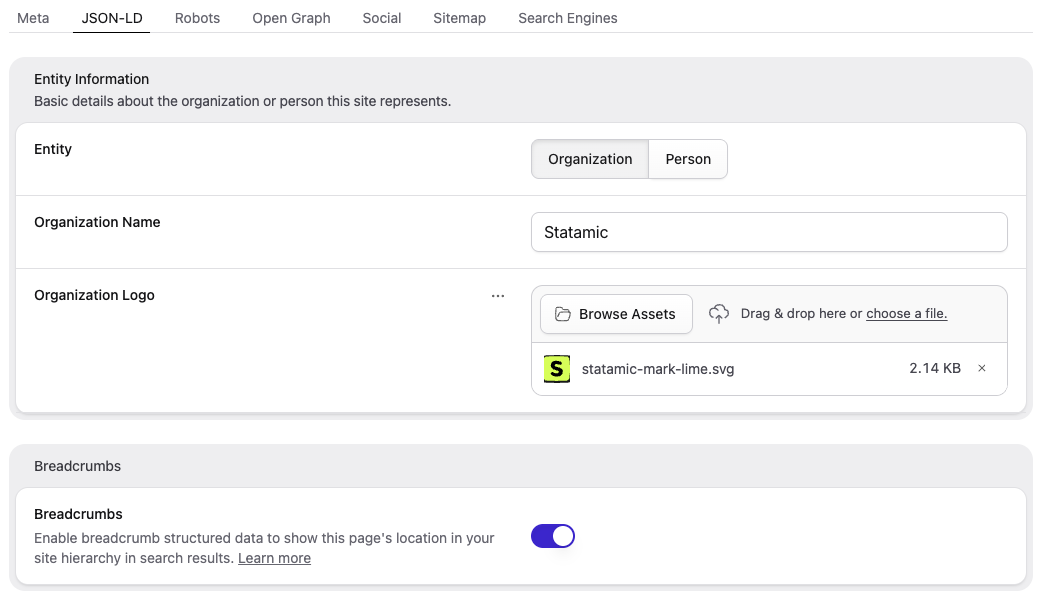
You can then configure JSON-LD objects for your content via section defaults, which can be overridden on a per-entry/term basis.
You can even use Antlers to pull data from fields as necessary:
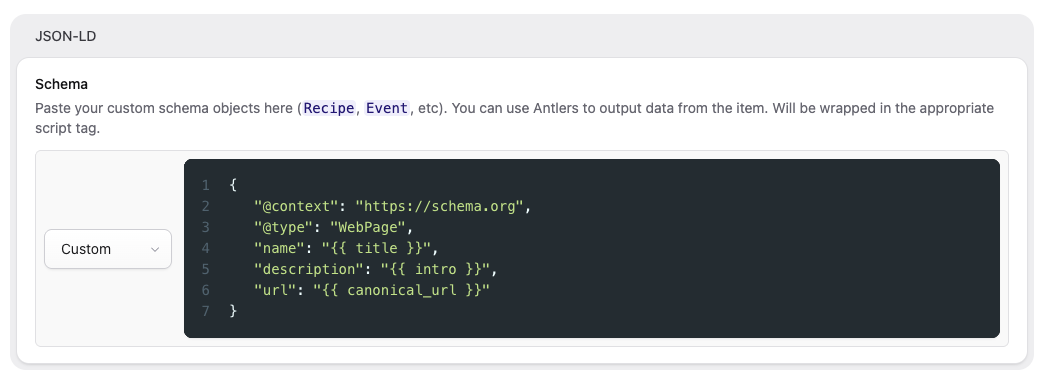
The "Organization Logo" will be dynamically resized using Glide to comply with the JSON-LD schema. If you'd prefer to disable this behaviour, you may disable the json_ld.use_glide_for_logo option in your config.
// config/statamic/seo-pro.php

'json_ld' => [
    'use_glide_for_logo' => false,
],You may generate an SEO report that checks all the pages of your site against a number of tests. The tests include mandatory items like title tag uniqueness, or suggested items like URLs being no more than 3 segments. Failing a mandatory item will result in a fail where failing a suggested item will result in a warning.
Reports will stick around until deleted, so you are free to compare reports to see how you are progressing.
You may generate a report through the Control Panel, or by running php please seo-pro:generate-report.
Depending on the size of your site, generating a report may take a while. To prevent request timeouts, you may enable queues, and the reports will be truly queued in the background.
A popular choice is to use a Redis store and queue driver, along with Laravel Horizon for managing your Redis queues.
You may add a reports widget to your dashboard to get a quick insight into your site's SEO status. Add the following to your widgets array within config/statamic/cp.php to show the latest report's score:
'widgets' => [
    [
        'type' => 'seo_pro',
        'width' => 50,
    ]
],SEO Pro includes a redirect manager that lets you define URL redirects, automatically create redirects when slugs change, and track 404 errors.
Head to Tools > SEO Pro > Redirects to create and manage redirects. Each redirect has a source URL, a destination URL, and a response code (301 or 302). Redirects can also be enabled or disabled.
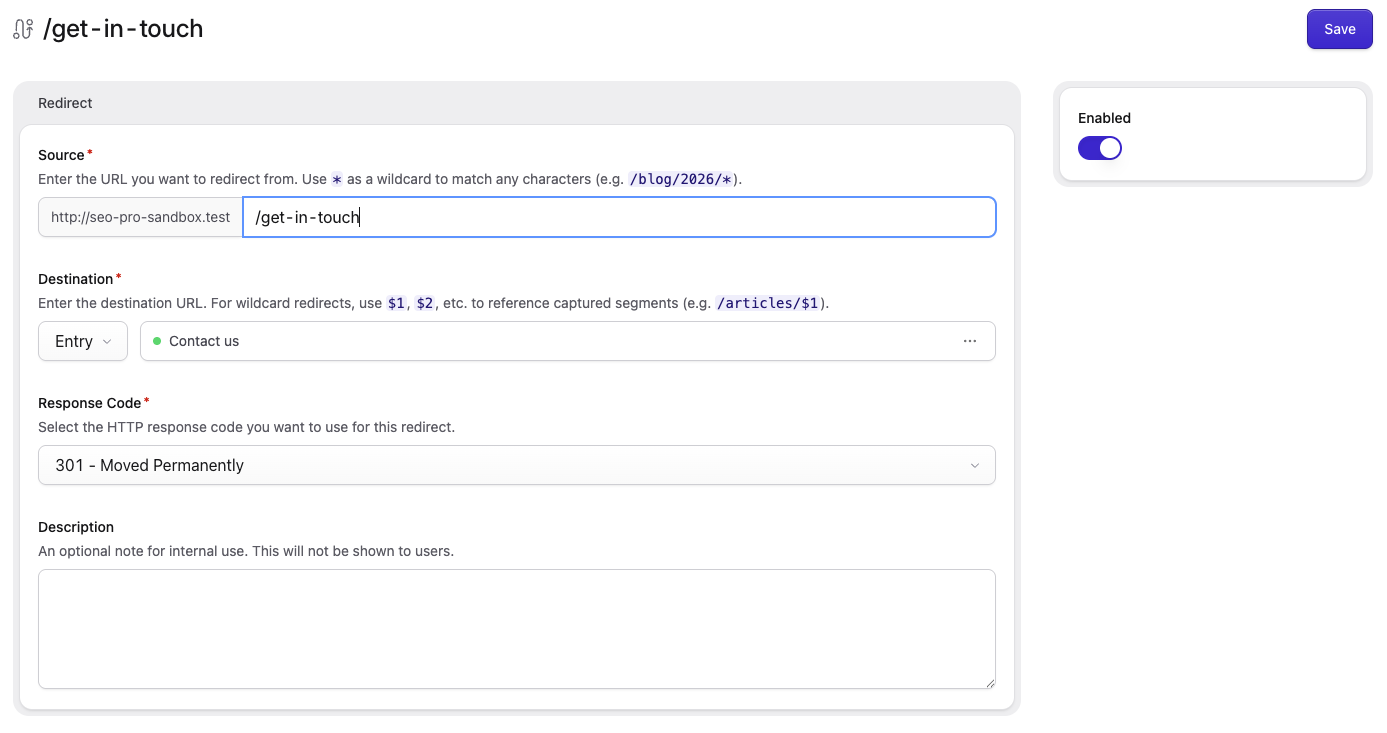
You can use wildcards in your source URLs. Each * captures a segment, and you can reference them in the destination with $1, $2, etc:
- Source:
/blog/*→ Destination:/articles/$1 - Source:
/blog/*/posts/*→ Destination:/articles/$1/entries/$2
Exact matches always take priority over wildcard matches.
By default, query strings from the original URL are retained when redirecting. You may disable this behaviour in your config:
// config/statamic/seo-pro.php

'redirects' => [
    'preserve_query_string' => false,
],By default, redirects are stored as YAML files in the content/seo-pro/redirects directory. You can change this in the config:
// config/statamic/seo-pro.php

'redirects' => [
    'driver' => 'file',
    'directory' => base_path('content/seo-pro/redirects'),
],
Alternatively, you may store redirects in the database by changing the driver:
// config/statamic/seo-pro.php

'redirects' => [
    'driver' => 'database',
],
Then run php please seo-pro:database-redirects to publish the migration and import existing redirects.
Redirects and errors are scoped to individual sites. Each redirect belongs to a single site, and the source URL is stored relative to the site root. For example, a redirect with the source /about on the French site will only match requests to example.com/fr/about (or example.fr/about, depending on your site configuration).
When using the Control Panel, redirects and errors are filtered to the currently selected site. The site can be changed using the site filter in the listing.
When you enable multi-site on an existing install via php please multisite, SEO Pro will automatically move your existing redirect and error files into subdirectories for the default site.
SEO Pro can automatically create redirects when an entry or term's slug changes. This prevents broken links when content is reorganized.
To enable automatic redirects, set the SEO_PRO_AUTOMATIC_REDIRECTS environment variable to true:
SEO_PRO_AUTOMATIC_REDIRECTS=trueBy default, automatic redirects apply to all collections and taxonomies. You may limit this to specific collections or taxonomies in the config:
// config/statamic/seo-pro.php

'redirects' => [
    'automatic_redirects' => [
        'enabled' => env('SEO_PRO_AUTOMATIC_REDIRECTS', false),
        'collections' => ['pages', 'posts'],
        'taxonomies' => ['tags'],
    ],
],
When an entry's slug changes, a redirect is created from the old URL to the new one, using the default response code (301 by default). If a redirect already exists for the old URL, its destination is updated rather than creating a duplicate.
You may change the default response code in the config:
// config/statamic/seo-pro.php

'redirects' => [
    'default_response_code' => 301,
],
In a multi-site setup, when an entry's slug changes, redirects are also created for any localizations that share the same slug change, each pointing to the localized version of the content.
Self-referencing redirects (where the source and destination are the same URL) are automatically cleaned up.
SEO Pro can track 404 errors, giving you visibility into broken links on your site. When a request doesn't match a redirect, the URL is recorded as an error.
To enable error tracking, set the SEO_PRO_TRACK_ERRORS environment variable:
SEO_PRO_TRACK_ERRORS=trueErrors can be viewed at Tools > SEO Pro > Errors. From there, you can see each error's URL, hit count, and last hit time. Each error also has a link to quickly create a redirect for that URL.
When a redirect is created, any errors matching the redirect's source URL are automatically deleted.
It's easy to accumulate lots of errors over time. To keep things tidy, SEO Pro will automatically purge errors older than 30 days.
You may customize the purge threshold in the config:
// config/statamic/seo-pro.php

'redirects' => [
    'errors' => [
        'purge_after_days' => 30,
    ],
],
You may also run the command manually:
php please seo-pro:purge-errors
By default, errors are stored in the storage/statamic/seopro/errors directory. You can change this in the config:
// config/statamic/seo-pro.php

'redirects' => [
   'errors' => [
      'driver' => 'file',
      'directory' => storage_path('statamic/seopro/errors'),
   ],
],
Errors can be stored in the database independently of redirects:
// config/statamic/seo-pro.php

'redirects' => [
    'errors' => [
        'driver' => 'database',
    ],
],
Then run php please seo-pro:database-errors to publish the migration and import existing errors.
You can add a recent errors widget to your dashboard to see the latest 404s at a glance:
// config/statamic/cp.php

'widgets' => [
    [
        'type' => 'recent_errors',
        'width' => 50,
        'limit' => 5,
    ],
],You can publish SEO Pro's config for modification by running the following:
php artisan vendor:publish --tag="seo-pro-config"
You can publish SEO Pro's sitemap.xml and humans.txt views for modification by running the following:
php artisan vendor:publish --tag="seo-pro-views"
These views will be published into your resources/views/vendor/seo-pro directory for modification.
You may also override the default meta.antlers.html view, though it is not published by default. Important Note: Overriding this view will require you to be mindful of updates as it will not be automatically maintained for you.
A sitemap.xml route is automatically generated for you.
If you disable SEO on the section or item level, the relevant section/item will automatically be discluded from the sitemap.
If you wish to completely disable the sitemap, change it's URL, or customize it's cache expiry, you can publish the SEO Pro config and modify these settings within config/statamic/seo-pro.php.
Custom URLs may be added to the sitemap via the additional hook:
// app/Providers/AppServiceProvider.php

use Statamic\SeoPro\Sitemap\Page;
use Statamic\SeoPro\Sitemap\Sitemap;

public function boot(): void
{
    // ...

    Sitemap::hook('additional', function ($payload, $next) {
        $payload->items->push((new Page)->with([
            'canonical_url' => url('additional-item'),
            'last_modified' => \Carbon\Carbon::parse('2025-01-01'),
            'change_frequency' => 'monthly',
            'priority' => 0.5,
        ]));

        return $next($payload);
    });
}
If you wish to customize the contents of the sitemap.xml view, you may also publish the SEO Pro views and modify the provided antlers templates within your resources/views/vendor/seo-pro folder.
You can also extend the Sitemap class if you need more advanced control over query logic, etc.
A humans.txt route is automatically generated for you.
If you wish to completely disable humans.txt or change it's URL, you can publish the SEO Pro config and modify these settings within config/statamic/seo-pro.php.
If you wish to customize the contents of the humans.txt view, you may also publish the SEO Pro views and modify the provided antlers templates within your resources/views/vendor/seo-pro folder.
By default, canonical URL meta will show pagination on ?page=2 and higher, with rel="prev" / rel="next" links when appropriate.
If you wish to customize or disable pagination, you can publish the SEO Pro config and modify these settings within config/statamic/seo-pro.php.
By default, twitter:card meta will be rendered using summary_large_image.
If you wish to change this to summary, you can publish the SEO Pro config and modify your twitter card within config/statamic/seo-pro.php.
If you're using statamic/ssg and require trailing slashes on your URLs (ie. for Netlify's SEO tooling), you should enable trailing slashes in your SSG config.
Otherwise, you can manually enforce trailing slashes across your app by adding \Statamic\Facades\URL::enforceTrailingSlashes() to the boot method of your AppServiceProvider.
Both of these methods should enforce trailing slashes on most URLs across your app, including in your SEO meta and your sitemap.xml.
If you're accessing content through Statamic's GraphQL API, you can render SEO meta on your entries and terms this way as well. For example, in an entries query you can access prerendered SEO meta html under seo:
{
    entries {
        data {
            seo {
                html
            }
        }
    }
}
Or if you prefer to render your own SEO meta HTML by hand, you can access the SEO Cascade directly (which will respect your Site Defaults and Section Defaults):
{
    entries {
        data {
            seo {
                site_name
                site_name_position
                site_name_separator
                title
                compiled_title
                description
                priority
                change_frequency
                og_title
                canonical_url
                alternate_locales {
                    url
                    site {
                        handle
                        locale
                    }
                }
                prev_url
                next_url
                home_url
                humans_txt
                twitter_card
                twitter_handle
                image {
                    url
                    permalink
                }
                last_modified(format: "Y-m-d")
            }
        }
    }
}
Tip: Feel free to browse the schema and test output through the GraphiQL explorer in your CP at /cp/graphiql.
To uninstall, run:
composer remove statamic/seo-pro
If you've saved any blueprints while SEO Pro was installed, an seo field will have been added to them. You will need to manually remove the seo field from the corresponding blueprints.