Add on-screen text alert option for quota warnings#1692
Conversation


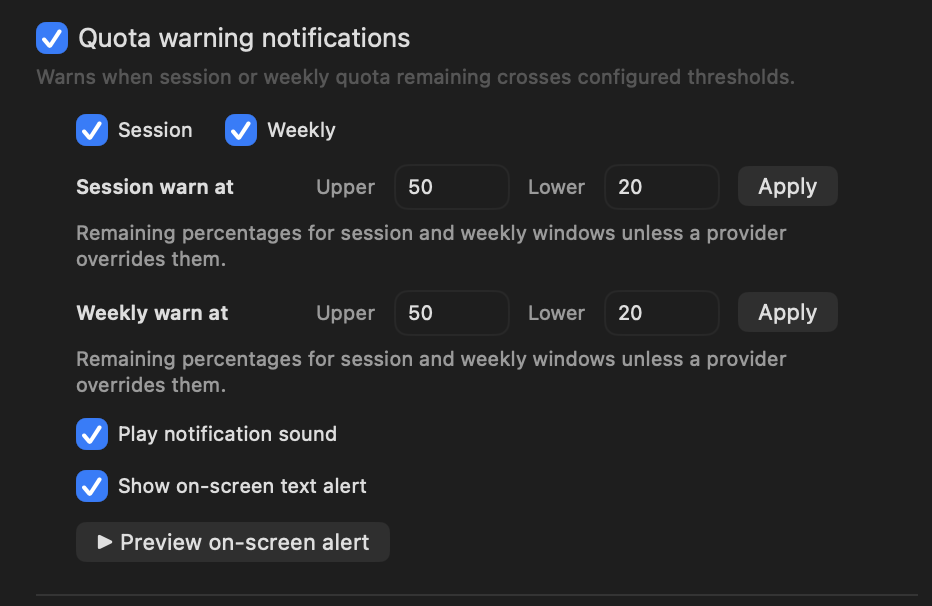
Adds a toggleable "Show on-screen text alert" setting next to the existing
"Play notification sound" checkbox in the Quota warning notifications section.

When enabled, crossing a session or weekly warning threshold presents a
transient, centered text card on screen (provider, window, and remaining %),
modeled on the existing confetti overlay: a borderless, click-through panel
that auto-dismisses and never steals focus. Off by default.

Closes steipete#1691

Co-Authored-By: Claude Opus 4.8 (1M context) <noreply@anthropic.com>

|
Codex review: needs maintainer review before merge. Reviewed June 20, 2026, 9:12 PM ET / 01:12 UTC. Summary Reproducibility: not applicable. this is a feature PR rather than a broken existing behavior. Current main lacks the alert toggle, and the PR screenshots show the new settings row and overlay rendering. Review metrics: 2 noteworthy metrics.
Root-cause cluster Members:
Proposal only: this assessment does not dispatch repair, suppress jobs, mutate sibling items, close, or merge anything. Merge readiness Overall follows the weaker of proof and patch quality, so missing proof can cap an otherwise strong patch. Rank-up moves:
Mantis proof suggestion Risk before merge
Maintainer options:
Next step before merge
Security Review detailsBest possible solution: If maintainers accept the feature, land the off-by-default overlay after normal validation and keep the linked feature request paired with this PR until merge. Do we have a high-confidence way to reproduce the issue? Not applicable: this is a feature PR rather than a broken existing behavior. Current main lacks the alert toggle, and the PR screenshots show the new settings row and overlay rendering. Is this the best way to solve the issue? Unclear until maintainer sign-off. The implementation shape is narrow and reuses existing warning copy, but accepting a new screen-level alert and privacy surface is a product decision. AGENTS.md: found and applied where relevant. Codex review notes: model internal, reasoning high; reviewed against 3f3e2f4a112a. Label changesLabel justifications:
Evidence reviewedWhat I checked:
Likely related people:
What the crustacean ranks mean
Shiny media proof means a screenshot, video, or linked artifact directly shows the changed behavior. Runtime, network, CSP, and security claims still need visible diagnostics. How this review workflow works
|
![chatgpt-codex-connector[bot]](https://avatars.githubusercontent.com/in/1144995?s=60&v=4)

There was a problem hiding this comment.
💡 Codex Review
Here are some automated review suggestions for this pull request.
Reviewed commit: 8cc47e6ea9
ℹ️ About Codex in GitHub
Codex has been enabled to automatically review pull requests in this repo. Reviews are triggered when you
- Open a pull request for review
- Mark a draft as ready
- Comment "@codex review".
If Codex has suggestions, it will comment; otherwise it will react with 👍.
When you sign up for Codex through ChatGPT, Codex can also answer questions or update the PR, like "@codex address that feedback".
| try? await Task.sleep(for: .seconds(Self.overlayLifetime)) | ||
| self?.dismiss() |
There was a problem hiding this comment.

When another warning arrives while an overlay is visible, show cancels the previous dismissalTask before assigning the replacement window; because this task swallows CancellationError from Task.sleep and then still calls dismiss(), the canceled old task can resume after the new window is stored and immediately close the new alert. This is reachable for back-to-back session/weekly threshold crossings in one refresh, so the on-screen alert can flash and disappear instead of staying up for 4.5 seconds; return on cancellation or gate dismissal to the task/window that scheduled it.
Useful? React with 👍 / 👎.
 clawsweeper
Bot
added
rating: 🧂 unranked krab
clawsweeper
Bot
added
rating: 🧂 unranked krab


|
Here's the new option in context — built and tested locally on macOS 26. Settings — the new "Show on-screen text alert" checkbox sits directly under "Play notification sound":
The alert itself — when enabled, crossing a session/weekly threshold presents a centered, click-through text card that auto-dismisses after ~4.5s:
|

|
@clawsweeper re-review Added real-behavior proof to the PR body: screenshots of the new Show on-screen text alert checkbox and the centered auto-dismissing overlay, captured from a freshly built CodexBar app (macOS 26). |
|
🦞🧹 I asked ClawSweeper to review this item again. |
clawsweeper
Bot
added
proof: sufficient
- QuotaWarningAlertOverlayController: bail out of the auto-dismiss task when
  it has been cancelled by a newer alert, so back-to-back session/weekly
  warnings don't tear down the replacement overlay early.
- Remove the CHANGELOG.md entry; release notes are release-owned in this repo
  (kept the context in the PR body instead).

Co-Authored-By: Claude Opus 4.8 (1M context) <noreply@anthropic.com>
|
Thanks for the thorough review! Addressed both findings in c3ee1ac:
The remaining items are maintainer product decisions for @steipete (opt-in screen-visible alert + privacy tradeoff). For context: the overlay reuses the exact same copy as the existing system notification, and the account name is already redacted upstream — |
|
@clawsweeper re-review Pushed |
|
🦞🧹 I asked ClawSweeper to review this item again. |
clawsweeper
Bot
added
rating: 🐚 platinum hermit
1 participant

Summary
Adds a toggleable "Show on-screen text alert" setting right next to the existing "Play notification sound" checkbox in the Quota warning notifications section.
When enabled, crossing a session or weekly warning threshold presents a transient, centered text card on screen showing the provider, window, and remaining percentage (reusing the existing quota-warning notification copy). It is modeled on the existing
ScreenConfettiOverlayController: a borderless, click-throughNSPanelabove all spaces that auto-dismisses after ~4.5s and never steals focus or blocks the user's work.Off by default to stay non-intrusive.
Implements the request in #1691.
Proof
Built and run locally on macOS 26, from a freshly built CodexBar app. No personal data is shown.
Settings — the new "Show on-screen text alert" checkbox sits directly under "Play notification sound":
The centered on-screen alert it produces (auto-dismisses after ~4.5s):
What changed
quotaWarningOnScreenAlertEnabledbool (UserDefaults keyquotaWarningOnScreenAlertEnabled, defaultfalse), wired throughSettingsStoreState,SettingsStore,SettingsStore+Defaults, the loader, and menu observation — mirroringquotaWarningSoundEnabledexactly..checkboxToggleinGlobalQuotaWarningSettingsView, with a new localization keyquota_warning_onscreen_alert="Show on-screen text alert"(en).QuotaWarningAlertOverlayController+ a small SwiftUI card (icon + title + body,.regularMaterialbackground, subtle spring-in). Centered on the main screen.SessionQuotaNotifier.postQuotaWarning(...)gains anonScreenAlertEnabledparameter and shows the overlay when set;UsageStorepasses the new setting. Protocol + the two test spies updated to match.Build & testing
swift build— build complete, app links cleanly with the change.make test/swiftformat/swiftlintlocally — the SwiftUI@Entry/#Previewmacro plugins and the swift-testing module for the Linux test target aren't available here. Code follows the existing style (4-space indent, ≤120 cols, explicitself). Happy to adjust to whatever CI/format flags.Notes / open questions
*.lprojfiles fall back to English viaL(). Glad to add translations or follow whatever localization sync flow you prefer.CHANGELOG.mdentry if you'd rather handle release notes through your own release flow — just say the word.