Slips is a machine learning-based intrusion prevention system for Linux and MacOS, developed at the Stratosphere Laboratories from the Czech Technical University in Prague. Slips reads network traffic flows from several sources, applies multiple detections (including machine learning detections) and detects infected computers and attackers in the network. It is easy to extend the functionality of Slips by writing a new module. This blog shows how to create a new module for Slips from scratch.
This blog creates an example module to detect when any private IP address communicates with another private IP address. What we want is to know if, for example, the IP 192.168.4.2, is communicating with the IP 192.168.4.87. This simple idea, but still useful, is going to be the purpose of our module. Also, it will generate an alert for Slips to consider this situation. Our module will be called local_connection_detector.
All modules implement the IModule interface located at slips_files/common/abstracts/module.py
Abstract methods in this interface must be implemented in every new slips module, the rest are optional.
Below is a detailed desciption of each abstract method.
The Module consists of the init() function for initializations, like subscribing to channels, reading API files, etc.
The main function of each module is the main(),
this function is run in a loop that keeps looping as long as
Slips is running so that the module doesn't terminate.
In case of errors in the module, the main() function should return 1 which will cause
the module to immediately terminate.
any initializations that should be run only once should be placed in the init() function
OR the pre_main(). the pre_main() is a function that acts as a hook for the main function. it runs only
once and then the main starts running in a loop.
the pre_main() is the place for initialization logic that cannot be done in the init, for example
dropping the root privileges from a module. we'll discuss this in detail later.
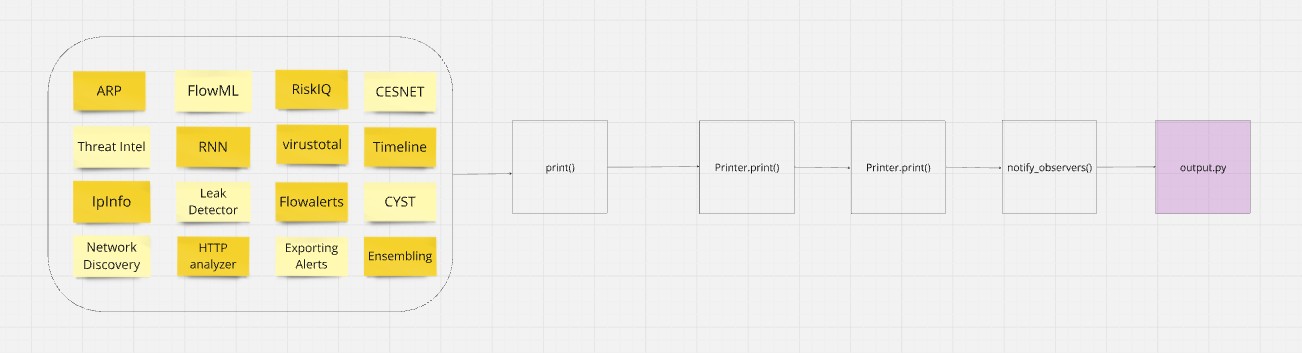
Printing in all modules is handled by a common print() method, the one implemented in the IModule interface.
All this common print() does is acts as a proxy between the module responsible for printing, output.py, and all slips modules.
Each Module has its own shutdown_gracefully() function
that handles cleaning up after the module is done processing.
It handles for example:
- Saving a model before Slips stops
- Saving alerts in a .txt file if the module's job is to export alerts
- Telling the main module (slips.py) that the module is done processing so slips.py can kill it etc.
When Slips runs, it automatically loads all the modules inside the modules/ directory. Therefore,
our new module should be placed there.
Slips has a template module directory that we are going to copy and then modify for our purposes.
cp -a modules/template modules/local_connection_detectorEach module in Slips should have a name, author and description.
We should change the name inside the python file by finding the lines with the name and description in the class 'Module' and changing them:
name = 'local_connection_detector'
description = (
    'detects connections to other devices in your local network'
    )
authors = ['Your name']
Also change the name of the class to something like this
class LocalConnectionDetector(IModule):
    ...
At the end you should have a structure like this:
modules/
├─ local_connection_detector/
│  ├─ __init__.py
│  ├─ local_connection_detector.py
The init.py is to make sure the module is treated as a python package, don't delete it.
Remember to delete the pycache dir if it's copied to the new module using:
rm -r modules/local_connection_detector/__pycache__
First, some initialization in the init():
- we need to subscribe to the channel
new_flow - to be able to convert the flows received in the above channel from dict format to objects, we'll need a classifier
self.c1 = self.db.subscribe('new_flow')

# add this channel to the module's list of channels
# this list will be used to get msgs from the channel later
self.channels = {
    'new_flow': self.c1,
}

# to be able to convert flows from dict format to objects
self.classifier = FlowClassifier()
So now everytime slips sees a new flow, you can access it from your module using the following line
msg = self.get_msg('new_flow')the implementation of the get_msg() is placed in the abstract module in slips_files/common/abstracts/module.py
and is inherited by all modules.
The above line checks if a message was received from the new_flow channel that you subscribed to.
Now, you can access the content of the flow using
flow = msg['data']Thus far, we have the following code to prep the module for receiving new flows
def init(self):
    self.c1 = self.db.subscribe('new_flow')
    self.channels = {
        'new_flow': self.c1,
    }
    # to be able to convert flows from dict format to objects
    self.classifier = FlowClassifier()
def pre_main(self):
"""
Initializations that run only once before the main() function runs in a loop
"""
utils.drop_root_privs() def main(self):
"""Main loop function"""
if msg:= self.get_msg('new_flow'):
#TODO
passNow that we have the flow, we need to:
- Extract the source IP
- Extract the destination IP
- Check if both of them are private
- Generate an evidence
Extracting IPs is done by the following:
msg = json.loads(msg['data'])
# convert the given dict flow to a flow object
flow = self.classifier.convert_to_flow_obj(msg["flow"])
saddr = flow.saddr
daddr = flow.daddr
timestamp = flow.starttime
The above snippet should be in the main() function, since we wanna repeat it in a loop everytime we get a new flow
Now we need to check if both of them are private.
import ipaddress
srcip_obj = ipaddress.ip_address(saddr)
dstip_obj = ipaddress.ip_address(daddr)
if srcip_obj.is_private and dstip_obj.is_private:
    #TODO
    pass
Now that we're sure both IPs are private, we need to generate an alert.
Slips requires certain info about the evidence to be able to deal with them.
First, since we are creating a new type of evidence that is not defined in the EvidenceType Enum in
slips_files/core/structure/evidence.py, we need to add a new type there.
so the EvidenceType Enum in slips_files/core/structures/evidence.py would look something like this
class EvidenceType(Enum):
    """
    These are the types of evidence slips can detect
    """
    ...
    CONNECTION_TO_LOCAL_DEVICE = auto()
    ...
Now we have our evidence type supported. it's time to set the evidence!
Now we need to use the Evidence structure of slips, to do that, First import the necessary dataclasses
from slips_files.core.evidence_structure.evidence import \
    (
        Evidence,
        ProfileID,
        TimeWindow,
        Victim,
        Attacker,
        ThreatLevel,
        EvidenceType,
        IoCType,
        Direction,
    )
now use them,
# on a scale of 0 to 1, how confident you are of this evidence
confidence = 0.8
# how dangerous is this evidence? info, low, medium, high, critical?
threat_level = ThreatLevel.HIGH

# the name of your evidence, you can put any descriptive string here
# this is the type we just created
evidence_type = EvidenceType.CONNECTION_TO_LOCAL_DEVICE
# which ip is the attacker here?
attacker = Attacker(
        direction=Direction.SRC, # who's the attacker the src or the dst?
        attacker_type=IoCType.IP, # is it an IP? is it a domain? etc.
        value=saddr # the actual ip/domain/url of the attacker, in our case, this is the IP
        )
victim = Victim(
        direction=Direction.SRC,
        victim_type=IoCType.IP,
        value=daddr,
        )
# describe the evidence
description = f'A connection to a local device {daddr}'
# the current profile is the source ip,
# this comes in the msg received in the channel
# the profile this evidence should be in, should be the profile of the attacker
# because this is evidence that this profile is attacker others right?
profile = ProfileID(ip=saddr)
# Profiles are split into timewindows, each timewindow is 1h,
# this if of the timewindwo comes in the msg received in the channel
twid_number = int(
    msg['twid'].replace("timewindow",'')
    )
timewindow = TimeWindow(number=twid_number)
# how many flows formed this evidence?
# in the case of scans, it can be way more than 1
conn_count = 1
# list of uids of the flows that are part of this evidence
uid_list = [flow.uid]
# no use the above info to create the evidence obj
evidence = Evidence(
                evidence_type=evidence_type,
                attacker=attacker,
                threat_level=threat_level,
                description=description,
                victim=victim,
                profile=profile,
                timewindow=timewindow,
                uid=uid_list,
                # when did this evidence happen? use the
                # flow's ts detected by zeek
                # this comes in the msg received in the channel
                timestamp=timestamp,
                conn_count=conn_count,
                confidence=confidence
            )
self.db.set_evidence(evidence)The module is now ready to be used. You can copy/paste the complete code that is here
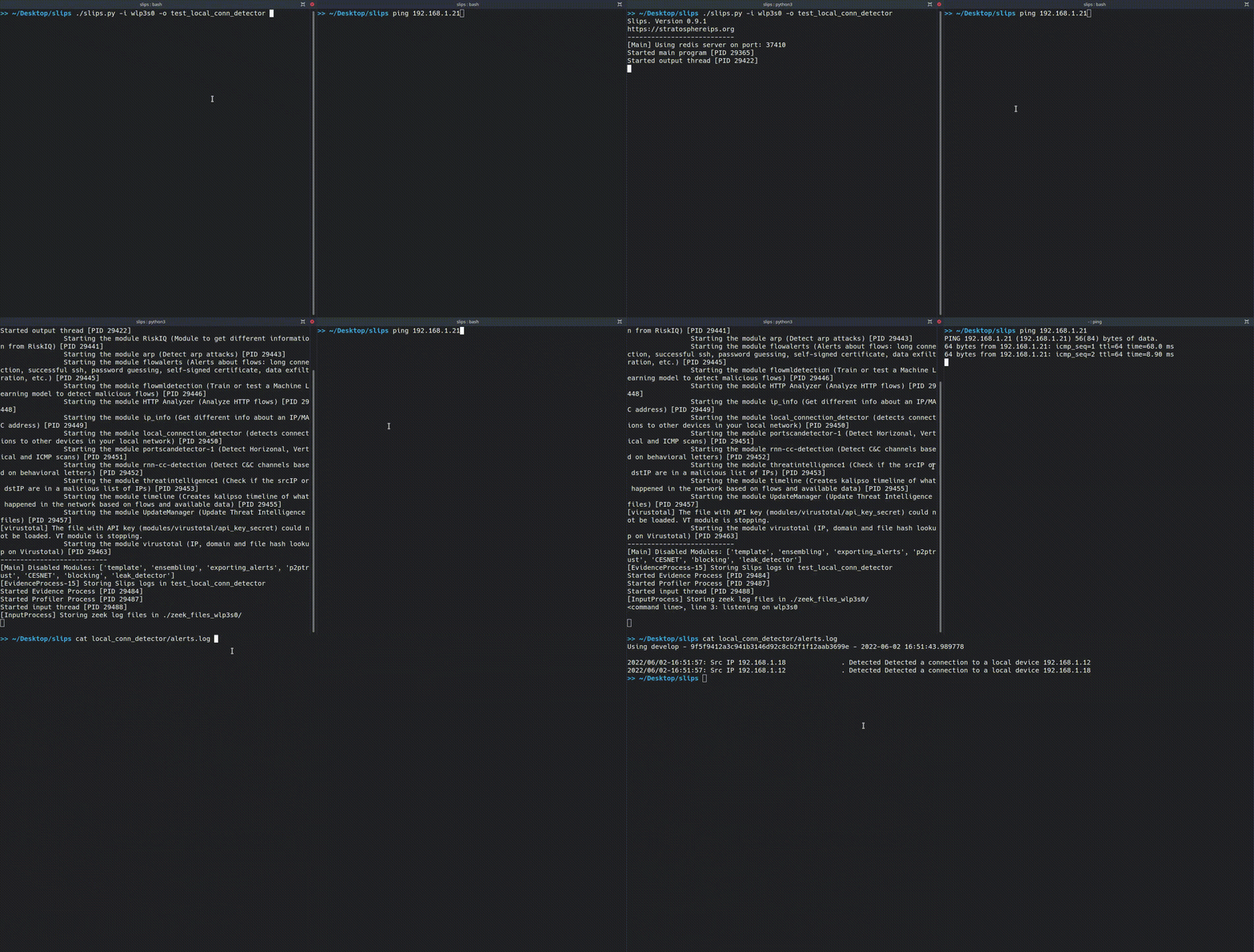
First we start Slips by using the following command:
./slips.py -i wlp3s0 -o local_conn_detector-o is to store the output in the local_conn_detector/ dir.
Then we make a connnection to a local ip (change it to a host you know is up in your network)
ping 192.168.1.18
And you should see your alerts in ./local_conn_detector/alerts.log by using
cat local_conn_detector/alerts.log
Using develop - 9f5f9412a3c941b3146d92c8cb2f1f12aab3699e - 2022-06-02 16:51:43.989778

2022/06/02-16:51:57: Src IP 192.168.1.18              . Detected a connection to a local device 192.168.1.12
2022/06/02-16:51:57: Src IP 192.168.1.12              . Detected a connection to a local device 192.168.1.18
Due to the high modularity of slips, adding a new slips module is as easy as modifying a few lines in our template module, and slips handles running your module and integrating it for you.
This is the list of the modules Slips currently have. You can enhance them, add detections, suggest new ideas using our Discord or by opening a PR.
For more info about the threat levels, check the docs
Detailed explanation of IDEA categories here
Detailed explanation of Slips profiles and timewindows here
Here is the whole local_connection_detector.py code for copy/paste.
import ipaddress
import json

from slips_files.common.flow_classifier import FlowClassifier
from slips_files.core.structures.evidence import

(
    Evidence,
    ProfileID,
    TimeWindow,
    Victim,
    Attacker,
    ThreatLevel,
    EvidenceType,
    IoCType,
    Direction,
    )
from slips_files.common.parsers.config_parser import ConfigParser
from slips_files.common.slips_utils import utils
from slips_files.common.abstracts.imodule import IModule


class LocalConnectionDetector(
    IModule
    ):
    # Name: short name of the module. Do not use spaces
    name = 'local_connection_detector'
    description = 'detects connections to other devices in your local network'
    authors = ['Template Author']


    def init(
        self
        ):
        # To which channels do you want to subscribe? When a message
        # arrives on the channel the module will receive a msg

        # You can find the full list of channels at
        # slips_files/core/database/redis_db/database.py
        self.c1 = self.db.subscribe(
            'new_flow'
            )
        self.channels = {
            'new_flow': self.c1,
            }
        # to be able to convert flows from dict format to objects
        self.classifier = FlowClassifier()


    def pre_main(
        self
        ):
        """
        Initializations that run only once before the main() function runs in a loop
        """
        utils.drop_root_privs()


    def main(
        self
        ):
        """Main loop function"""
        if msg := self.get_msg(
                'new_flow'
                ):
            msg = json.loads(
                msg['data']
                )
            # convert the given dict flow to a flow object
            flow = self.classifier.convert_to_flow_obj(
                msg["flow"]
                )
            saddr = flow.saddr
            daddr = flow.daddr
            timestamp = flow.starttime
            srcip_obj = ipaddress.ip_address(
                saddr
                )
            dstip_obj = ipaddress.ip_address(
                daddr
                )
            if srcip_obj.is_private and dstip_obj.is_private:
                # on a scale of 0 to 1, how confident you are of this evidence
                confidence = 0.8
                # how dangerous is this evidence? info, low, medium, high, critical?
                threat_level = ThreatLevel.HIGH

                # the name of your evidence, you can put any descriptive string here
                # this is the type we just created
                evidence_type = EvidenceType.CONNECTION_TO_LOCAL_DEVICE
                # which ip is the attacker here?
                attacker = Attacker(
                    direction=Direction.SRC,
                    # who's the attacker the src or the dst?
                    attacker_type=IoCType.IP,
                    # is it an IP? is it a domain? etc.
                    value=saddr
                    # the actual ip/domain/url of the attacker, in our case, this is the IP
                    )
                victim = Victim(
                    direction=Direction.SRC,
                    ioc_type=IoCType.IP,
                    value=daddr,
                    )
                # describe the evidence
                description = f'A connection to a local device {daddr}'
                # the current profile is the source ip,
                # this comes in the msg received in the channel
                # the profile this evidence should be in, should be the profile of the attacker
                # because this is evidence that this profile is attacker others right?
                profile = ProfileID(
                    ip=saddr
                    )
                # Profiles are split into timewindows, each timewindow is 1h,
                # this if of the timewindwo comes in the msg received in the channel
                twid_number = int(
                    msg['twid'].replace(
                        "timewindow",
                        ''
                        )
                    )
                timewindow = TimeWindow(
                    number=twid_number
                    )
                # list of uids of the flows that are part of this evidence
                uid_list = [flow.uid]
                # no use the above info to create the evidence obj
                evidence = Evidence(
                    evidence_type=evidence_type,
                    attacker=attacker,
                    threat_level=threat_level,
                    description=description,
                    victim=victim,
                    profile=profile,
                    timewindow=timewindow,
                    uid=uid_list,
                    # when did this evidence happen? use the
                    # flow's ts detected by zeek
                    # this comes in the msg received in the channel
                    timestamp=timestamp,
                    confidence=confidence
                    )
                self.db.set_evidence(
                    evidence
                    )
                self.print(
                    "Done setting evidence!!!"
                    )
All good, you can find your evidence now in alerts.json and alerts.log of the output directory.
This section is for more detailed explanation of what each line of the module does.
In order to print in your module, you simply use the following line
self.print("some text", 1, 0)
and the text will be sent to the output process for logging and printing to the terminal.
Now here's the pre_main() function, all initializations like dropping root privs, checking for API keys, etc
should be done here
utils.drop_root_privs()the above line is responsible for dropping root privileges, so if slips starts with sudo and the module doesn't need the root permissions, we drop them.
Now here's the main() function, this is the main function of each module,
it's the one that gets executed in a loop when the module starts.
All the code in this function is run in a loop as long as the module is up.
in case of an error, the module's main should return non-zero and
the module will finish execution and terminate.
if there's no errors, the module will keep looping until it runs out of msgs in the redis channels
and will call shutdown_gracefully() and terminate.
if msg := self.get_msg('new_flow'):The above line listens on the channel called new_flow that we subscribed to earlier.
The messages received in the channel are flows the slips read by the input process.
Slips relies on input process for reading flows, either from an interface, a pcap, or zeek files, etc.
If you want to add your own module that reads flows from somehwere else,
for example from a simulation framework like the CYST module,
you can easily do that using the --input-module <module_name> parameter
Reading flows should be handeled by that module, then sent to the inputprocess for processing using the
new_module_flow channel.
For now, this feature only supports reading flows in zeek json format, but feel free to extend it.
So, for example if you're training a ML model in your module, and you want to save it before the module stops,
You should place your save_model() function in the shutdown_gracefully() function.
-
If the module does not start at all, make sure it is not disabled in the
config/slips.yamlfile. -
Check that the __init__.py file is present in module directory
-
Read the output files (errors.log and slips.log) - if there were any errors (eg. import errors), they would prevent the module from starting.
-
If the module started, but did not receive any messages from the channel, make sure that:
-
The channel is properly subscribed to in the module
-
Messages are being sent in this channel
-
Other modules subscribed to the channel get the message
-
The channel name is present in the supported_channels list in
slips_files/core/database/redis_db/database.py
-
Slips has 2 kinds of tests, unit tests and integration tests.
integration tests are in tests/integration_tests/, In there we test all files in our dataset/ dir.
Before pushing, run the unit tests and integration tests by:
1- Make sure you're in slips main dir
2- Run all tests ./tests/run_all_tests.sh
Slips supports the -P flag to run redis on your port of choice. this flag is used so that slips can keep track of the ports it opened while testing and close them later.
Slips uses pytest as the main testing framework, You can add your own unit tests by:
1- create a file called test_module_name.py in the tests/ dir
2- create a method for initializing your module in tests/module_factory.py
3- every function should start with test_
4- go to the main slips dir and run ./tests/run_all_tests.sh and every test file in the tests/ dir will run
Feel free to join our Discord server and ask questions, suggest new features or give us feedback.
PRs and Issues are welcomed in our repo.
Adding a new feature to SLIPS is an easy task. The template is ready for everyone to use and there is not much to learn about Slips to be able to write a module.
If you wish to add a new module to the Slips repository, issue a pull request and wait for a review.