中文文档在这里:中文文档
This bundle integration tui.editor for your symfony project. The code for this bundle was modified from FOSCKEditorBundle. Thanks FOSCKEditorBundle author:Eric Geleon and FriendsOfSymfony Community , your code is cool. Thanks MIT License.
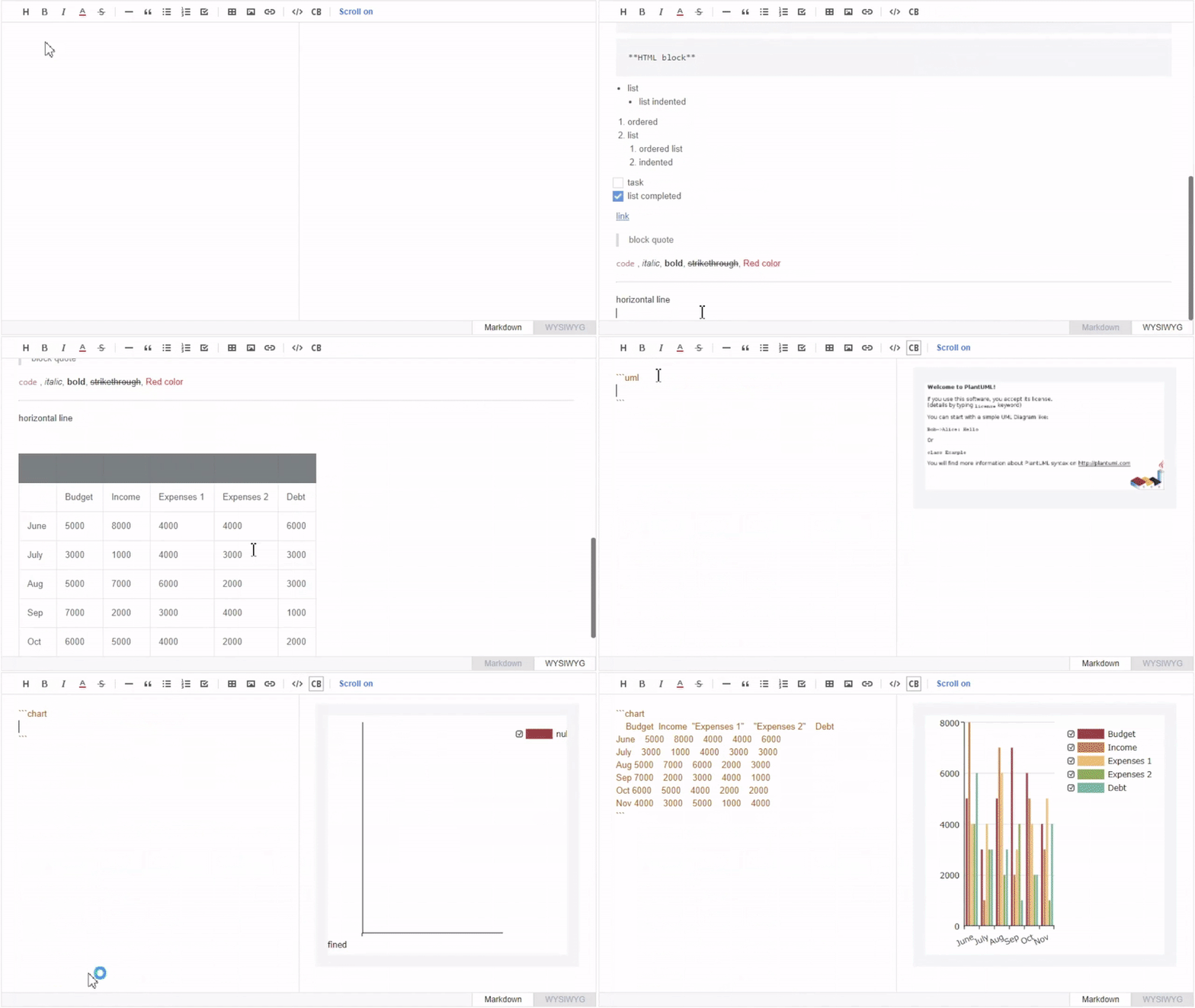
Open a command console, enter your project directory and execute:
$ composer require teebbstudios/tuieditor-bundleOpen a command console, enter your project directory and execute the following command to download the latest stable version of this bundle:
$ composer require teebbstudios/tuieditor-bundleThis command requires you to have Composer installed globally, as explained in the installation chapter of the Composer documentation.
Then, enable the bundle by adding it to the list of registered bundles
in the app/AppKernel.php file of your project:
// app/AppKernel.php

// ...
class AppKernel extends Kernel
{
    public function registerBundles()
    {
        $bundles = [
            // ...
            new Teebb\TuiEditorBundle\TeebbTuiEditorBundle(),
        ];

        // ...
    }

    // ...
}Download the latest tui.editor-bundles in your project.
$ php bin/console tuieditor:installThis will download the tui.editor all resources to TeebbTuiEditorBundle src/Resources/public folder. Then:
$ php bin/console assets:install --symlinkYou can add a config file in config/packages folder.(Just a simple config, But you can use the following configuration completely):
#config/packages/teebb_tuieditor.yaml
teebb_tui_editor:
    #enable: true                                           # Whether to enable tui.editor.
    #jquery:
        #enable: false                                      # Whether to enable jquery.
        #js_paths:                                          #  Custom jquery path.
            #- /bundles/teebbtuieditor/tui.editor-bundles/js/jquery.min.js
    #asset_repository: 'teebbstudios/tui.editor-bundles'    # Public assets installer repository
    # ...                                                   # more config options, you can see: bin/console debug:config teebb_tui_editor

    #editor:
        #js_paths:
            #- /bundles/teebbtuieditor/tui.editor-bundles/js/toast-ui-editor-bundle.js
        #css_paths:
            #- /bundles/teebbtuieditor/tui.editor-bundles/css/toastui-editor.css
        #options:
            #height: 'auto'                                 # Editor's height style value. Height is applied as border-box ex) '300px', '100%', 'auto'
            #initial_edit_type: 'wysiwyg'                   # Initial editor type (markdown, wysiwyg)
            #preview_style: 'vertical'                      # Markdown editor's preview style (tab, vertical)
            #theme: 'dark'                                  # override editor color scheme with dark theme
            #toolbar_items:
                #- ['heading', 'bold', 'italic', 'strike']
                #- ['hr', 'quote']
                #- ['ul', 'ol', 'task', 'indent', 'outdent']
                #- ['table', 'image', 'link']
                #- ['code', 'codeblock']
    #viewer:
        #js_paths:
            #- /bundles/teebbtuieditor/tui.editor-bundles/js/toast-ui-viewer-bundle.js
        #css_paths:
            #- /bundles/teebbtuieditor/tui.editor-bundles/css/toastui-editor-viewer.css
        #options:
            #height: 'auto'                                 # Viewer's height style value. Height is applied as border-box ex) '300px', '100%', 'auto'
    #extensions:                                            # extensions must defined as array of plugin_name variable or [plugin_name, [plugin_options]]
        #chart:                                             # chart custom options
            #js_paths:
                #- /bundles/teebbtuieditor/tui.editor-bundles/js/toast-ui-chart-bundle.js
            #css_paths:
                #- /bundles/teebbtuieditor/tui.editor-bundles/css/toastui-chart.min.css
            #options:
                #width: 'auto'                              # number|string	'auto'	Default width value
                #height: 'auto'                             # number|string	'auto'	Default height value
                #minWidth: 0                                # number	0	Minimum width value
                #maxWidth: 0                                # number	0	Minimum height value
                #minHeight: Infinity                        # number    Infinity	Maximum width value
                #maxHeight: Infinity                        # number	Infinity	Maximum height value
        #codeSyntaxHighlight:
            #js_paths:
                #- /bundles/teebbtuieditor/tui.editor-bundles/js/toast-ui-code-syntax-highlight-bundle.js
            #css_paths:
                #- /bundles/teebbtuieditor/tui.editor-bundles/css/toastui-editor-plugin-code-syntax-highlight.css
        #colorSyntax:                                       # colorSyntax custom options
            #js_paths:
                #- /bundles/teebbtuieditor/tui.editor-bundles/js/toast-ui-color-syntax-bundle.js
            #css_paths:
                #- /bundles/teebbtuieditor/tui.editor-bundles/css/toastui-editor-plugin-color-syntax.css
                #- /bundles/teebbtuieditor/tui.editor-bundles/css/tui-color-picker.css
            #options:
                #preset: ['#181818', '#292929']         # [required] preset	Array.<string>		Preset for color palette
        #tableMergedCell:
            #js_paths:
                #- /bundles/teebbtuieditor/tui.editor-bundles/js/toast-ui-table-merged-cell-bundle.js
            #css_paths:
                #- /bundles/teebbtuieditor/tui.editor-bundles/css/toastui-editor-plugin-table-merged-cell.css
        #uml:                                               # uml custom options
            #js_paths:
                #- /bundles/teebbtuieditor/tui.editor-bundles/js/toast-ui-uml-bundle.js
            #options:
                #rendererURL: ~                             # [required]string	'http://www.plantuml.com/plantuml/png/'	URL of plant uml renderer
    #dependencies:                                          # You may add any dependancy that you need here
        #editor_dark_theme:
            #css_paths:
                #- /bundles/teebbtuieditor/tui.editor-bundles/css/toastui-editor-dark.css

    default_config: basic_config
    configs:
        basic_config:
            to_html: false                                  # Save to database use html syntax?
            #editor:
                #js_paths:
                    - /bundles/teebbtuieditor/tui.editor-bundles/js/toast-ui-editor-bundle.js
                #css_paths:
                    #- /bundles/teebbtuieditor/tui.editor-bundles/css/toastui-editor.css
                #options:
                    #height: 'auto'                             # Editor's height style value. Height is applied as border-box ex) '300px', '100%', 'auto'
                    #initial_edit_type: 'wysiwyg'               # Initial editor type (markdown, wysiwyg)
                    #preview_style: 'vertical'                  # Markdown editor's preview style (tab, vertical)
                    #theme: 'dark'                              # override editor color scheme with dark theme
                    #toolbar_items:
                        #- ['heading', 'bold', 'italic', 'strike']
                        #- ['hr', 'quote']
                        #- ['ul', 'ol', 'task', 'indent', 'outdent']
                        #- ['table', 'image', 'link']
                        #- ['code', 'codeblock']
            #viewer:
                #js_paths:
                    #- /bundles/teebbtuieditor/tui.editor-bundles/js/toast-ui-viewer-bundle.js
                #css_paths:
                    #- /bundles/teebbtuieditor/tui.editor-bundles/css/toastui-editor-viewer.css
                #options:
                    #height: 'auto'                             # Viewer's height style value. Height is applied as border-box ex) '300px', '100%', 'auto'
            extensions:                                            # extensions must defined as array of plugin_name variable or [plugin_name, [plugin_options]]
                chart:                                             # chart custom options
                    #js_paths:
                        #- /bundles/teebbtuieditor/tui.editor-bundles/js/toast-ui-chart-bundle.js
                    #css_paths:
                        #- /bundles/teebbtuieditor/tui.editor-bundles/css/toastui-chart.min.css
                    #options:
                        #width: 'auto'                              # number|string	'auto'	Default width value
                        #height: 'auto'                             # number|string	'auto'	Default height value
                        #minWidth: 0                                # number	0	Minimum width value
                        #maxWidth: 0                                # number	0	Minimum height value
                        #minHeight: Infinity                        # number    Infinity	Maximum width value
                        #maxHeight: Infinity                        # number	Infinity	Maximum height value
                codeSyntaxHighlight:
                    #js_paths:
                        #- /bundles/teebbtuieditor/tui.editor-bundles/js/toast-ui-code-syntax-highlight-bundle.js
                    #css_paths:
                        #- /bundles/teebbtuieditor/tui.editor-bundles/css/toastui-editor-plugin-code-syntax-highlight.css
                colorSyntax:                                       # colorSyntax custom options
                    #js_paths:
                        #- /bundles/teebbtuieditor/tui.editor-bundles/js/toast-ui-color-syntax-bundle.js
                    #css_paths:
                        #- /bundles/teebbtuieditor/tui.editor-bundles/css/toastui-editor-plugin-color-syntax.css
                        #- /bundles/teebbtuieditor/tui.editor-bundles/css/tui-color-picker.css
                    #options:
                        #preset: ['#181818', '#292929']         # [required] preset	Array.<string>		Preset for color palette
                tableMergedCell:
                    #js_paths:
                        #- /bundles/teebbtuieditor/tui.editor-bundles/js/toast-ui-table-merged-cell-bundle.js
                    #css_paths:
                        #- /bundles/teebbtuieditor/tui.editor-bundles/css/toastui-editor-plugin-table-merged-cell.css
                uml:                                               # uml custom options
                    #js_paths:
                        #- /bundles/teebbtuieditor/tui.editor-bundles/js/toast-ui-uml-bundle.js
                    #options:
                        #rendererURL: ~                             # [required]string	'http://www.plantuml.com/plantuml/png/'	URL of plant uml renderer
            #dependencies:                                          # You may add any dependancy that you need here
                #editor_dark_theme:                                 # Must include if using 'dark' theme
                    #css_paths:
                        #- /bundles/teebbtuieditor/tui.editor-bundles/css/toastui-editor-dark.css
Caution
asset_repository config is the GitHub repository that will be used for the php bin/console tuieditor:install command, the script will look for the latest release and download all files into the TeebbTuiEditorBundle src/Resources/public folder. Use only trusted repository for this bundle.
You can config tui.editor language.
#config/services.yaml

parameters:
    locale: 'zh_CN'                   # Change the locale
Add the tui.editor dependencies in your page top. For example:
{{ tuieditor_dependencies() }}This will add the tui.editor dependencies JS and CSS libs like:
<link rel="stylesheet" href="/bundles/teebbtuieditor/tui.editor-bundles/css/toastui-editor-dark.css">Second, use the TuiEditorType in your form field:
use Teebb\TuiEditorBundle\Form\Type\TuiEditorType;

class ArticleType extends AbstractType
{
    public function buildForm(FormBuilderInterface $builder, array $options)
    {
        $builder
            // ...
            ->add('body', TuiEditorType::class)
        ;
    }

    // ...
} If you were saved markdown syntax in the database. Then you can use the twig function tuieditor_viewer_widget to render the markdown syntax content.
The first parameter id: div DOM id.
The second parameter content: twig variable, the markdown syntax content.
Tips: Don't forget render the dependencies in the page top!
<div id="id"></div>
{{ tuieditor_viewer_widget("id", content) }}Yeah! Good Job! The tui.editor will use in your page. Now you can use your inspiration to create.