Added Review & Clone Tests, Comments & Alerts docs #109
Conversation


* Added Review & Clone Tests, Comments & Alerts docs

* Update microsoft-teams.md

WalkthroughThis PR expands documentation and navigation for Test Management by Testsigma, adding new pages for notifications (Email, Slack, Microsoft Teams), SMTP configuration, test case operations (cloning, commenting, review management), updating dashboard reporting documentation with enhanced metrics and filters, and integrating these features into the left navigation structure. Changes
Estimated code review effort🎯 3 (Moderate) | ⏱️ ~25 minutes
Possibly related PRs
Suggested reviewers
Poem
Pre-merge checks and finishing touches✅ Passed checks (3 passed)
✨ Finishing touches🧪 Generate unit tests (beta)
Thanks for using CodeRabbit! It's free for OSS, and your support helps us grow. If you like it, consider giving us a shout-out. Comment |
![coderabbitai[bot]](https://avatars.githubusercontent.com/in/347564?s=60&v=4)

There was a problem hiding this comment.
Actionable comments posted: 6
Caution
Some comments are outside the diff and can’t be posted inline due to platform limitations.
⚠️ Outside diff range comments (1)
src/pages/docs/test-management/reports/dashboard-reports.md (1)
15-35: Fix duplicate and malformed contextual navigation link.Two issues in the contextual links:
- Duplicate entry: "Test Case Review Status" appears twice (lines 16-17 and 33-35), violating DRY and creating confusing navigation.
- Anchor mismatch: Line 17 uses
#Test Case Review Status(with spaces and mixed case), while line 35 correctly uses#test-case-review-status(lowercase with hyphens). The anchor on line 17 won't resolve correctly to the section heading at line 177.Remove the duplicate and ensure consistent anchor formatting.
🔎 Apply this diff:
  - type: link
-   name: 'Test Case Review Status'
-   url: '#Test Case Review Status'
- - type: link
+   name: 'Summary Metrics'
+   url: '#summary-metrics'
  - type: link
    name: 'Active Runs'
    url: '#active-runs'
  - type: link
    name: 'Closed Test Runs'
    url: '#closed-test-runs'
  - type: link
    name: 'Results from Closed Test Runs'
    url: '#results-from-closed-test-runs'
  - type: link
    name: 'Defects Logged'
    url: '#defects-logged'
  - type: link
    name: 'Test Case Review Status'
    url: '#test-case-review-status'
🧹 Nitpick comments (3)
src/pages/docs/test-management/test-cases/comment-in-test-cases.md (1)
74-82: Repetitive sentence structure in procedural steps.Static analysis flagged that lines 74, 78, and 80 all begin with "Click." While this is acceptable and common in procedural documentation, you may optionally vary the wording for improved readability.
Based on static analysis hints (LanguageTool).
src/pages/docs/test-management/settings/notifications/email.md (1)
29-29: Use markdown blank lines instead of<br>tags.Markdown documentation typically uses blank lines for spacing rather than HTML
<br>tags. This maintains consistency with markdown idioms and improves maintainability.🔎 Apply this diff:
-<br>
+
src/pages/docs/test-management/settings/notifications/microsoft-teams.md (1)
29-29: Use markdown blank lines instead of<br>tags.Consistent with the email.md file, use markdown blank lines for spacing rather than HTML
<br>tags.🔎 Apply this diff:
-<br>
+
📜 Review details
Configuration used: defaults
Review profile: CHILL
Plan: Pro
📒 Files selected for processing (11)
src/left-nav-title.json(1 hunks)src/pages/docs/test-management/reports/dashboard-reports.md(4 hunks)src/pages/docs/test-management/settings/custom-fields.md(3 hunks)src/pages/docs/test-management/settings/notifications/email.md(1 hunks)src/pages/docs/test-management/settings/notifications/microsoft-teams.md(1 hunks)src/pages/docs/test-management/settings/notifications/overview.md(1 hunks)src/pages/docs/test-management/settings/notifications/slack.md(1 hunks)src/pages/docs/test-management/settings/smtp-configuration.md(1 hunks)src/pages/docs/test-management/test-cases/clone-test-cases.md(1 hunks)src/pages/docs/test-management/test-cases/comment-in-test-cases.md(1 hunks)src/pages/docs/test-management/test-cases/review-management.md(1 hunks)
🧰 Additional context used
🪛 LanguageTool
src/pages/docs/test-management/test-cases/comment-in-test-cases.md
[style] ~78-~78: Three successive sentences begin with the same word. Consider rewording the sentence or use a thesaurus to find a synonym.
Context: ...e Emoji icon to add a reaction. 3. Click the Edit icon to modify a comment, ...
(ENGLISH_WORD_REPEAT_BEGINNING_RULE)
[style] ~80-~80: Three successive sentences begin with the same word. Consider rewording the sentence or use a thesaurus to find a synonym.
Context: ... comment, click Update Comment. 4. Click the meatballs menu (⋯) on a comment...
(ENGLISH_WORD_REPEAT_BEGINNING_RULE)
src/pages/docs/test-management/settings/custom-fields.md
[style] ~73-~73: You have already used this phrasing in nearby sentences. Consider replacing it to add variety to your writing.
Context: ...t Cases** and select the test cases you want to update. 2. Press Command+K, and ch...
(REP_WANT_TO_VB)
[style] ~75-~75: You have already used this phrasing in nearby sentences. Consider replacing it to add variety to your writing.
Context: ...**, and choose the Custom Field you want to edit from the available options. 3. In...
(REP_WANT_TO_VB)
[style] ~78-~78: You have already used this phrasing in nearby sentences. Consider replacing it to add variety to your writing.
Context: ...dialog: - Select/enter the value you want to apply. - Click **Update <number&g...
(REP_WANT_TO_VB)
🪛 markdownlint-cli2 (0.18.1)
src/pages/docs/test-management/settings/notifications/overview.md
40-40: Unordered list indentation
Expected: 0; Actual: 3
(MD007, ul-indent)
41-41: Unordered list indentation
Expected: 0; Actual: 3
(MD007, ul-indent)
42-42: Unordered list indentation
Expected: 0; Actual: 3
(MD007, ul-indent)
src/pages/docs/test-management/settings/smtp-configuration.md
35-35: Multiple spaces after blockquote symbol
(MD027, no-multiple-space-blockquote)
36-36: Multiple spaces after blockquote symbol
(MD027, no-multiple-space-blockquote)
37-37: Multiple spaces after blockquote symbol
(MD027, no-multiple-space-blockquote)
38-38: Multiple spaces after blockquote symbol
(MD027, no-multiple-space-blockquote)
⏰ Context from checks skipped due to timeout of 90000ms. You can increase the timeout in your CodeRabbit configuration to a maximum of 15 minutes (900000ms). (1)
- GitHub Check: CI
🔇 Additional comments (12)
src/pages/docs/test-management/settings/notifications/email.md (3)
1-27: LGTM on front matter and navigation structure.The metadata, page ordering, and contextual links are well-structured and consistent with documentation standards. The order value (10.82) provides appropriate sequencing within the notifications section.
104-104: The referenced SMTP Configuration link may be broken or incorrect.The URL (https://testsigma.com/docs/test-management/settings/smtp-configuration/) could not be verified as it does not appear in Testsigma's accessible documentation. Either the page does not exist, the URL is incorrect, or the documentation has been moved. Confirm the correct documentation link before merging.
115-115: The S3 image URL syntax is correct and follows Testsigma's established conventions, but actual accessibility verification requires external HTTP requests or AWS credential access beyond this environment's capabilities. The URL format at line 115 is valid for S3 path-style references and aligns with Testsigma's documented S3 bucket naming patterns.src/pages/docs/test-management/settings/notifications/microsoft-teams.md (2)
38-39: Good contextual note on account authorization limitation.The note clarifying that the account used for authorization won't receive notifications is a helpful callout that sets proper expectations for users.
1-27: Metadata and navigation structure are consistent.The page ordering (10.84) aligns well with the email notifications documentation (10.82). The contextual links are well-structured.
src/pages/docs/test-management/reports/dashboard-reports.md (7)
47-49: Content update is clear and accurate.The rewritten introduction effectively communicates that the dashboard provides metrics beyond real-time data (e.g., test case counts, automation coverage, trends, review status). This aligns well with the expanded sections in the document.
64-89: Filters section improvements are well-structured.The rewritten Date Range and Assigned To sections provide clearer guidance with explicit options and combined-filter examples. The guidance to combine filters for targeted insights is helpful.
91-101: New Summary Metrics section is clear and actionable.The Dashboard Header metrics (Automation Coverage, Automated/Manual/Total Test Cases) are well-explained and provide users with actionable insights on project distribution.
135-147: Results from Closed Test Runs section is comprehensive.The Horizontal Stacked Bar Chart description with grouped status information and guidance to evaluate quality outcomes is well-structured.
151-166: New Types of Test Cases section adds valuable classification breakdown.The Donut Chart showing category distribution (Functional, Integration, Non-Functional, Unit Test, User Experience) with total counts provides useful test portfolio insights.
177-201: Test Case Review Status section clearly separates reviewer responsibilities.The two tables (Awaiting My Review, Submitted for Review) with distinct purposes and columns are well-designed to help users manage review workflows.
169-174: Both "Defects Logged" and "Test Case Review Status" sections are intentionally retained and represent distinct dashboard features. The file structure is clear and properly formatted with complete content for each section.
| 2. Create a new test plan or open an existing one. | ||
|
|
||
| 3. In the **Notifications** section, select the **MS Teams** channel from the dropdown menu. | ||
| 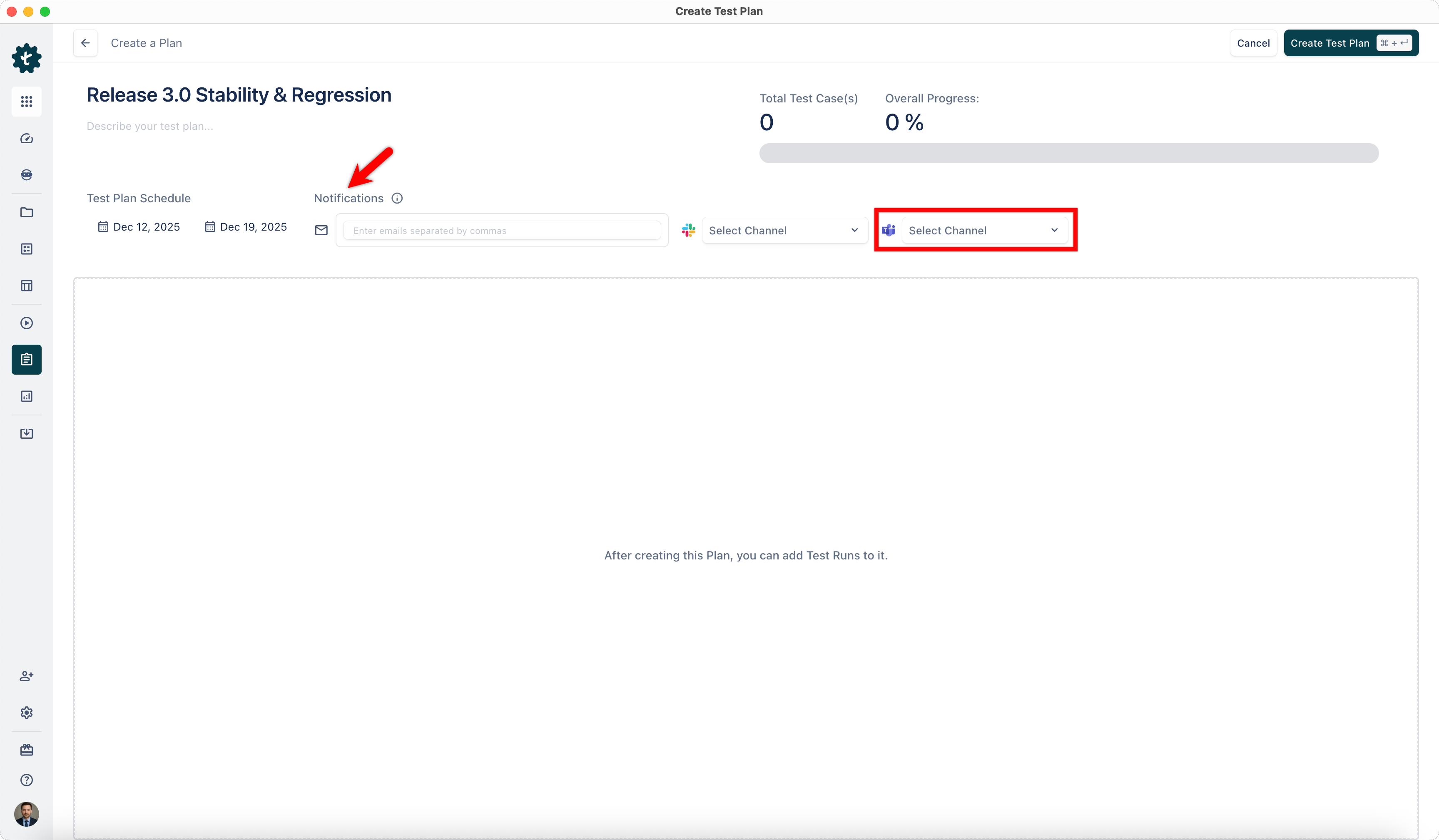 |
There was a problem hiding this comment.
🧩 Analysis chain
🏁 Script executed:
cat src/pages/docs/test-management/settings/notifications/microsoft-teams.md | sed -n '122p'Repository: testsigmahq/TMSDocs
Length of output: 215
Use virtual-hosted-style or region-specific path-style S3 URL instead of the deprecated legacy endpoint.
The current URL uses the deprecated global path-style format (s3.amazonaws.com/bucket/key). For the bucket static-docs.testsigma.com, update to the virtual-hosted style: https://static-docs.testsigma.com.s3.region.amazonaws.com/new_images/projects/Updated_Doc_Images/MS_Teams_Notifications.png, or if the bucket is not in us-east-1, use the region-specific path-style format instead. The legacy global endpoint does not reliably serve buckets in regions other than us-east-1.
🤖 Prompt for AI Agents
In src/pages/docs/test-management/settings/notifications/microsoft-teams.md
around line 122, the image URL uses the deprecated global path-style S3 endpoint
(https://s3.amazonaws.com/static-docs.testsigma.com/...), so replace it with a
virtual-hosted–style or region-specific endpoint: e.g.,
https://static-docs.testsigma.com.s3.<region>.amazonaws.com/new_images/projects/Updated_Doc_Images/MS_Teams_Notifications.png
(substitute the correct AWS region), or if the bucket is in a non-us-east-1
region and virtual-hosted style is unsuitable, use the region-specific
path-style format; also scan and update any other S3 links in the doc to the
appropriate region-aware URL format.
| - [Email](https://testsigma.com/docs/test-management/settings/notifications/email/) | ||
| - [Slack](https://testsigma.com/docs/test-management/settings/notifications/slack/) | ||
| - [MS Teams](https://testsigma.com/docs/test-management/settings/notifications/microsoft-teams/) |
There was a problem hiding this comment.
Fix list indentation.
The unordered list items are indented with 3 spaces but should start at column 0 for consistency with Markdown style guidelines.
Based on static analysis hints (markdownlint-cli2).
🔎 Apply this diff to fix the indentation:
 ## **Tools Available for Notification Integration**
-   - [Email](https://testsigma.com/docs/test-management/settings/notifications/email/)
-   - [Slack](https://testsigma.com/docs/test-management/settings/notifications/slack/)
-   - [MS Teams](https://testsigma.com/docs/test-management/settings/notifications/microsoft-teams/)
+- [Email](https://testsigma.com/docs/test-management/settings/notifications/email/)
+- [Slack](https://testsigma.com/docs/test-management/settings/notifications/slack/)
+- [MS Teams](https://testsigma.com/docs/test-management/settings/notifications/microsoft-teams/)
📝 Committable suggestion
‼️ IMPORTANT
Carefully review the code before committing. Ensure that it accurately replaces the highlighted code, contains no missing lines, and has no issues with indentation. Thoroughly test & benchmark the code to ensure it meets the requirements.
| - [Email](https://testsigma.com/docs/test-management/settings/notifications/email/) | |
| - [Slack](https://testsigma.com/docs/test-management/settings/notifications/slack/) | |
| - [MS Teams](https://testsigma.com/docs/test-management/settings/notifications/microsoft-teams/) | |
| - [Email](https://testsigma.com/docs/test-management/settings/notifications/email/) | |
| - [Slack](https://testsigma.com/docs/test-management/settings/notifications/slack/) | |
| - [MS Teams](https://testsigma.com/docs/test-management/settings/notifications/microsoft-teams/) |
🧰 Tools
🪛 markdownlint-cli2 (0.18.1)
40-40: Unordered list indentation
Expected: 0; Actual: 3
(MD007, ul-indent)
41-41: Unordered list indentation
Expected: 0; Actual: 3
(MD007, ul-indent)
42-42: Unordered list indentation
Expected: 0; Actual: 3
(MD007, ul-indent)
🤖 Prompt for AI Agents
In src/pages/docs/test-management/settings/notifications/overview.md around
lines 40 to 42, the unordered list items are indented with three spaces; move
each list item to start at column 0 (remove the leading spaces) so the bullets
align with the left margin and conform to Markdown style guidelines.
| > 1. SMTP server address | ||
| > 2. Port number | ||
| > 3. Valid username and password | ||
| > 4. Any required additional parameters |
There was a problem hiding this comment.
Fix blockquote formatting.
The list items within the prerequisites blockquote have multiple spaces after the > symbol. Markdown style guidelines recommend a single space.
Based on static analysis hints (markdownlint-cli2).
🔎 Apply this diff to fix the formatting:
 > Before you begin, ensure that you have the following details from your email service provider:
->    1. SMTP server address
->    2. Port number
->    3. Valid username and password
->    4. Any required additional parameters
+> 1. SMTP server address
+> 2. Port number
+> 3. Valid username and password
+> 4. Any required additional parameters
📝 Committable suggestion
‼️ IMPORTANT
Carefully review the code before committing. Ensure that it accurately replaces the highlighted code, contains no missing lines, and has no issues with indentation. Thoroughly test & benchmark the code to ensure it meets the requirements.
| > 1. SMTP server address | |
| > 2. Port number | |
| > 3. Valid username and password | |
| > 4. Any required additional parameters | |
| > Before you begin, ensure that you have the following details from your email service provider: | |
| > 1. SMTP server address | |
| > 2. Port number | |
| > 3. Valid username and password | |
| > 4. Any required additional parameters |
🧰 Tools
🪛 markdownlint-cli2 (0.18.1)
35-35: Multiple spaces after blockquote symbol
(MD027, no-multiple-space-blockquote)
36-36: Multiple spaces after blockquote symbol
(MD027, no-multiple-space-blockquote)
37-37: Multiple spaces after blockquote symbol
(MD027, no-multiple-space-blockquote)
38-38: Multiple spaces after blockquote symbol
(MD027, no-multiple-space-blockquote)
🤖 Prompt for AI Agents
In src/pages/docs/test-management/settings/smtp-configuration.md around lines 35
to 38, the blockquote list items use multiple spaces after the '>' which
violates markdownlint rules; update each blockquote line so there is exactly one
space after the '>' (e.g., change ">    1. ..." to "> 1. ...") to restore proper
blockquote/list formatting and re-run the linter to confirm.
| - type: section | ||
| name: 'Contents' |
There was a problem hiding this comment.
Remove duplicate "Contents" section.
The contextual links include two identical "Contents" section entries, which is likely a copy-paste error.
🔎 Apply this diff to remove the duplicate:
   - type: section
     name: 'Contents'
-  - type: section
-    name: 'Contents'
   - type: link
     name: 'Prerequisites'
📝 Committable suggestion
‼️ IMPORTANT
Carefully review the code before committing. Ensure that it accurately replaces the highlighted code, contains no missing lines, and has no issues with indentation. Thoroughly test & benchmark the code to ensure it meets the requirements.
| - type: section | |
| name: 'Contents' | |
| - type: section | |
| name: 'Contents' | |
| - type: link | |
| name: 'Prerequisites' |
🤖 Prompt for AI Agents
In src/pages/docs/test-management/test-cases/clone-test-cases.md around lines 12
to 13, there is a duplicate "Contents" section entry likely from copy-paste;
remove the redundant block so only one "type: section / name: 'Contents'"
remains in the frontmatter or nav list, keeping the original contextual links
intact and preserving surrounding indentation/formatting.
| - type: section | ||
| name: 'Contents' |
There was a problem hiding this comment.
Remove duplicate "Contents" section.
The contextual links include two identical "Contents" section entries, which is likely a copy-paste error.
🔎 Apply this diff to remove the duplicate:
   - type: section
     name: 'Contents'
-  - type: section
-    name: 'Contents'
   - type: link
     name: 'Prerequisites'
Committable suggestion skipped: line range outside the PR's diff.
🤖 Prompt for AI Agents
In src/pages/docs/test-management/test-cases/comment-in-test-cases.md around
lines 12 to 13, there's a duplicate "Contents" section entry; remove the extra
block so only one "type: section name: 'Contents'" entry remains in the
contextual links, ensuring surrounding YAML/markdown list formatting stays valid
and no other entries are shifted.
| - type: section | ||
| name: 'Contents' |
There was a problem hiding this comment.
Remove duplicate "Contents" section.
The contextual links include two identical "Contents" section entries, which is likely a copy-paste error.
🔎 Apply this diff to remove the duplicate:
   - type: section
     name: 'Contents'
-  - type: section
-    name: 'Contents'
   - type: link
     name: 'Prerequisites'
📝 Committable suggestion
‼️ IMPORTANT
Carefully review the code before committing. Ensure that it accurately replaces the highlighted code, contains no missing lines, and has no issues with indentation. Thoroughly test & benchmark the code to ensure it meets the requirements.
| - type: section | |
| name: 'Contents' | |
| - type: section | |
| name: 'Contents' | |
| - type: link | |
| name: 'Prerequisites' |
🤖 Prompt for AI Agents
In src/pages/docs/test-management/test-cases/review-management.md around lines
12 to 13, there's a duplicated frontmatter entry "type: section name:
'Contents'"; remove the redundant duplicate so only a single "type: section
name: 'Contents'" entry remains in the file, preserving surrounding frontmatter
structure and spacing.


2 participants


Review Management

Clone Test Case

Comment in Test Cases

Overview: Set Up Notifications

Set Up Email Notifications

Set Up Slack Notifications

Set Up MS Teams Notifications

Reports in Dashboard View

Bulk Edit Custom Fields in Test Cases

Summary by CodeRabbit
New Features
Documentation
✏️ Tip: You can customize this high-level summary in your review settings.