The only one that you will ever need, to keep an organized list of potential leads for your product!
Table of Contents
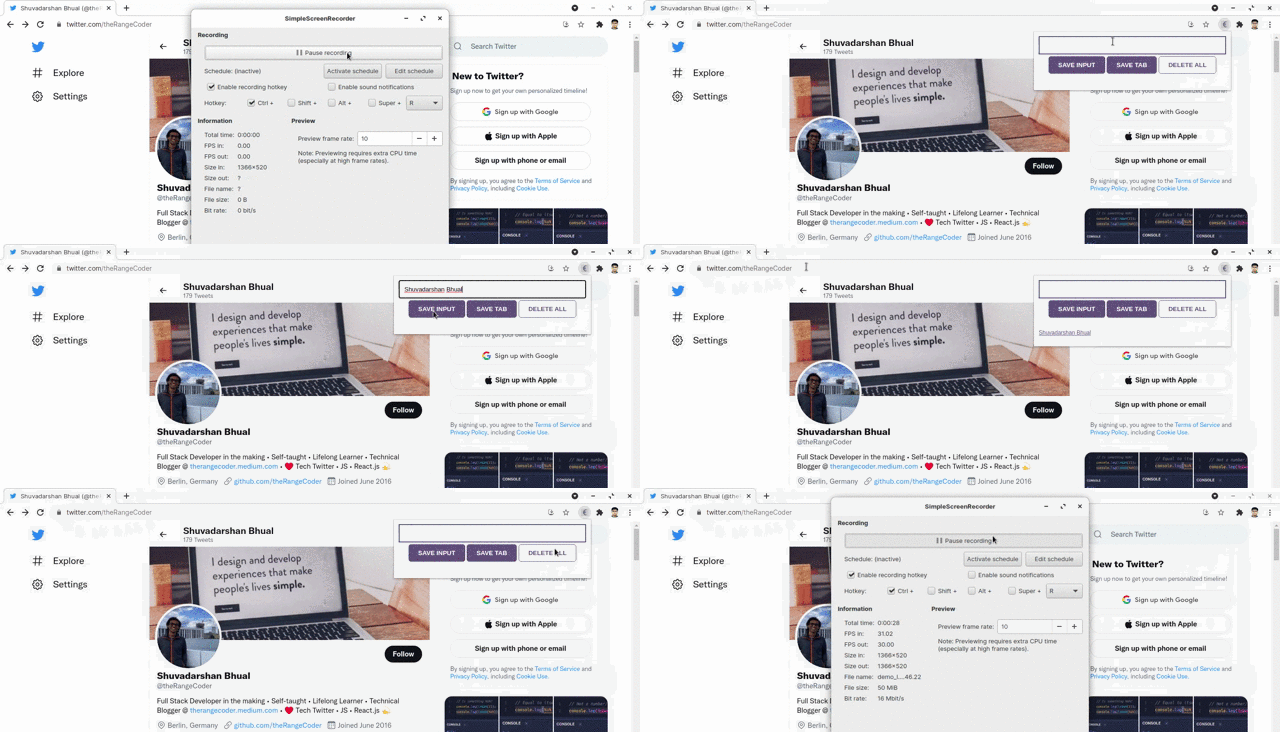
It can indeed be challenging sometimes for marketers and sales representatives to keep an organized track of potential leads for their products. After all, getting a lead to develop trust in the company's brand and make up his/ her mind to make a purchase, does require a lot more than just keeping track of them.
This is where the Essential Lead Tracker comes to the rescue!
As the name suggests, the tracker helps sales representatives and marketers in maintaining an organized list of potential leads, which in my opinion, is quite an essential step in the sales and marketing process. This not only helps them to have a better overview of who their potential leads might be, but also allows them to devote more time to the other activities in the sales and marketing of their product, thus ensuring a better sales campaign and hence, higher chances of potential purchases.
These are the technologies that I used to build the Essential Lead Tracker:
- HTML5
- CSS3
- JavaScript
To get a local copy of the app, up and running on your system, follow these steps.
- Fork this repository

- Clone the repository
git clone https://github.com/[your_username]/lead-tracker-chrome-extension.git
To add the extension to your Chrome Browser, follow the steps below.
-
Go to
chrome://extensions/on your Chrome Browser. -
Click on the
Load unpackedbutton.

- Select the
lead-tracker-chrome-extensiondirectory and clickOpen.
There you go! The Lead Tracker has been successfully added to your Chrome Browser as an extension.
Happy Tracking!
Once you have successfully added the extension to your Chrome Browser, you can start utilizing it to the fullest.
Have a lead in mind, that you would like to save manually? The SAVE INPUT button can be pretty handy in here.

To save leads from particular websites, the SAVE TAB button could be a good option.

And finally, once you have completed the interactions with the current leads and would like to remove them from the list (in order to be able to create a new list of leads), the DELETE ALL button can be pretty useful for that.
The README template, used for this project, was distributed under the MIT License. See LICENSE for more information.
- The code was adapted from Per Harald Borgen's JavaScript course
- Othneil Drew for the README template
- Tracker icon by Icons8