Self-hosted AI agent platform for teams - autonomous, multi-channel, multi-tenant.




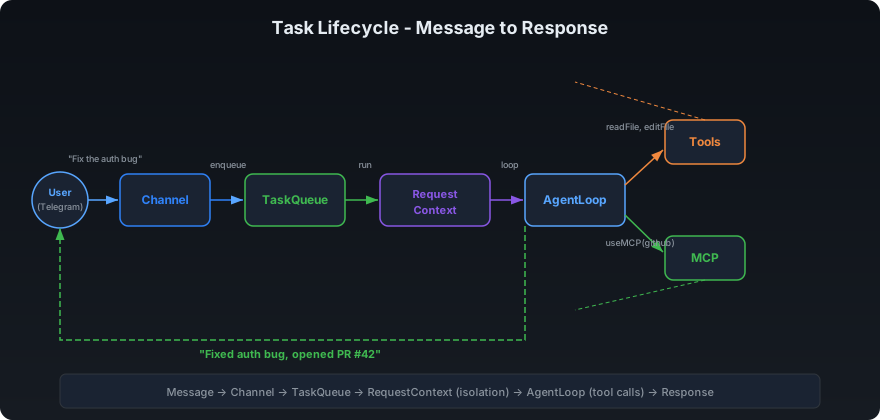
Deploy once on your machine. Connect your channels. Your team messages the bot - it writes code, does research, sends emails, runs cron jobs, and reports back. Each user gets isolated memory, encrypted keys, and cost caps. You own everything.
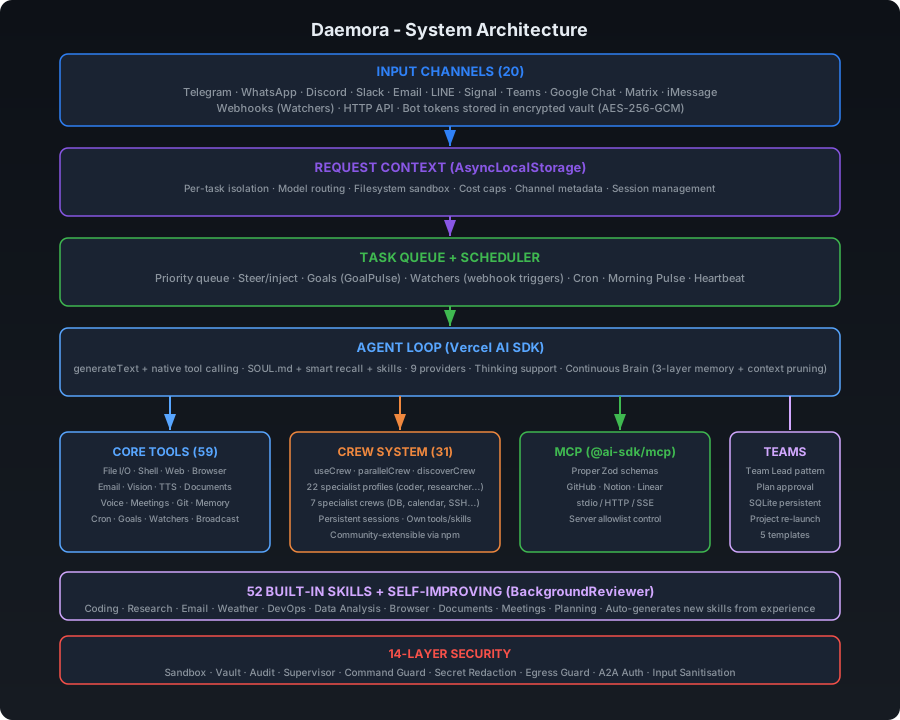
59 built-in tools. 20 channels. 16 security layers. 7 AI providers. Multi-agent teams. Production-grade scheduling. Crew system with self-improving learning. MCP integration. All self-hosted - nothing leaves your infrastructure except the tokens you send to model APIs.
| Capability | Description |
|---|---|
| Code | Write, edit, run, test, and debug code across multiple files. Takes screenshots of UIs to verify output. Fixes failing tests. Ships working software. |
| Research | Search the web, read pages, analyse images, cross-reference sources, write reports. Spawns parallel sub-agents for speed. |
| Goals | Set persistent goals - the agent works toward them autonomously on schedule. No prompting needed. Runs 24/7 with isolated sessions, auto-pauses on repeated failures. |
| Watchers | Named event triggers - "when GitHub issue opens, triage and notify Telegram." Webhook-driven with pattern matching, cooldown, and per-tenant scoping. |
| Scheduler | Production-grade scheduling (one-shot, interval, cron expressions) with overlap prevention, retry with backoff, channel delivery, failure alerts, Morning Pulse daily briefing, and run history. |
| Fleet Command | One admin command → every tenant's agent executes simultaneously. Each uses their own context, memory, tools. Each reports back individually. |
| Communicate | Send emails, Telegram messages, Slack posts, Discord messages - autonomously. Screenshots, files, and media sent directly back to you via replyWithFile. |
| Crew | Self-contained specialist sub-agents - database queries, smart home control, SSH, notifications, calendars. Build your own crew member in 3 files. Community crew marketplace coming soon. |
| Self-Improving | After complex tasks, a background agent reviews the conversation and auto-creates reusable skills + saves user preferences. The more you use it, the better it gets. |
| Tools | Connect to any MCP server - create Notion pages, open GitHub issues, update Linear tasks, manage Shopify products, query databases. |
| Voice & Meetings | Join any meeting (Google Meet, Zoom, Teams) via phone dial-in. OpenAI Realtime STT + ElevenLabs/OpenAI TTS. Voice cloning. Outbound voice calls. Auto-transcription + meeting summaries. |
| Multi-Agent | Spawn parallel sub-agents (researcher + coder + writer working simultaneously). Create agent teams with shared task lists, dependencies, and inter-agent messaging. |
| Multi-Tenant | Run one instance for your whole team. Per-user memory, cost caps, tool allowlists, filesystem isolation, and encrypted API keys. |
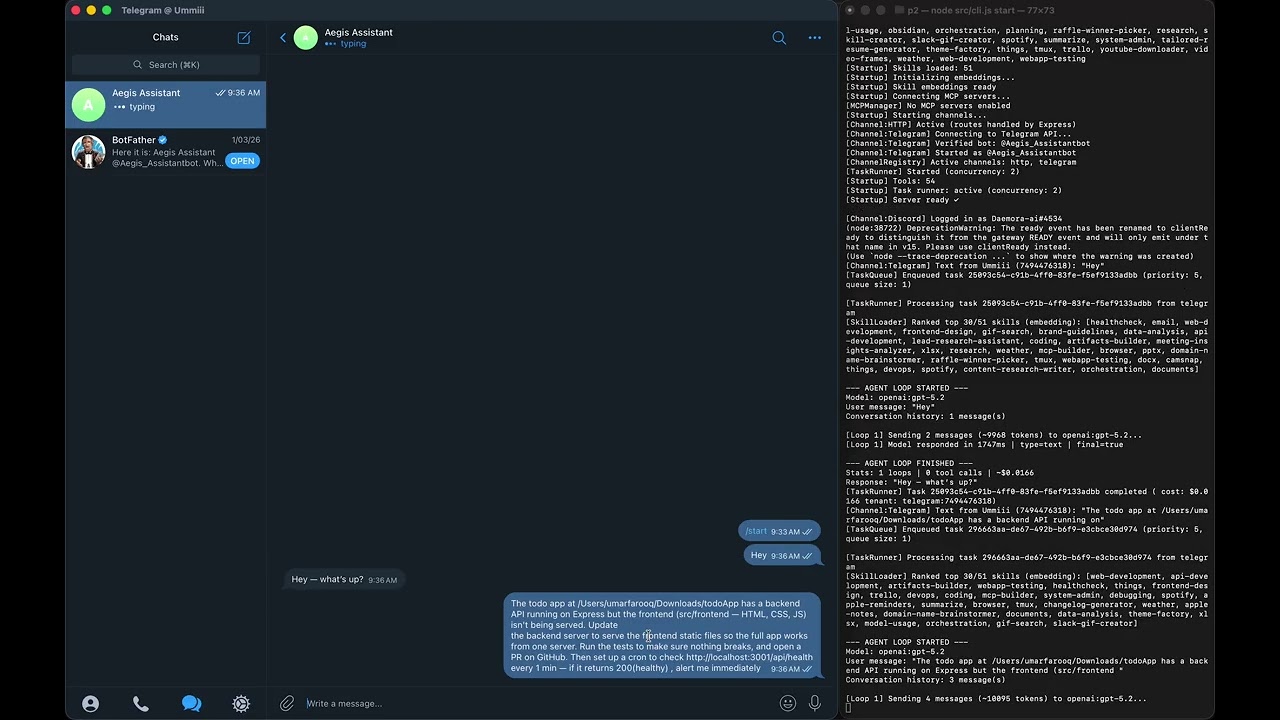
Daemora fixes a bug in a GitHub repo, opens a PR, runs the test suite locally, and pings you every minute with a health check — autonomously.
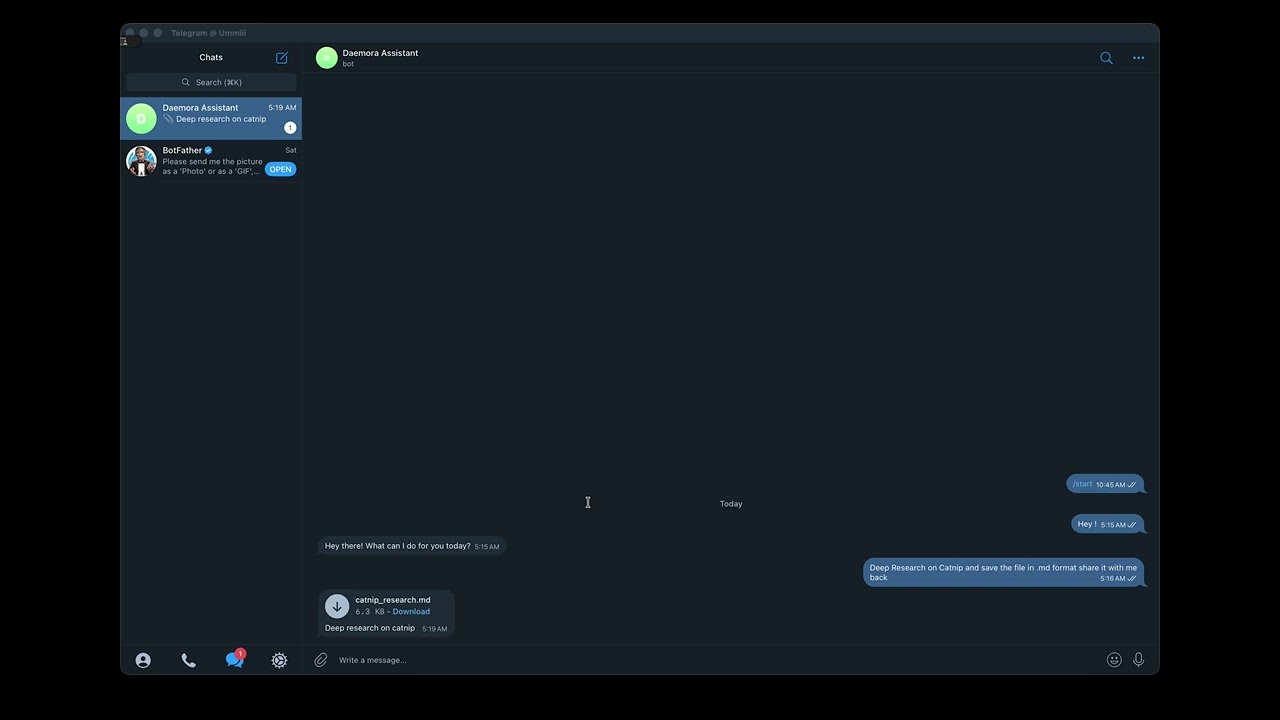
Ask Daemora to research catnip. It searches the web, synthesises a report, saves it to your machine, and sends you the file directly on Telegram.
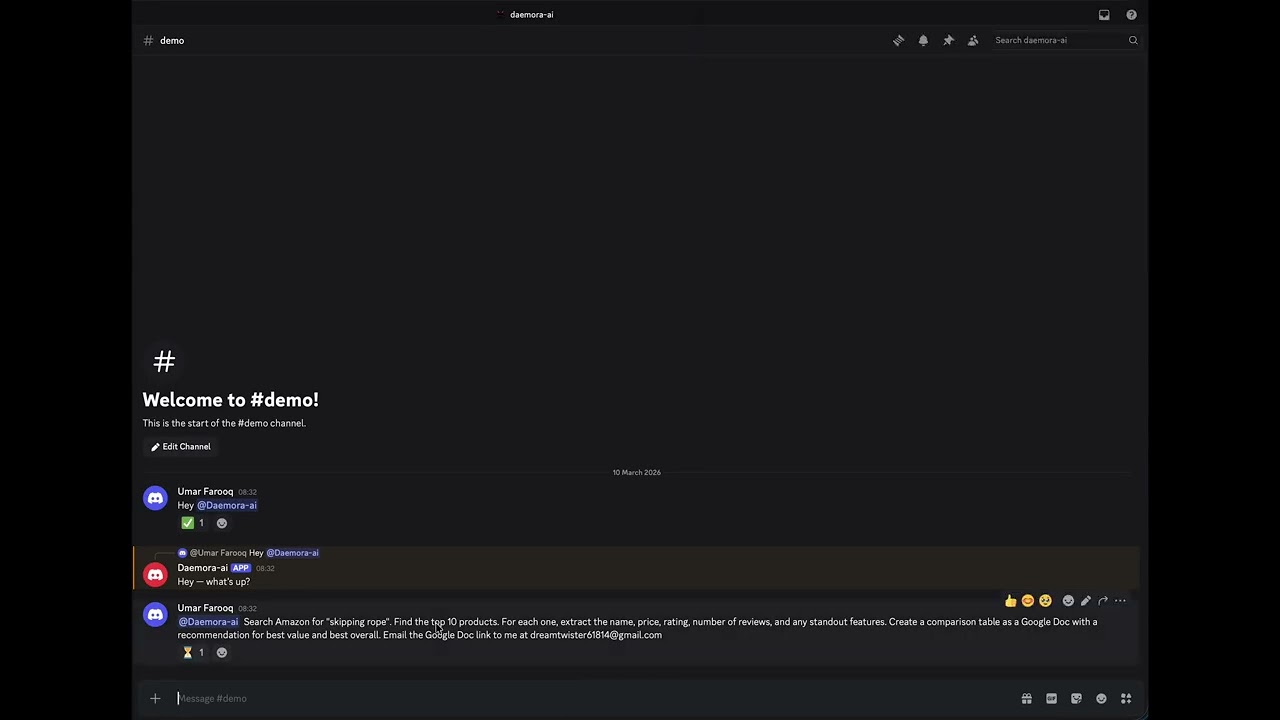
"Find the top 10 skipping ropes on Amazon, analyse them, create a Google Doc with the results, and email it to someone." One message. Fully autonomous.
npm install -g daemora
daemora setup      # interactive wizard (11 steps) - models, channels, tools, cleanup, vault, MCP, multi-tenant
daemora start      # start the agent
Then message your bot. That's it.
npm install -g daemora
daemora setup
daemora startgit clone https://github.com/CodeAndCanvasLabs/Daemora.git
cd daemora-agent
pnpm install
cp .env.example .env
# Add your API keys to .env
daemora setup
daemora startdaemora daemon install # Register as a system service (launchctl / systemd / Task Scheduler)
daemora daemon start # Start in background
daemora daemon status # Check status
daemora daemon logs # View logs
daemora daemon stop # StopCopy .env.example to .env and fill in what you need.
At least one provider is required:
OPENAI_API_KEY=sk-...
ANTHROPIC_API_KEY=sk-ant-...
GOOGLE_AI_API_KEY=...
XAI_API_KEY=...
DEEPSEEK_API_KEY=...
MISTRAL_API_KEY=...

# Default model (used when no model is specified)
DEFAULT_MODEL=openai:gpt-4.1-mini
7 providers, 59+ models - including:
| Provider | Models |
|---|---|
| OpenAI | gpt-5.4, gpt-5.2, gpt-5.1, gpt-5, gpt-4.1, gpt-4.1-mini, gpt-4o, o4-mini, o3, o3-mini, o1, gpt-5.3-codex, gpt-5.1-codex |
| Anthropic | claude-opus-4-6, claude-sonnet-4-6, claude-sonnet-4-5, claude-haiku-4-5 |
gemini-3.1-pro-preview, gemini-3-pro-preview, gemini-2.5-pro, gemini-2.5-flash, gemini-2.0-flash |
|
| xAI | grok-4, grok-3-beta, grok-3-mini-beta |
| DeepSeek | deepseek-chat, deepseek-reasoner |
| Mistral | mistral-large-latest, codestral-latest, mistral-small-latest |
| Ollama | llama3, llama3.1, qwen2.5-coder - local, no API key needed |
Use format provider:model-id (e.g. openai:gpt-5.2, anthropic:claude-sonnet-4-6). Supports dynamic passthrough for any model ID your provider accepts.
Route different task types to the best model automatically:
CODE_MODEL=anthropic:claude-sonnet-4-6
RESEARCH_MODEL=google:gemini-2.5-flash
WRITER_MODEL=openai:gpt-4.1
ANALYST_MODEL=openai:gpt-4.1
SUB_AGENT_MODEL=openai:gpt-4.1-mini    # default model for all sub-agents
When a sub-agent is spawned with profile: "coder", it automatically uses CODE_MODEL. Sub-agents without a profile route fall back to SUB_AGENT_MODEL, then the parent's model, then DEFAULT_MODEL.
Enable only what you need. Each channel supports {CHANNEL}_ALLOWLIST and {CHANNEL}_MODEL overrides.
| Channel | Required Env Vars |
|---|---|
| Telegram | TELEGRAM_BOT_TOKEN |
TWILIO_ACCOUNT_SID, TWILIO_AUTH_TOKEN |
|
| Discord | DISCORD_BOT_TOKEN |
| Slack | SLACK_BOT_TOKEN, SLACK_APP_TOKEN |
EMAIL_USER, EMAIL_PASSWORD |
|
| LINE | LINE_CHANNEL_ACCESS_TOKEN, LINE_CHANNEL_SECRET |
| Signal | SIGNAL_CLI_URL, SIGNAL_PHONE_NUMBER |
| Microsoft Teams | TEAMS_APP_ID, TEAMS_APP_PASSWORD |
| Google Chat | GOOGLE_CHAT_SERVICE_ACCOUNT |
| Matrix | MATRIX_HOMESERVER_URL, MATRIX_ACCESS_TOKEN |
| Mattermost | MATTERMOST_URL, MATTERMOST_TOKEN |
| Twitch | TWITCH_BOT_USERNAME, TWITCH_OAUTH_TOKEN, TWITCH_CHANNEL |
| IRC | IRC_SERVER, IRC_NICK |
| iMessage | IMESSAGE_ENABLED=true (macOS only) |
| Feishu | FEISHU_APP_ID, FEISHU_APP_SECRET |
| Zalo | ZALO_APP_ID, ZALO_ACCESS_TOKEN |
| Nextcloud | NEXTCLOUD_URL, NEXTCLOUD_USER, NEXTCLOUD_PASSWORD |
| BlueBubbles | BLUEBUBBLES_URL, BLUEBUBBLES_PASSWORD |
| Nostr | NOSTR_PRIVATE_KEY |
daemora channels             # List all channels + setup status
daemora channels add         # Configure a new channel interactively
daemora channels add discord # Configure a specific channel directlyMAX_COST_PER_TASK=0.50 # Max $ per task (agent stops mid-task if exceeded)
MAX_DAILY_COST=10.00 # Max $ per day across all tasksPERMISSION_TIER=standard # minimal | standard | full
ALLOWED_PATHS=/home/user/work # Sandbox: restrict file access to these directories
BLOCKED_PATHS=/home/user/.secrets # Always block these, even inside allowed paths
RESTRICT_COMMANDS=true # Block shell commands referencing paths outside sandbox
# Multi-tenant mode
MULTI_TENANT_ENABLED=true # Enable per-user isolation
AUTO_REGISTER_TENANTS=true # Auto-create tenants on first message
TENANT_ISOLATE_FILESYSTEM=true # Tenant temp files → data/tenants/{id}/workspace/
# Per-tenant API key encryption (required for production multi-tenant mode)
# Generate: openssl rand -hex 32
DAEMORA_TENANT_KEY=MCP (Model Context Protocol) lets Daemora control external tools. Each connected server gets a specialist sub-agent with focused context.
# Add a server (interactive)
daemora mcp add

# Add a server (command line)
daemora mcp add github npx -y @modelcontextprotocol/server-github
daemora mcp add notion npx -y @notionhq/notion-mcp-server
daemora mcp add myserver https://api.example.com/mcp          # HTTP
daemora mcp add myserver https://api.example.com/sse --sse    # SSE

# Manage servers
daemora mcp list              # Show all configured servers
daemora mcp enable github     # Enable a server
daemora mcp disable github    # Disable without removing
daemora mcp reload github     # Reconnect after config changes
daemora mcp remove github     # Remove permanently
Popular MCP servers:
| Service | Install Command |
|---|---|
| GitHub | npx -y @modelcontextprotocol/server-github |
| Notion | npx -y @notionhq/notion-mcp-server |
| Linear | npx -y @linear/mcp-server |
| Slack | npx -y @modelcontextprotocol/server-slack |
| PostgreSQL | npx -y @modelcontextprotocol/server-postgres |
| Filesystem | npx -y @modelcontextprotocol/server-filesystem |
| Brave Search | npx -y @anthropic-ai/brave-search-mcp-server |
| Puppeteer | npx -y @modelcontextprotocol/server-puppeteer |
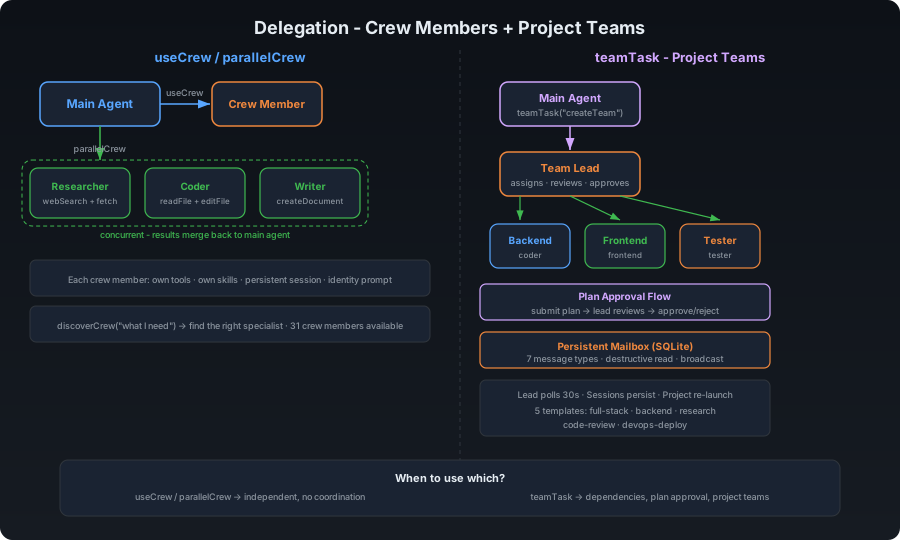
Crew members are self-contained specialist sub-agents. Each has its own tools, profile, skills, and persistent session. The main agent delegates via useCrew(crewId, task).
| Crew Member | Tools | Description |
|---|---|---|
| google-services | calendar, contacts, googlePlaces | Google Calendar, Contacts, Places |
| database-connector | database | PostgreSQL, MySQL, SQLite queries |
| smart-home | philipsHue, sonos | Philips Hue lights, Sonos speakers |
| ssh-remote | sshTool | SSH exec, SCP file transfer |
| notifications | notification | Desktop, ntfy, Pushover push notifications |
| imessage | iMessageTool | Send/read iMessages (macOS) |
| system-monitor | systemInfo | CPU, memory, disk, processes, network |
daemora crew install daemora-crew-weather
daemora crew list
daemora crew remove weatherSee crew/README.md for the full guide. Three files:
crew/my-crew/
├── plugin.json       # manifest (id, name, description, profile, skills)
├── index.js          # register tools via api.registerTool()
└── tools/
    └── myTool.js     # tool implementation
daemora crew list         # Show all crew members + status
daemora crew install <pkg> # Install from npm
daemora crew remove <id>   # Remove a crew member
daemora crew reload # Hot-reload all crew members57 tools the agent uses autonomously:
| Category | Tools |
|---|---|
| Files | readFile, writeFile, editFile, listDirectory, applyPatch |
| Search | glob, grep |
| Shell | executeCommand (foreground + background) |
| Web | webFetch, webSearch, browserAction (navigate, click, fill, screenshot) |
| Vision | imageAnalysis, screenCapture |
| Communication | sendEmail, messageChannel, sendFile, replyWithFile, replyToUser, makeVoiceCall, meetingAction, transcribeAudio, textToSpeech |
| Documents | createDocument (Markdown, PDF, DOCX), readPDF |
| Memory | readMemory, writeMemory, searchMemory, pruneMemory, readDailyLog, writeDailyLog, listMemoryCategories |
| Delegation | useCrew, parallelCrew, discoverCrew, teamTask, useMCP, manageAgents |
| MCP + Crew | useMCP, manageMCP, useCrew |
| Scheduling | cron, goal, watcher, broadcast (Fleet Command) |
| Tracking | projectTracker, taskManager |
| Dev Tools | gitTool (status, diff, commit, branch, log, stash) |
| Media | generateImage (DALL-E / Stable Diffusion) |
| System | clipboard |
| Admin | reload (config, models, vault, caches) |
Teams enable coordinated multi-agent collaboration with shared task lists, dependency tracking, and inter-agent messaging. Use teams when agents need to coordinate - use parallelCrew when they don't.
createTeam("feature-sprint")
  → addTeammate({ profile: "coder", instructions: "..." })
  → addTeammate({ profile: "researcher" })
  → addTeammate({ profile: "writer" })
  → addTask({ title: "Research API options", ... })
  → addTask({ title: "Implement chosen API", blockedBy: ["task-1"] })
  → addTask({ title: "Write docs", blockedBy: ["task-2"] })
  → spawnAll()
  → teammates claim tasks, work, complete, message each other
  → disbandTeam()
| Feature | Description |
|---|---|
| Shared Task List | addTask with blockedBy dependency tracking. Teammates claim → complete or fail tasks. |
| Inter-Agent Messaging | sendMessage(to, message) for direct, broadcast(message) for all. Teammates read mail between tool calls. |
| Dependency Tracking | Tasks with unmet blockedBy deps are not claimable. Automatically unblocked when deps complete. |
| Status Monitoring | getTeamStatus returns full state - teammates, tasks, messages. |
| Scenario | Use |
|---|---|
| 5 independent web searches | parallelCrew - no coordination needed |
| Research → implement → document pipeline | Team - tasks depend on each other |
| Coder + reviewer need to discuss approach | Team - inter-agent messaging |
| Translate a doc into 3 languages | parallelCrew - independent, no coordination |
- Max 5 teams per tenant
- Max 10 teammates per team
- Max 7 concurrent sub-agents
- Max nesting depth: 3
Skills inject behaviour instructions when a task matches certain keywords. Create a .md file in skills/ with a YAML frontmatter:
---
name: deploy
description: Handle deployment tasks for web apps and APIs
triggers: deploy, release, ship, production, go live
---

# Deployment Checklist

Always follow this order when deploying:

1. Run the full test suite - never deploy broken code
2. Check for .env differences between dev and prod
3. Build the production bundle
4. Use zero-downtime deployment if possible (blue/green, rolling)
5. Verify the deployment is healthy before reporting done
6. Notify the user with the live URL
52 built-in skills cover: coding, research, email, weather, Spotify, Obsidian, Apple Notes, Apple Reminders, Things, Trello, Tmux, PDF, image generation, video frames, health checks, GIF search, webcam capture, documents (PDF/DOCX/XLSX/PPTX), data analysis, DevOps, API development, browser automation, meeting attendance, planning, orchestration, and more.
Run Daemora as a shared agent serving multiple users. Each user gets isolated memory, filesystem, API keys, cost limits, per-tenant channel instances, and optionally their own model tier.
# List all tenants
daemora tenant list

# Set a per-user daily cost cap
daemora tenant set telegram:123 maxDailyCost 2.00

# Restrict which tools a tenant can use
daemora tenant set telegram:123 tools readFile,webSearch,sendEmail

# Restrict which MCP servers a tenant can access
daemora tenant set telegram:123 mcpServers github,notion

# Assign a model tier
daemora tenant plan telegram:123 pro

# Store a tenant's own OpenAI key (AES-256-GCM encrypted at rest)
daemora tenant apikey set telegram:123 OPENAI_API_KEY sk-their-key

# Per-tenant channel instances (tenant gets their own bot)
# Configured via UI → Tenant Edit → Channel Connections
# Each tenant can have separate Telegram, Discord, Slack, etc. bots
# Channel identities auto-linked on first message - enables cross-channel sends

# Manage per-tenant workspace paths
daemora tenant workspace telegram:123                  # Show workspace paths
daemora tenant workspace telegram:123 add /home/user   # Add to allowedPaths
daemora tenant workspace telegram:123 remove /home/user
daemora tenant workspace telegram:123 block /secrets   # Add to blockedPaths
daemora tenant workspace telegram:123 unblock /secrets

# Suspend a user
daemora tenant suspend telegram:123 "Exceeded usage policy"
Per-tenant isolation:
| Isolation | Mechanism |
|---|---|
| Memory | data/tenants/{id}/MEMORY.md - never shared across users |
| Sessions | Persistent per-user sessions + per-sub-agent sessions (userId--coder, userId--researcher) |
| Filesystem | allowedPaths and blockedPaths scoped per user. TENANT_ISOLATE_FILESYSTEM=true → temp files in data/tenants/{id}/workspace/ |
| API keys | AES-256-GCM encrypted; passed through call stack, never via process.env |
| Cost tracking | Per-tenant daily cost recorded in audit log |
| MCP servers | mcpServers field restricts which servers a tenant can call |
| Tools | tools allowlist limits which tools the agent can use for this user |
| Channel context | channelMeta auto-carried in TenantContext - tools like replyWithFile send files back without LLM knowing channel details |
| Channel identity | Auto-linked routing metadata per channel - enables cross-channel sends (e.g. "send to telegram" from discord) |
| Per-tenant channels | Each tenant can have their own channel instances (telegram::tenantId) with separate bot tokens |
All isolation runs via AsyncLocalStorage - concurrent tasks from different users cannot read each other's context.
# Run a full security audit
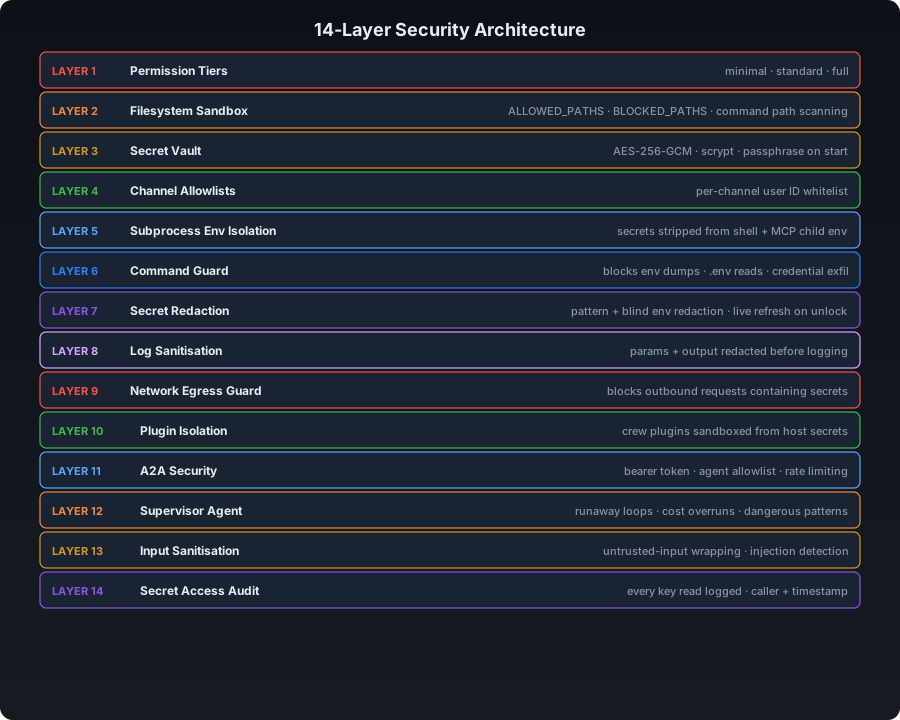
daemora doctor| Layer | Feature | Description |
|---|---|---|
| 1 | Permission tiers | minimal / standard / full - controls which tools the agent can call |
| 2 | Filesystem sandbox | Directory scoping via ALLOWED_PATHS, hardcoded blocks for .ssh, .env, .aws. All 19 file-touching tools enforce FilesystemGuard |
| 3 | Secret vault | AES-256-GCM encrypted secrets in SQLite, scrypt key derivation, passphrase required on start |
| 4 | Channel allowlists | Per-channel user ID whitelist - blocks unknown senders |
| 5 | Subprocess env isolation | Secrets stripped from executeCommand child processes and MCP stdio subprocesses. Agent cannot dump env. |
| 6 | Command guard | Blocks env dumps, .env reads, credential exfiltration, CLI privilege escalation |
| 7 | Comprehensive secret redaction | ALL env secrets tracked (not just 3). Pattern + blind redaction. Live refresh on vault unlock. |
| 8 | Log sanitisation | Tool params and output redacted before console.log - secrets never written to logs |
| 9 | Network egress guard | Outbound HTTP requests and emails scanned for secret values - blocks exfiltration attempts |
| 10 | Crew tenant isolation | Crew members can only access current request's tenant keys - cross-tenant access blocked and logged |
| 11 | A2A security | Agent-to-agent protocol: bearer token, agent allowlist, rate limiting |
| 12 | Supervisor agent | Detects runaway loops, cost overruns, rm -rf, `curl |
| 13 | Input sanitisation | User messages wrapped in <untrusted-input> tags; prompt injection patterns flagged |
| 14 | Multi-tenant isolation | AsyncLocalStorage - no cross-tenant data leakage in concurrent requests |
| 15 | Secret access audit trail | Every resolveKey() call logged to SQLite - caller, key name, tenant, timestamp |
| 16 | Tool filesystem guard | All 19 file-touching tools enforce checkRead/checkWrite per-tenant scoping |
SQLite database (data/daemora.db) stores configuration, sessions, tasks, tenants, cron jobs, vault secrets, and channel identities. File-based storage is used for memory, audit logs, cost tracking, and tenant workspaces.
data/
├── daemora.db      SQLite database (config, sessions, tasks, tenants, vault, cron)
├── memory/         MEMORY.md + daily logs + skill embeddings
├── audit/          Append-only JSONL audit logs (secrets stripped)
├── costs/          Per-day cost tracking logs
├── tenants/        Per-tenant memory and workspaces
│   └── {tenantId}/
│       ├── MEMORY.md
│       └── workspace/
└── skill-embeddings.json
Configurable retention prevents unbounded growth. Set via CLEANUP_AFTER_DAYS env var, CLI, or setup wizard.
daemora cleanup stats            # Show storage usage
daemora cleanup set 30           # Auto-delete files older than 30 days
daemora cleanup set 0            # Never auto-delete
daemora cleanup                  # Run cleanup now
Auto-cleanup runs on startup. Cleans: tasks, audit logs, cost logs, and stale sub-agent sessions. Main user sessions are never auto-deleted.
daemora start                    Start the agent server
daemora setup                    Interactive setup wizard
daemora doctor                   Security audit - scored report

daemora mcp list                 List all MCP servers
daemora mcp add                  Add an MCP server (interactive)
daemora mcp add <name> <cmd>     Add an MCP server (non-interactive)
daemora mcp remove <name>        Remove an MCP server
daemora mcp enable <name>        Enable a disabled server
daemora mcp disable <name>       Disable without removing
daemora mcp reload <name>        Reconnect a server

daemora daemon install           Install as a system daemon
daemora daemon start             Start the daemon
daemora daemon stop              Stop the daemon
daemora daemon status            Check daemon status
daemora daemon logs              View daemon logs

daemora vault set <key>          Store an encrypted secret
daemora vault get <key>          Retrieve a secret
daemora vault list               List all secret keys
daemora vault unlock             Unlock the vault

daemora sandbox show             Show current sandbox rules
daemora sandbox add <path>       Allow a directory (activates scoped mode)
daemora sandbox remove <path>    Remove from allowed list
daemora sandbox block <path>     Always block a path
daemora sandbox restrict         Enable command restriction
daemora sandbox clear            Back to unrestricted mode

daemora tenant list              List all tenants
daemora tenant show <id>         Show tenant config
daemora tenant set <id> <k> <v>  Set a tenant config value
daemora tenant plan <id> <plan>  Set tenant plan (free/pro/admin)
daemora tenant suspend <id>      Suspend a tenant
daemora tenant unsuspend <id>    Unsuspend a tenant
daemora tenant apikey set <id> <KEY> <value>   Store per-tenant API key (encrypted)
daemora tenant apikey delete <id> <KEY>        Remove a per-tenant API key
daemora tenant apikey list <id>                List stored key names (values never shown)
daemora tenant workspace <id>                  Show workspace paths (allowed + blocked)
daemora tenant workspace <id> add <path>       Add directory to tenant's allowedPaths
daemora tenant workspace <id> remove <path>    Remove from allowedPaths
daemora tenant workspace <id> block <path>     Add to tenant's blockedPaths
daemora tenant workspace <id> unblock <path>   Remove from blockedPaths

daemora channels                 List all channels + setup status
daemora channels add             Configure a new channel interactively
daemora channels add <name>      Configure a specific channel directly

daemora cleanup                  Run data cleanup now (uses configured retention)
daemora cleanup stats            Show storage usage (tasks, sessions, audit, costs)
daemora cleanup set <days>       Set retention period (0 = never delete)

daemora help                     Show full help
The agent exposes a REST API on http://localhost:8081.
# System health
curl http://localhost:8081/health

# List recent tasks
curl http://localhost:8081/tasks

# Get task status
curl http://localhost:8081/tasks/{taskId}

# Today's API costs
curl http://localhost:8081/costs/today

# List tenants
curl http://localhost:8081/tenants

# List MCP servers
curl http://localhost:8081/mcp
POST /chat and POST /tasks (unauthenticated task submission) are disabled by default - use a channel (Telegram, Slack, etc.) instead.
Daemora runs entirely on your own machine. Nothing is sent to any third party beyond the AI model APIs you configure.
Requirements:
- Node.js 20+
- 512 MB RAM minimum
- macOS, Linux, or Windows WSL
Production setup:
npm install -g daemora
daemora setup
daemora daemon install
daemora daemon start
daemora doctor       # verify security configuration
Use nginx or Caddy as a reverse proxy for HTTPS if exposing the API port.
| Layer | Technology |
|---|---|
| Runtime | Node.js 20+ - ES modules, no build step |
| AI SDK | Vercel AI SDK (ai) - model-agnostic, 25+ providers |
| Models | OpenAI, Anthropic, Google Gemini, xAI, DeepSeek, Mistral, Ollama (local) |
| Testing | Vitest (unit + integration), Playwright (E2E) |
| MCP | @modelcontextprotocol/sdk - stdio, HTTP, SSE |
| Channels | grammy, twilio, discord.js, @slack/bolt, nodemailer/imap, botbuilder, google-auth-library |
| Voice/Meetings | Twilio (phone dial-in + WebSocket media streams), OpenAI Realtime API (STT), ElevenLabs/OpenAI (TTS), cloudflared (auto-tunneling) |
| Scheduling | croner - production-grade cron with overlap prevention, retry, delivery |
| Vault | Node.js crypto built-in - AES-256-GCM + scrypt, no binary deps |
| Sandbox | Node.js tool-level path enforcement - no Docker required |
| Storage | SQLite (node:sqlite) + file-based (Markdown, JSONL) |
pnpm test                  # Run all tests
pnpm test:watch            # Interactive watch mode
pnpm test:coverage         # Coverage report
pnpm test:unit             # Unit tests only
pnpm test:integration      # Integration tests only
97 tests covering: Task lifecycle, CostTracker (per-tenant daily budgets), SecretScanner (pattern + blind env-var redaction), FilesystemGuard (blocked patterns, path scoping), TenantManager (AES-256-GCM encryption round-trip, tamper detection), TenantContext (AsyncLocalStorage concurrent isolation), ModelRouter (task-type routing, profile resolution), and multi-tenant integration (cross-tenant filesystem + cost isolation).
git clone https://github.com/CodeAndCanvasLabs/Daemora.git
cd daemora-agent
pnpm install
cp .env.example .env
# Add your API keys to .env
daemora setup
pnpm test          # Make sure everything passes
daemora start
Contributions are welcome. Please open an issue before submitting large PRs.
AGPL-3.0 - Daemora is open source. If you modify Daemora and distribute it, or run it as a network service, you must open-source your changes under AGPL-3.0.
See LICENSE for the full text.