A Semaphore S is an integer variable that, apart from initialization, is accessed only through two standard atomic operations: wait() and signal(). It is used to solve the critical section problem.
Wait
The wait operation decrements the value of its argument S, if it is positive. If S is negative or zero, then no operation is performed. The wait operation was originally termed P (“to test”) .
wait(S) { while(S<=0);
S--; }
Signal
The signal operation increments the value of its argument S. Signal operations was originally called V (“to increment”) .
signal(S) { S++; }
These are integer value semaphores and have an unrestricted value domain. These semaphores are used to coordinate the resource access, where the semaphore count is the number of available resources. If the resources are added, semaphore count automatically incremented and if the resources are removed, the count is decremented.
The binary semaphores are like counting semaphores but their value is restricted to 0 and 1. The wait operation only works when the semaphore is 1 and the signal operation succeeds when semaphore is 0. It is sometimes easier to implement binary semaphores than counting semaphores.
Some of the advantages of semaphores are as follows −
Semaphores allow only one process into the critical section. They follow the mutual exclusion principle strictly and are much more efficient than some other methods of synchronization.
There is no resource wastage because of busy waiting in semaphores as processor time is not wasted unnecessarily to check if a condition is fulfilled to allow a process to access the critical section.
Semaphores are implemented in the machine independent code of the microkernel. So they are machine independent.
Some of the disadvantages of semaphores are as follows −
Semaphores are complicated so the wait and signal operations must be implemented in the correct order to prevent deadlocks.
Semaphores are impractical for last scale use as their use leads to loss of modularity. This happens because the wait and signal operations prevent the creation of a structured layout for the system.
Semaphores may lead to a priority inversion where low priority processes may access the critical section first and high priority processes later.
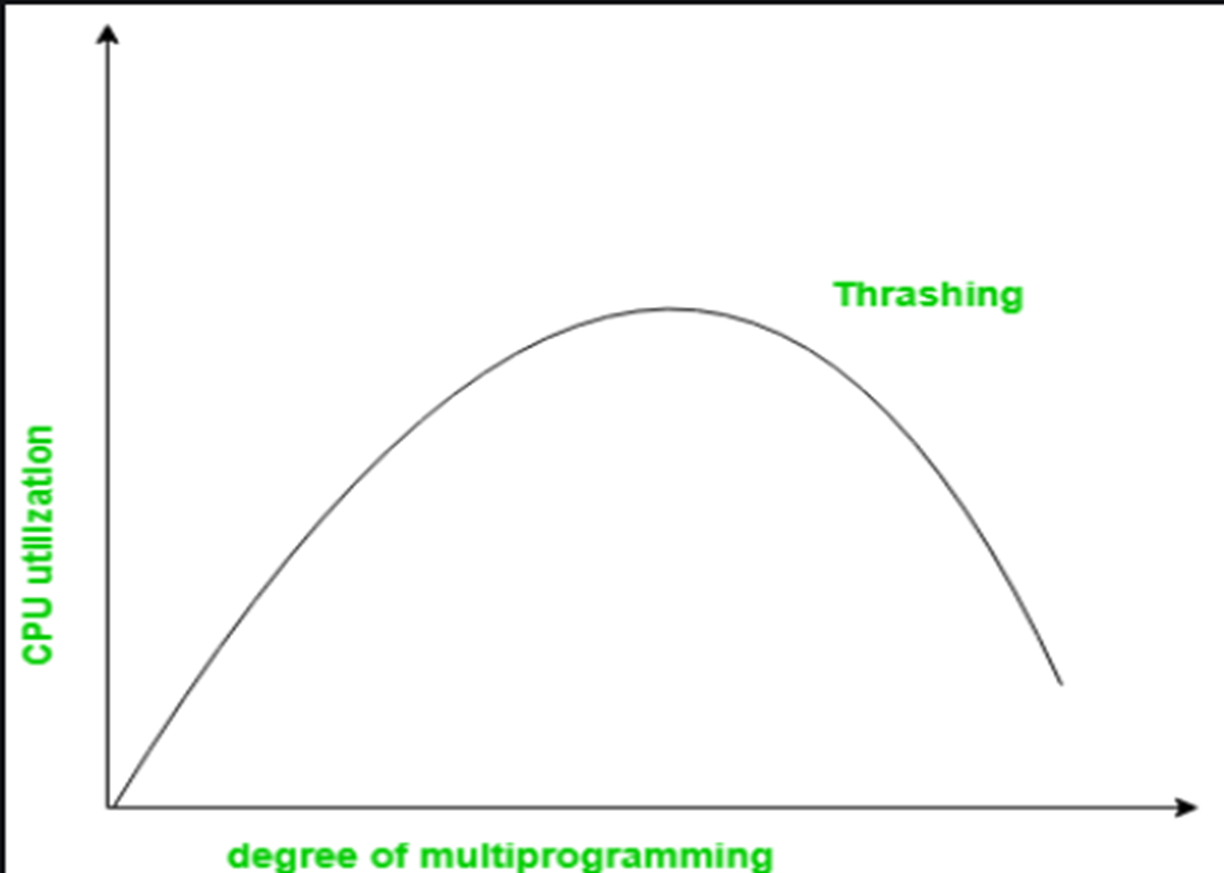
Thrashing is a condition or a situation when the system is spending a major portion of its time servicing the page faults, but the actual processing done is very negligible.
Thrashing has an impact on the operating system’s execution performance. Thrashing also causes serious performance issues with the operating system. When the CPU’s usage is low, the process scheduling mechanism tries to load multiple processes into memory at the same time, increasing the degree of Multi programming.
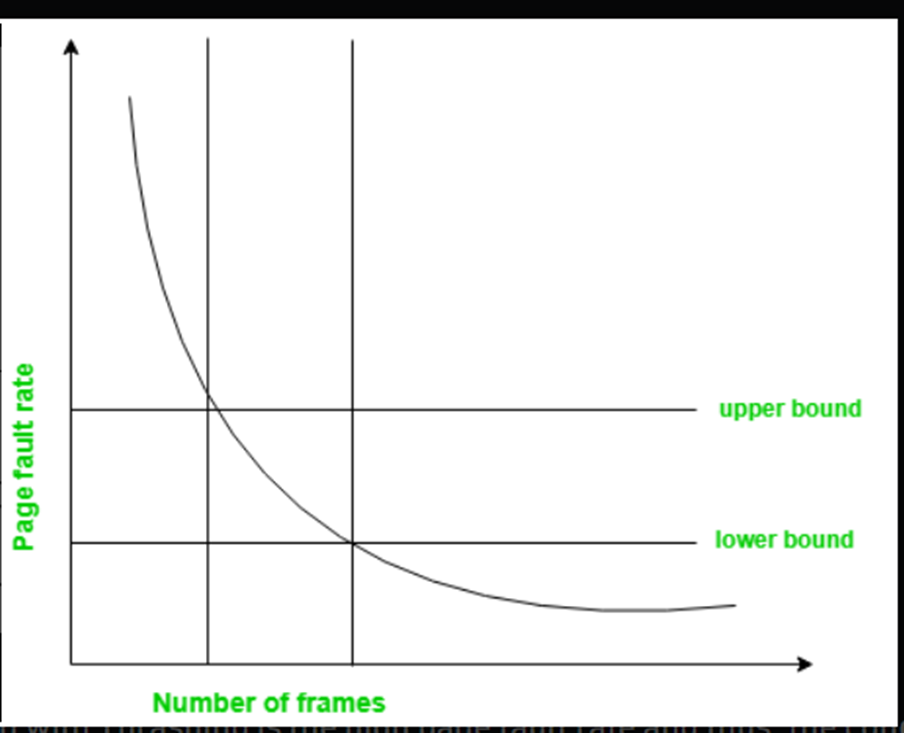
To handling thrashing there is one method that is used called the Page-Fault Frequency concept. The problem associated with Thrashing is the high page fault rate and thus, the concept here is to control the page fault rate. �If the page fault rate is too high, it indicates that the process has too few frames allocated to it. On the contrary, a low page fault rate indicates that the process has too many frames. �Upper and lower limits can be established on the desired page fault rate as shown in the diagram. If the page fault rate falls below the lower limit, frames can be removed from the process. Similarly, if the page fault rate exceeds the upper limit, more frames can be allocated to the process. �In other words, the graphical state of the system should be kept limited to the rectangular region formed in the given diagram �Here too, if the page fault rate is high with no free frames, then some of the processes can be suspended and frames allocated to them can be reallocated to other processes. The suspended processes can then be restarted later.
Whenever thrashing starts, the operating system tries to apply either the Global page replacement Algorithm or the Local page replacement algorithm.
- Global Page Replacement
Since global page replacement can bring any page, it tries to bring more pages whenever thrashing is found. But what actually will happen is that no process gets enough frames, and as a result, the thrashing will increase more and more. Therefore, the global page replacement algorithm is not suitable when thrashing happens.
- Local Page Replacement
Unlike the global page replacement algorithm, local page replacement will select pages which only belong to that process. So there is a chance to reduce the thrashing. But it is proven that there are many disadvantages if we use local page replacement. Therefore, local page replacement is just an alternative to global page replacement in a thrashing scenario.
Thrashing has some negative impacts on hard drive health and system performance. Therefore, it is necessary to take some actions to avoid it. To resolve the problem of thrashing, here are the following methods, such as:
Adjust the swap file size:If the system swap file is not configured correctly, disk thrashing can also happen to you. Increase the amount of RAM: As insufficient memory can cause disk thrashing, one solution is to add more RAM to the laptop. With more memory, your computer can handle tasks easily and don't have to work excessively. Generally, it is the best long-term solution.
Decrease the number of applications running on the computer: If there are too many applications running in the background, your system resource will consume a lot. And the remaining system resource is slow that can result in thrashing. So while closing, some applications will release some resources so that you can avoid thrashing to some extent. Replace programs: Replace those programs that are heavy memory occupied with equivalents that use less memory.