Demonstrates how to build an application using vvvv that can load binary plugins (dlls) that were also exported from vvvv.
Requires vvvv gamma > 7.1
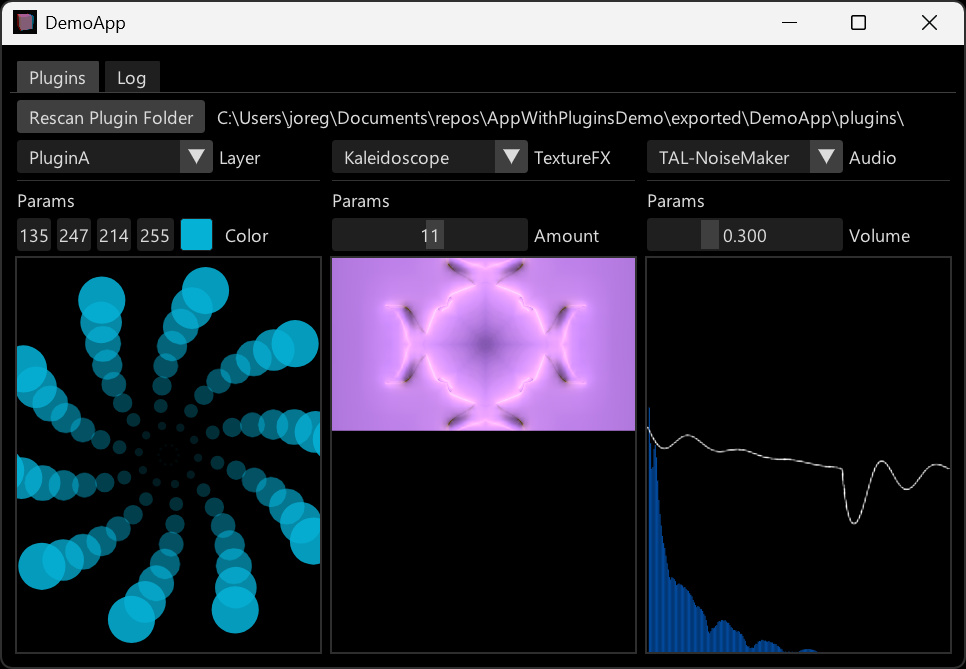
The application in this repository is demoing a most simplistic but fully working example:
It can host plugins based on different datatypes:
- Skia Layer
- Texture
- AudioSignal
For each of those types of plugins the app shows a drop-down that lists all the available plugins that it found in dedicated \plugins folder on startup. By choosing one of the entries you can specify which of the plugins is running, while all other plugins are not being executed.
- The core of the application is made out of several packages (located in
\core) which gets passed as a package repository to vvvv. By structuring the application that way we get several benefits- Reduced startup time during plugin development (vvvv pre-compiles packages by default)
- External plugin development can easily be achieved by publishing the core packages on a nuget feed
- External and in-house plugin development use the same workflow (package references)
- The main application:
DemoApp.vlreferencesDemoApp.Host. This is what is being exported to deploy the app. - A separate document for developing plugins:
PluginDev.vl. The same as above but: Also references any plugin .vl documents directly to work on them. This file is a development file only, ie. not intended to use for exportingDemoApp. - The host package
DemoApp.Hostmust not be referenced by plugins. In this example it will show a combo box to select the plugin which should run. - Plugin interfaces are contained in
DemoApp.PluginInterface.Layer,DemoApp.PluginInterface.TexFX,DemoApp.PluginInterface.Audio
The \plugins folder with example plugins:
pluginA,pluginBcontain Skia Layer pluginsAnasimple TextureFXPosterizea TextureFX with custom shadersTexFXWithAssetsa TextureFX with an asset folderTAL-NoiseMakeran Audio plugin that uses a VST instrument
- Run vvvv with package-repositories pointing to the
\corefolder which will load all packages inside that folder as source packages:vvvv.exe --package-repositories MY_REPOS\AppWithPluginsDemo\core - Export
DemoApp.vl- Notice how it is set-up to export into
MY_REPOS\AppWithPluginsDemo\exported\DemoApp
- Notice how it is set-up to export into
- Open the individual plugins from the
\pluginsfolder and export them- Notice how they are set-up to export into
MY_REPOS\AppWithPluginsDemo\exported\DemoApp\plugins - Notice how
TexFXWithAssetsincludes a .targets file that makes sure the assets folder is also copied over
- Notice how they are set-up to export into
- When running the exported
DemoApp, it will look for apluginsfolder next to itself and search for plugin dlls inside that folder
- Open "PluginDev.vl", reference the plugin you want to work on and operate on it live
Sidenote: Check the vvvv commandline compiler to automate deployment of the app and plugins.
- Keep your interfaces as minimal as possible. Make sure they only reference packages that they actually need. This helps to keep the output folder small. If you have multiple plugin interfaces using different technologies think about placing them in seperate VL files.
- Make sure that
PluginDev.vlalways only references the .vl file of a plugin, but never an exported .dll of a plugin. Ignoring this, may lead to aTypeLoadException. - Don't mix vvvv versions: All plugins need to be exported with the exact version of vvvv that the main app has been exported with! Reason: APIs provided by vvvv and used by your plugins could change in between versions and break compatibility. You most likely will see
MissingMethodExceptionorTypeLoadExceptionin case that happens. - Don't mix NuGet package versions across plugins and the main app: Build a list of versions of NuGet packages the main app is using and therefore all plugins should also use if they need the package.
- You find the folders of the exported plugins containing too many .dlls? Indeed you may consider stripping plugins of duplicated dlls, but be aware: If you have a single known host application, you can strip plugins of .dlls the host already provides. But consider the case of multiple host apps that understand the same plugins: In this case you need to be more considerate...
- Shader names must be unique across the main app and all plugins! This is a limitation that comes with Stride.
- When referencing assets in a plugin patch, use the node
PatchPathto get a relative path starting from your plugins folder.
Feel free to get in touch if any of these bug you:
- A plugin needs to have a dummy entry point in order to show up in the export dialog. A simple comment in the application patch is enough.
- "Rescan Plugins" button in
DemoAppdoes not work for TexFX plugins - Plugins referencing VL.Stride will contain a Stride bundle (data\db\default.bundle) which is quite big
- Untested: A plugin that makes use of native dll
- If your plugins make use of VL.Stride you will also have to reference VL.Stride from
DemoAppor the exported app might not run. This seems to be an issue with source package pre-compilation. Probably not an issue ifDemoApp.Hostwould be a regular (ie. not source package) nuget package.
Feel free to get in touch if any of these are interesting to you:
Currently plugins cannot be removed or updated at runtime. We could explore loading the plugins via a separate assembly load context to allow this. It could also allow different plugins to use different versions of the same package. Beware though: Different versions of a package may come with the same shader, which would still pose potential problems, because remember: Shader names need to be globally unique!
Currently anyone developing a plugin needs full source access to DemoApp. In case this is not practical what would be needed is a way to ship pre-compiled NuGet packages that don't contain the .vl files
Imagine being able to develop plugins directly in the host app by opening a VL editor...
This is a modified version as was previously outlined in the forum.
For the sponsoring of this development we bow to Studio Jan Henrik Hansen (spacemusic.com, hansen.ch).
Compile vvvv itself with
cd MY_REPOS\vvvv
build EditorAndPackages
Compile DemoApp.vl with
cd bin\win-x64\vvvv_gamma_MY_VERSION
vvvvc MY_REPOS\AppWithPluginsDemo\DemoApp.vl --export-package-sources MY_REPOS\vvvv\bin\win-x64\packages