Sourcegraph supports Perforce depots using the git p4 adapter or p4-fusion. This creates an equivalent Git repository from a Perforce depot. An experimental feature can be enabled to configure Perforce depots through the Sourcegraph UI. For Sourcegraph <3.25.1, Sourcegraph's tool for serving local directories is required - see adding depots using src serve-git.
Screenshot of using Sourcegraph for code navigation in a Perforce depot:
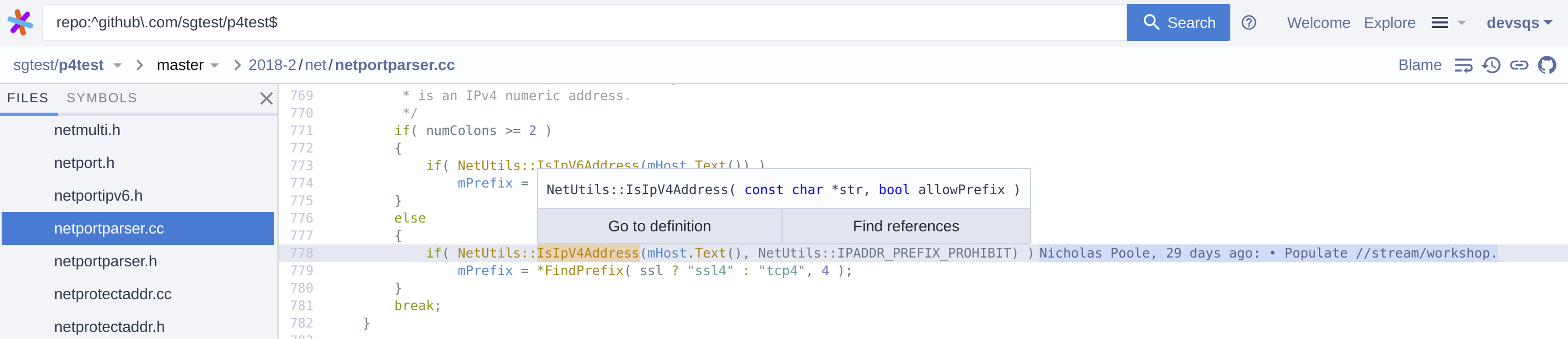
NOTE: Perforce support is a work in progress - see known issues and limitations.
Experimental Sourcegraph 3.25.1+
Adding Perforce depots as an external code host through the UI is an experimental feature. To access this functionality, a site admin must enable the experimental feature in the site configuration:
{
	"experimentalFeatures": {
		"perforce": "enabled"
  }
  ...
}
To connect Perforce to Sourcegraph:
- Go to Site admin > Manage code hosts > Add code host
- Select Perforce.
- Configure the connection to Perforce using the action buttons above the text field, and additional fields can be added using Cmd/Ctrl+Space for auto-completion. See the configuration documentation below.
- Click Add repositories.
NOTE: Only "local" type depots are supported.
Use the depots field to configure which depots are mirrored/synchronized as Git repositories to Sourcegraph:
depots
A list of depot paths that can be either a depot root or an arbitrary subdirectory.p4.user
The user to be authenticated for p4 CLI, and should be capable of performingp4 ping,p4 login,p4 trustand any p4 commands involved withgit p4 cloneandgit p4 syncfor listeddepots. If repository permissions are mirrored, the user needs additional ability to perform thep4 protects,p4 groups,p4 group,p4 userscommands (aka. "super" access level).p4.passwd
The ticket value to be used for authenticating thep4.user. It is recommended to create tickets of users in a group that never expire. Use the commandp4 -u <p4.user> login -p -ato obtain a ticket value.
Notable things about depot syncing:
- Depot syncing uses the
git p4command to convert Perforce depots into git repositories. - It takes approximately one second to import one Perforce change into a Git commit, this translates to sync a Perforce depot with 1000 changes takes approximately 1000 seconds, which is about 17 minutes. It is possible to limit the maximum changes to import using
maxChangesconfig option. - Rename of a Perforce depot will cause a re-import of the depot, including changing the depot on the Perforce server or the
repositoryPathPatternconfig option.
We optionally support using the p4-fusion tool and it will likely become our default in future:
A fast Perforce depot to Git repository converter using the Helix Core C/C++ API as an attempt to mitigate the performance bottlenecks in git-p4.py.
To use it, configure the fusionClient setting in your code host config, for example:
{
    ...
    "fusionClient": {
      "enabled": true,
      "lookAhead": 1000
    }
}
Details of all fields can be seen in here
Sourcegraph 3.26+
To enable permissions syncing for Perforce depots using Perforce permissions tables, include the authorization field:
{
  ...
  "authorization": {}
}
WARNING: By default Sourcegraph only supports repository-level permissions and does not match the granularity of Perforce permissions tables. Some notable disparities include:
- file-level permissions are not fully supported. Read on to learn more about the workaround.
- the host field from protections are not supported.
NOTE: We are testing an experimental feature that will allow syncing permissions with full granularity, details here
Site admins should sync subdirectories of a depot using the depots configuration that best describe the most concrete path of your permissions boundary, which can then enforce permissions in Sourcegraph.
For example, if your Perforce depot //Sourcegraph/ has different permissions for //Sourcegraph/Backend/ and some subdirectories of //Sourcegraph/Frontend/, we recommend setting the following depots:
{
  ...
  "depots": [
    "//Sourcegraph/Backend/",
    "//Sourcegraph/Frontend/Web/",
    "//Sourcegraph/Frontend/Extension/"
  ]
}
By configuring each subdirectory that has unique permissions, Sourcegraph is able to recognize and enforce permissions for each defined repository. You cannot define these permissions as:
{
  ...
  "depots": [
    "//Sourcegraph/Backend/",
    "//Sourcegraph/Frontend/",
    "//Sourcegraph/Frontend/Extension/"
  ]
}
as this will override the permissions for the //Sourcegraph/Frontend/Extension/ depot. Learn more.
Sourcegraph 3.31+
Sourcegraph provides limited support for * and ... paths ("wildcards") in Perforce permissions tables. For example, the following can be supported using the workaround described in repository permissions:
write user alice * //TestDepot/...
write user alice * //TestDepot/*/spec/...
write user alice * //TestDepot/.../spec/...
WARNING: Permissions only be enforced per-repository, not per-file - learn more.
NOTE: See below for details on experimental support for file level permissions
Sourcegraph does not support file-level permissions, as allowed in Perforce permissions tables. That means if a user has access to a directory and also has exclusions to some subdirectories, those exclusions will not be enforced in Sourcegraph because Sourcegraph does not support file-level permissions.
For example, consider the following output of p4 protects -u alice:
list user * * -//...
list user * * -//spec/...
write user alice * //TestDepot/...
=write user alice * -//TestDepot/Secret/...
If the site admin configures "depots": ["//TestDepot/"], the exclusion of the last line will not be enforced in Sourcegraph. In other words, the user alice will have access to //TestDepot/Secret/ in Sourcegraph even though alice does not have access to this directory on the Perforce Server.
Since Sourcegraph uses partial matching to determine if a user has access to a repository in Sourcegraph, refer to the workaround described in repository permissions to mitigate this issue.
Experimental Sourcegraph insiders
We are working on experimental support for file / path level permissions. In order to opt in you need to enable the experimental feature in site config:
{
	"experimentalFeatures": {
    "perforce": "enabled",
    "subRepoPermissions": { "enabled": true }
  }
}
You also need to explicitly enable it for each Perforce code host connection in the authorisation section:
{
  "authorization": {
    "subRepoPermissions": true
  }
}
Permissions will be synced in the background based on your Perforce permissions tables. The mapping between Sourcegraph users and Perforce users are based on matching verified e-mail addresses.
As long as a user has been granted at least Read permissions in Perforce they will be able to view content in Sourcegraph.
As a special case, commits in which a user does not have permissions to read any files are hidden. If a user can read a subset of files in a commit, only those files are shown.
Sourcegraph < 3.26
- Git
- Perforce
p4CLI configured to access your Perforce depot git p4(see "Addinggit p4to an existing install")src serve-git
For each Perforce repository you want to use with Sourcegraph, follow these steps:
- Create a local Git repository with the contents of your Perforce depot:
git p4 clone //DEPOT/PATH@all(replace//DEPOT/PATHwith the Perforce repository path). - Run
src serve-gitfrom the parent directory that holds all of the new local Git repositories. - Follow the instructions in the
src serve-gitQuickstart to add the repositories to your Sourcegraph instance.
To update the repository after new Perforce commits are made, run git p4 sync in the local repository directory. These changes will be automatically reflected in Sourcegraph as long as src serve-git is running.
We recommend running this command on a periodic basis using a cron job, or some other scheduler. The frequency will dictate how fresh the code is in Sourcegraph, and can range from once every 10s to once per day, depending on how large your codebase is and how long it takes git p4 sync to complete.
If you prefer, you can skip using src serve-git, and instead push the new local Git repository to a Git-based code host of your choice. For updates, you would run git p4 sync && git push periodically.
If you do this, the repositories you created on your Git host are normal Git repositories, so you can add the repositories to Sourcegraph as you would any other Git repositories.
The instructions below will help you get Perforce depots on Sourcegraph quickly and easily, while retaining all code change history. If your Perforce codebase is large enough that converting it to Git takes long enough to cause noticeable staleness on Sourcegraph, you can use src-expose's optional syncing functionality along with a faster fetching command (like p4 sync instead of git p4 sync) to periodically fetch and squash changes without trying to preserve the original Perforce history.
We intend to improve Sourcegraph's Perforce support in the future. Please file an issue to help us prioritize any specific improvements you'd like to see.
- Sourcegraph was initially built for Git repositories only, so it exposes Git concepts that are meaningless for converted Perforce depots, such as the commit SHA, branches, and tags.
- The commit messages for a Perforce depot converted to a Git repository have an extra line at the end with Perforce information, such as
[git-p4: depot-paths = "//guest/example_org/myproject/": change = 12345]. - Permissions
- File-level permissions are not supported when syncing permissions via the code host integration.
- The host field in protections are not supported.