


This is not an official Fitbit CLI
Access your Fitbit data directly from your terminal 💻. View 💤 sleep logs, ❤️ heart rate, 🏋️♂️ activity levels, 🩸 SpO2, and more, all presented in a simple, easy-to-read table format!
AI agent-friendly 🤖 — since v1.6.0, use
--jsonfor minimized, token-efficient JSON output or--raw-jsonfor the full Fitbit API response. No spinners, pure JSON.


Only
GETAPIs are supported!
- Install the Fitbit CLI
python -m pip install fitbit-cli- See Help
fitbit-cli -h
usage: fitbit-cli [-h] [-i] [-j] [-r] [-s [DATE[,DATE]|RELATIVE]] [-o [DATE[,DATE]|RELATIVE]] [-e [DATE[,DATE]|RELATIVE]] [-a [DATE[,DATE]|RELATIVE]]
                  [-b [DATE[,DATE]|RELATIVE]] [-H [DATE[,DATE]|RELATIVE]] [-B [DATE[,DATE]|RELATIVE]]
                  [-t [DATE[,DATE]|RELATIVE]] [-u] [-d] [-v]

Fitbit CLI -- Access your Fitbit data at your terminal.

options:
  -h, --help            show this help message and exit
  -i, --init-auth       Initialize Fitbit iterative authentication setup
  -j, --json            Output table data as JSON.
  -r, --raw-json        Output raw JSON from the Fitbit API.
  -v, --version         Show fitbit-cli version

APIs:
  Specify a date, date range (YYYY-MM-DD[,YYYY-MM-DD]), or relative date.
  Relative dates: yesterday, last-week, last-month, last-N-days/weeks/months (e.g., last-2-days).
  If not provided, defaults to today's date.

  -s, --sleep [DATE[,DATE]|RELATIVE]
                        Show Sleep Log by Date Range.
  -o, --spo2 [DATE[,DATE]|RELATIVE]
                        Show SpO2 Summary by Interval.
  -e, --heart [DATE[,DATE]|RELATIVE]
                        Show Heart Rate Time Series by Date Range.
  -a, --active-zone [DATE[,DATE]|RELATIVE]
                        Show AZM Time Series by Interval.
  -b, --breathing-rate [DATE[,DATE]|RELATIVE]
                        Show Breathing Rate Summary by Interval.
  -H, --hrv [DATE[,DATE]|RELATIVE]
                        Show HRV Summary by Interval.
  -B, --body [DATE[,DATE]|RELATIVE]
                        Show Body Time Series for Weight, BMI, and Body Fat.
  -t, --activities [DATE[,DATE]|RELATIVE]
                        Show Daily Activity Summary.
  -u, --user-profile    Show Profile.
-d, --devices Show Devices.-
Register Fitbit App
- Go to https://dev.fitbit.com/apps
- Click on "REGISTER AN APP" tab
- Follow below example and register an app
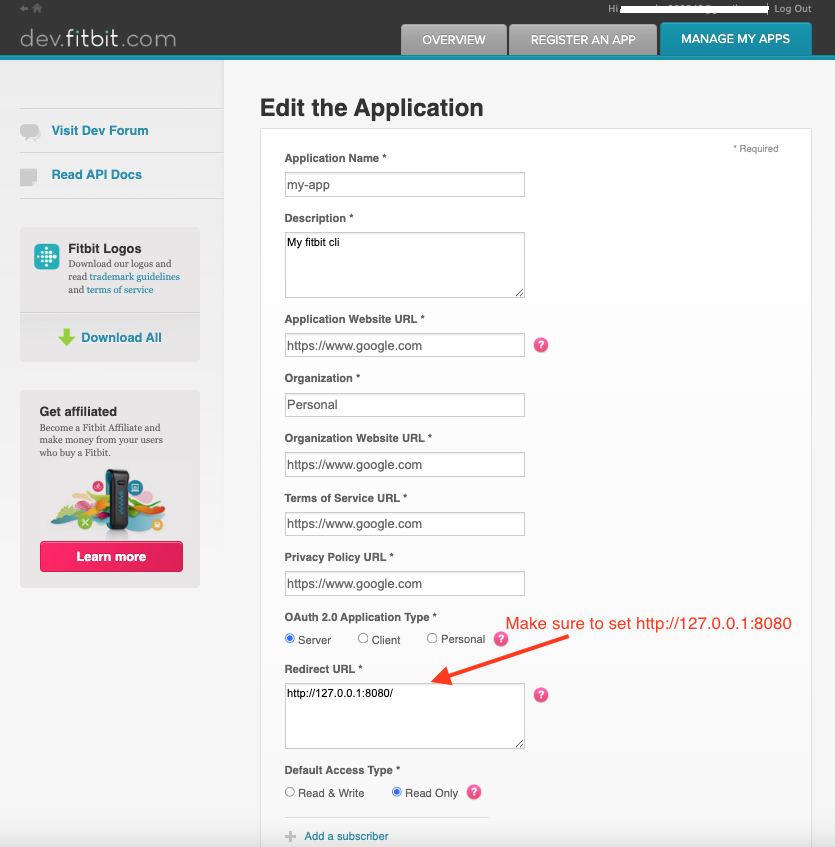
-
Run the following command to set up interactive authentication and store the Fitbit token locally
fitbit-cli --init-auth
-
Start using it 😎

fitbit-cli -s
                                            Sleep Data Summary 😴
┏━━━━━━━━━━━━┳━━━━━━━━━━━━━━┳━━━━━━━━━━━━━━━━┳━━━━━━━━━━━━━━┳━━━━━━━━━━━━━━┳━━━━━━━━━━━━━━━┳━━━━━━━━━━━━━━━━┓
┃ Date 📆    ┃ Deep Sleep 🛏 ┃ Light Sleep 💤 ┃ REM Sleep 🌙 ┃ Wake Time ⏰ ┃ Efficiency 💯 ┃ Time in Bed 🕐 ┃
┡━━━━━━━━━━━━╇━━━━━━━━━━━━━━╇━━━━━━━━━━━━━━━━╇━━━━━━━━━━━━━━╇━━━━━━━━━━━━━━╇━━━━━━━━━━━━━━━╇━━━━━━━━━━━━━━━━┩
│ 2025-05-03 │ 129 min      │ 271 min        │ 140 min      │ 66 min       │ 57%           │ 10.1 hr        │
└────────────┴──────────────┴────────────────┴──────────────┴──────────────┴───────────────┴────────────────┘
NOTE: The token is valid for only 8 hours, fitbit-cli automatically refreshes the token when it expires.
git clone git@github.com:veerendra2/fitbit-cli.git
cd fitbit-cli

python -m venv venv
source venv/bin/activate
python -m pip install -e .

deactivate