SkyWalking backend distribution package includes following parts
- bin/cmd scripts, in
/binfolder. Include startup linux shell and Windows cmd scripts for Backend server and UI startup. - Backend config, in
/configfolder. Include setting files of backend, which areapplication.yml,log4j.xmlandalarm-settings.yml. Most open settings are in these files. - Libraries of backend, in
/oap-libsfolder. All jar files of backend are in it. - Webapp env, in
webappfolder. UI frontend jar file is in here and itswebapp.ymlsetting file.
Requirement: JDK8 to JDK12 are tested, other versions are not tested and may or may not work.
Before you do quick start, you should know, quick start is to run skywalking backend and UI for preview or demonstration. In here, performance and long-term running are not our goals.
Want to deploy to product/test env? Go to Backend and UI deployment documents
You can use bin/startup.sh(or cmd) to startup backend and UI in default settings, which include the following
things you need to know.
- Storage, use H2 by default, in order to make sure, don't need further deployment.
- Backend listens
0.0.0.0/11800for gRPC APIs and0.0.0.0/12800for http rest APIs. In Java, .NetCore, Node.js, Istio agents/probe, set the gRPC service address toip/host:11800. (ip/host is where the backend at) - UI listens
8080port and request127.0.0.1/12800to do GraphQL query.
After the quick start, you should want to deploy the backend and UI in the distributed env. Before that, you should know how agent/probe, backend, UI communicate with each other.
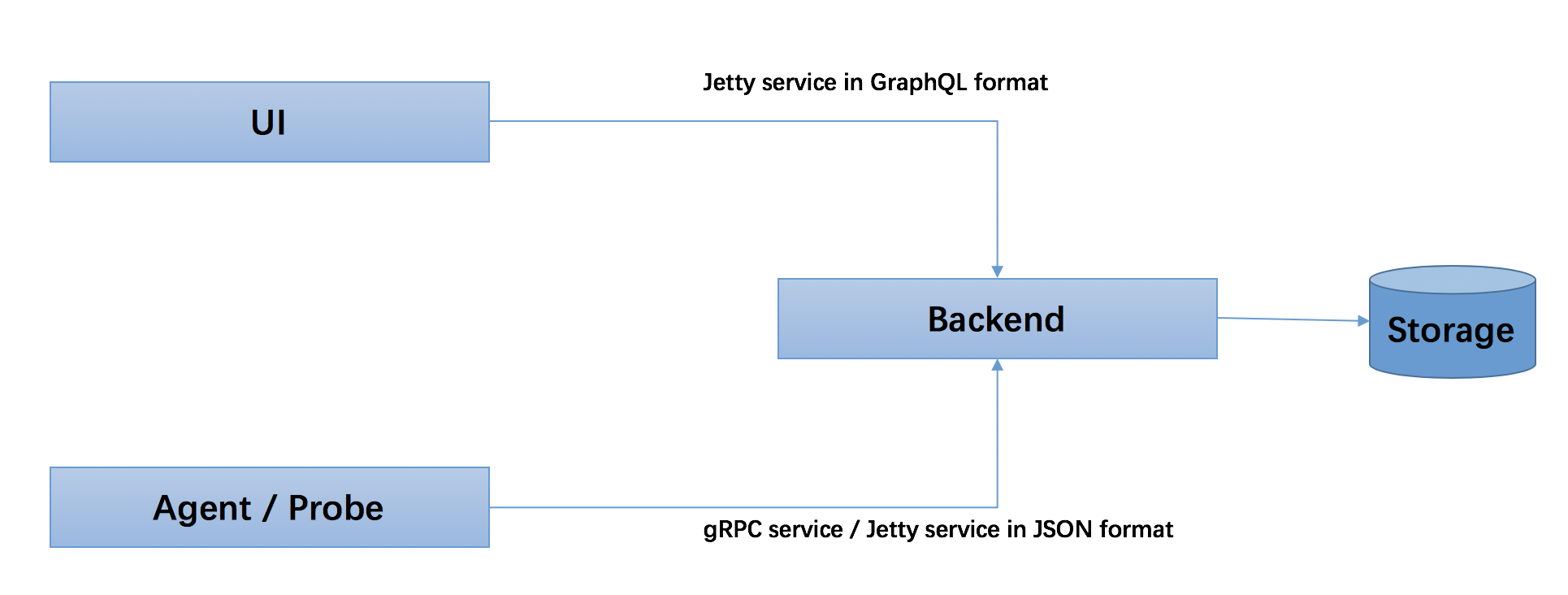
- All native agents and probes, either language based or mesh probe, are using gRPC service(
core/default/gRPC*inapplication.yml) to report data to backend. Also, jetty service supported in JSON format. - UI uses GraphQL(HTTP) query to access backend also in Jetty service(
core/default/rest*inapplication.yml).
Now, let's continue with the backend and UI setting documents.